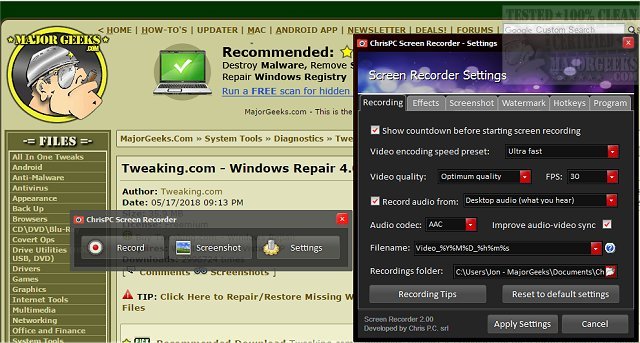
ChrisPC Screen Recorder has recently released version 2.26.0210, providing users with a comprehensive toolbox for screen recording. This software allows users to capture audio alongside video, saving the recordings as MP4 files, and also enables high-quality screenshots in various formats such as PNG, JPG, or BMP.
The utility is particularly beneficial for creating tutorials, enabling users to produce video walk-throughs that can be easily shared on platforms like YouTube, thus simplifying the process of explaining how to use different applications. Additionally, it serves as a solution for saving video streams from sources that may not support direct downloads, such as web browsers.
Key features of ChrisPC Screen Recorder include:
- One-click screen recording with audio into MP4 format.
- Multiple recording modes: full-screen, a selected area, or specific application windows.
- The capability to record gameplay in both windowed and borderless modes.
- Adjustable recording quality settings and customizable frame rates (FPS) ranging from 1 to 60.
- Video encoding presets for H.264 and audio encoding options in AAC or MP3.
- Customizable file naming based on date and time for both recordings and screenshots.
- Options to preview and edit videos post-recording.
- Functionality to hide cursor movements and to add customizable text and image watermarks.
- Screenshot capabilities in three modes with the same customizable filename options.
- A user-friendly interface with fast hotkey configuration and skinning options.
In summary, the new version of ChrisPC Screen Recorder provides enhanced features for both casual users and professionals alike, making it a versatile tool for anyone looking to create, edit, and share screen recordings and screenshots efficiently. The software caters to a broad audience, from gamers and educators to business professionals, ensuring that everyone can benefit from its extensive functionalities
The utility is particularly beneficial for creating tutorials, enabling users to produce video walk-throughs that can be easily shared on platforms like YouTube, thus simplifying the process of explaining how to use different applications. Additionally, it serves as a solution for saving video streams from sources that may not support direct downloads, such as web browsers.
Key features of ChrisPC Screen Recorder include:
- One-click screen recording with audio into MP4 format.
- Multiple recording modes: full-screen, a selected area, or specific application windows.
- The capability to record gameplay in both windowed and borderless modes.
- Adjustable recording quality settings and customizable frame rates (FPS) ranging from 1 to 60.
- Video encoding presets for H.264 and audio encoding options in AAC or MP3.
- Customizable file naming based on date and time for both recordings and screenshots.
- Options to preview and edit videos post-recording.
- Functionality to hide cursor movements and to add customizable text and image watermarks.
- Screenshot capabilities in three modes with the same customizable filename options.
- A user-friendly interface with fast hotkey configuration and skinning options.
In summary, the new version of ChrisPC Screen Recorder provides enhanced features for both casual users and professionals alike, making it a versatile tool for anyone looking to create, edit, and share screen recordings and screenshots efficiently. The software caters to a broad audience, from gamers and educators to business professionals, ensuring that everyone can benefit from its extensive functionalities
ChrisPC Screen Recorder 2.26.0210 released
ChrisPC Screen Recorder puts all the screen recording options you need in one toolbox allowing you to record audio to MP4 video files or snap high-quality screenshots in PNG/JPG/BMP formats and more.