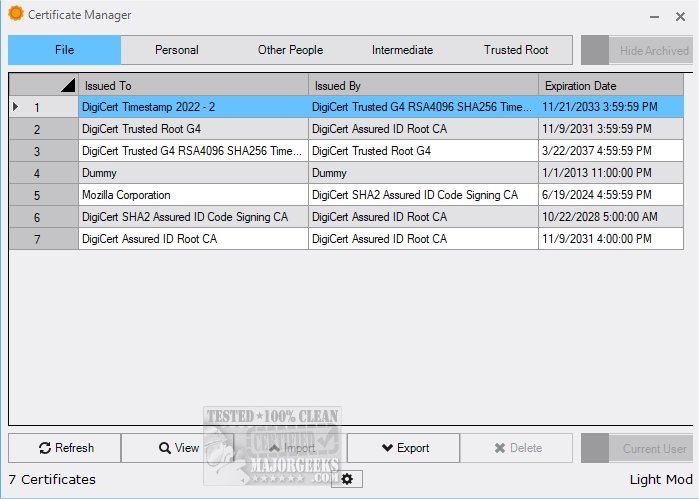
The latest version of Certificate Manager, 19.3, provides users with an advanced overview of their certificates, allowing for easy access to detailed information. This tool not only simplifies the management of existing certificates but also enhances capabilities by enabling users to import new certificates and export existing ones.
For many end-users, app certificates may not be a primary concern until issues arise during app installations. However, for developers, ensuring that their software is properly signed is critical to maintaining security and trustworthiness. Certificate Manager serves as an essential resource, allowing users to view all relevant certificates linked to their system efficiently.
Key Features and Benefits of Certificate Manager:
- Comprehensive Certificate Overview: Users can easily navigate through all personal certificates associated with their profiles.
- Detailed Information Access: By double-clicking on an entry, users can access in-depth details about the issuer, validity periods, and other technical aspects of the certificates.
- Organized Interface: The application categorizes certificates into sections, including Intermediate and Trusted Root certificates, making it simple to check expiration dates and issuers without extensive searching.
- User-Friendly Design: The intuitive interface ensures that even complex tasks related to certificate management are straightforward, allowing users to import and export certificates with minimal effort.
Conclusion:
Certificate Manager 19.3 stands out as an invaluable tool for effective digital certificate management. Its user-friendly design and robust features streamline the often complicated process of handling certificates, making it accessible for both casual users and seasoned developers. Whether you're managing your own app certifications or overseeing multiple software projects, Certificate Manager simplifies the entire process. Download Certificate Manager today to experience its powerful capabilities firsthand!
As the digital landscape continues to evolve, tools like Certificate Manager are essential for maintaining security and compliance, making it a must-have for anyone involved in software development or IT management
For many end-users, app certificates may not be a primary concern until issues arise during app installations. However, for developers, ensuring that their software is properly signed is critical to maintaining security and trustworthiness. Certificate Manager serves as an essential resource, allowing users to view all relevant certificates linked to their system efficiently.
Key Features and Benefits of Certificate Manager:
- Comprehensive Certificate Overview: Users can easily navigate through all personal certificates associated with their profiles.
- Detailed Information Access: By double-clicking on an entry, users can access in-depth details about the issuer, validity periods, and other technical aspects of the certificates.
- Organized Interface: The application categorizes certificates into sections, including Intermediate and Trusted Root certificates, making it simple to check expiration dates and issuers without extensive searching.
- User-Friendly Design: The intuitive interface ensures that even complex tasks related to certificate management are straightforward, allowing users to import and export certificates with minimal effort.
Conclusion:
Certificate Manager 19.3 stands out as an invaluable tool for effective digital certificate management. Its user-friendly design and robust features streamline the often complicated process of handling certificates, making it accessible for both casual users and seasoned developers. Whether you're managing your own app certifications or overseeing multiple software projects, Certificate Manager simplifies the entire process. Download Certificate Manager today to experience its powerful capabilities firsthand!
As the digital landscape continues to evolve, tools like Certificate Manager are essential for maintaining security and compliance, making it a must-have for anyone involved in software development or IT management
Certificate Manager 19.3 released
Certificate Manager offers an in-depth overview of your current certificates, enabling you to access detailed information with ease.