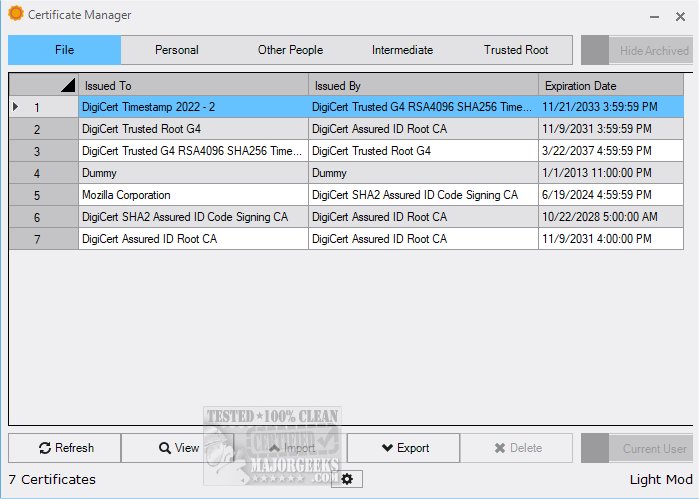
The recently launched Certificate Manager 19.00 provides users with an extensive overview of their existing certificates, allowing for easy access to detailed information. This tool enhances users' capabilities by facilitating the import and export of certificates, thereby streamlining certificate management processes.
For most end-users, app certificates are typically overlooked until issues arise during app installations. However, for developers, the proper signing of their software is of utmost importance. Certificate Manager serves as a valuable resource in this regard, enabling users to view all relevant system certificates efficiently. It simplifies the management of app certifications by allowing users to import or export significant certificates as needed.
Upon accessing Certificate Manager, users can explore personal certificates linked to their profiles. By double-clicking on any certificate entry, they can view critical details such as the issuer, validity period, and other technical specifications. The interface is organized into dedicated sections for Intermediate and Trusted Root certificates, presenting all certificates in a user-friendly manner. This design allows users to swiftly check expiration dates and issuers without the hassle of individually inspecting each certificate.
Geek Verdict: Certificate Manager is an outstanding tool that simplifies digital certificate management. Its intuitive interface allows users to navigate effortlessly through its features, making the processes of viewing, importing, and exporting certificates both efficient and pleasant. By transforming the often complex task of certificate management into a straightforward experience, Certificate Manager proves itself to be an indispensable tool for both casual users and developers alike.
Extension: As the digital landscape continues to evolve, the implementation of robust certificate management solutions like Certificate Manager becomes increasingly vital. Organizations and developers must stay on top of their certificate statuses to avoid potential security risks and service interruptions. The ability to easily manage certificates not only ensures compliance with security standards but also enhances overall operational efficiency. With features like automated alerts for upcoming expirations and integration with other security systems, the future versions of Certificate Manager could further enhance user experience and security management. Download Certificate Manager 19.00 today to experience the benefits of efficient certificate management firsthand
For most end-users, app certificates are typically overlooked until issues arise during app installations. However, for developers, the proper signing of their software is of utmost importance. Certificate Manager serves as a valuable resource in this regard, enabling users to view all relevant system certificates efficiently. It simplifies the management of app certifications by allowing users to import or export significant certificates as needed.
Upon accessing Certificate Manager, users can explore personal certificates linked to their profiles. By double-clicking on any certificate entry, they can view critical details such as the issuer, validity period, and other technical specifications. The interface is organized into dedicated sections for Intermediate and Trusted Root certificates, presenting all certificates in a user-friendly manner. This design allows users to swiftly check expiration dates and issuers without the hassle of individually inspecting each certificate.
Geek Verdict: Certificate Manager is an outstanding tool that simplifies digital certificate management. Its intuitive interface allows users to navigate effortlessly through its features, making the processes of viewing, importing, and exporting certificates both efficient and pleasant. By transforming the often complex task of certificate management into a straightforward experience, Certificate Manager proves itself to be an indispensable tool for both casual users and developers alike.
Extension: As the digital landscape continues to evolve, the implementation of robust certificate management solutions like Certificate Manager becomes increasingly vital. Organizations and developers must stay on top of their certificate statuses to avoid potential security risks and service interruptions. The ability to easily manage certificates not only ensures compliance with security standards but also enhances overall operational efficiency. With features like automated alerts for upcoming expirations and integration with other security systems, the future versions of Certificate Manager could further enhance user experience and security management. Download Certificate Manager 19.00 today to experience the benefits of efficient certificate management firsthand
Certificate Manager 19.00 released
Certificate Manager offers an in-depth overview of your current certificates, enabling you to access detailed information with ease.