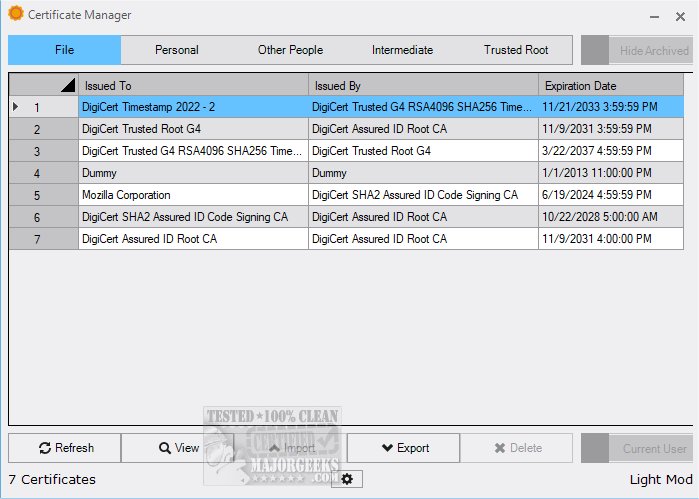
The latest version of Certificate Manager, 18.45, provides users with an extensive overview of their current certificates, facilitating easy access to detailed information. This tool is particularly beneficial for managing app certifications, which often go unnoticed until an installation issue arises. While end-users may overlook the importance of app certificates, developers must ensure their software is properly signed to avoid potential complications.
Key Features and Functionalities
Certificate Manager stands out as a valuable resource for users looking to manage their digital certificates effectively. It allows users to view all relevant certificates associated with their system and offers robust functionalities for importing new certificates and exporting existing ones. The application is designed to make certificate management more accessible and practical.
Upon launching Certificate Manager, users can access personal certificates linked to their profiles. By double-clicking on a specific certificate, users can view detailed information, including the issuer, validity period, and other technical specifications. The interface is organized into dedicated sections for Intermediate and Trusted Root certificates, allowing users to quickly check expiration dates and issuers without sifting through individual entries.
User Experience and Verdict
The intuitive interface of Certificate Manager makes it an exceptional tool for managing digital certificates. Users can effortlessly view, import, and export certificates, enhancing their overall experience with the application. The user-friendly design simplifies the navigation of its powerful features, transforming the often daunting task of certificate management into a straightforward process. For anyone looking to streamline their certificate management, downloading Certificate Manager 18.45 is highly recommended.
Future Considerations
As the digital landscape continues to evolve, the importance of certificate management will only increase. Future updates to Certificate Manager could include enhanced security measures, more automation options for certificate renewal, and integration with other security tools. Additionally, expanding support for cloud-based certificates and interoperability with various platforms may further enhance its utility for both developers and end-users alike. As the need for secure digital transactions grows, tools like Certificate Manager will play a crucial role in ensuring that software remains compliant and trustworthy
Key Features and Functionalities
Certificate Manager stands out as a valuable resource for users looking to manage their digital certificates effectively. It allows users to view all relevant certificates associated with their system and offers robust functionalities for importing new certificates and exporting existing ones. The application is designed to make certificate management more accessible and practical.
Upon launching Certificate Manager, users can access personal certificates linked to their profiles. By double-clicking on a specific certificate, users can view detailed information, including the issuer, validity period, and other technical specifications. The interface is organized into dedicated sections for Intermediate and Trusted Root certificates, allowing users to quickly check expiration dates and issuers without sifting through individual entries.
User Experience and Verdict
The intuitive interface of Certificate Manager makes it an exceptional tool for managing digital certificates. Users can effortlessly view, import, and export certificates, enhancing their overall experience with the application. The user-friendly design simplifies the navigation of its powerful features, transforming the often daunting task of certificate management into a straightforward process. For anyone looking to streamline their certificate management, downloading Certificate Manager 18.45 is highly recommended.
Future Considerations
As the digital landscape continues to evolve, the importance of certificate management will only increase. Future updates to Certificate Manager could include enhanced security measures, more automation options for certificate renewal, and integration with other security tools. Additionally, expanding support for cloud-based certificates and interoperability with various platforms may further enhance its utility for both developers and end-users alike. As the need for secure digital transactions grows, tools like Certificate Manager will play a crucial role in ensuring that software remains compliant and trustworthy
Certificate Manager 18.45 released
Certificate Manager offers an in-depth overview of your current certificates, enabling you to access detailed information with ease.