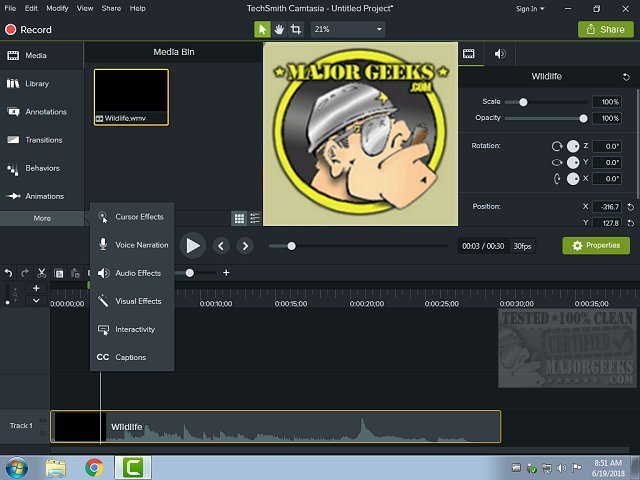
Camtasia 2026.2.6.0.1.14418 has been released, offering users a robust tool for creating professional screen videos without the need for formal training. This software is occasionally utilized by Majorgeeks for their YouTube content, highlighting its versatility and accessibility for users looking to produce high-quality videos.
With Camtasia, users can easily record their screens—whether capturing the entire display or just a specific section—making it ideal for a variety of purposes such as training, teaching, or sales presentations. The recorder is user-friendly; after selecting the desired screen area, you simply click 'record' to start capturing your content. It's important to keep in mind the final destination of your videos, like YouTube or Vimeo, and to choose an appropriate size for your project. By selecting the largest option from the 'Custom' tab in the recording menu, you can ensure that your video fits well within the defined parameters, minimizing potential sizing issues later on.
The recording capabilities allow for a range of applications, including walkthroughs, gameplay recordings, and tutorials. Users can also incorporate webcam footage for a more personal touch. Once the recording is complete, Camtasia provides a comprehensive editing platform that allows for cutting, cropping, and adding transitions, as well as editing audio tracks or including background music. If any mistakes are made during the recording, such as a stammer or soft speech, users can easily re-record audio tracks with just a few clicks.
Upon completing a project, users can click "Produce and Share" to convert their work into a playable video file, with multiple format options available. There's also an option to upload directly to YouTube, making the sharing process seamless. Additionally, Camtasia includes a proprietary feature known as SmartPlayer, which enhances user interactivity by allowing navigation buttons and quizzes in videos. However, it’s worth noting that SmartPlayer is limited to use on TechSmith's screencast site or as a stand-alone product and is not compatible with platforms like YouTube.
In conclusion, Camtasia stands out as a powerful video creation tool that caters to various needs and skill levels. Whether for educational purposes, professional development, or entertainment, it offers a user-friendly experience that simplifies the video-making process while delivering high-quality results. As technology continues to advance, tools like Camtasia will likely evolve further, incorporating even more features to enhance video production and engagement capabilities
With Camtasia, users can easily record their screens—whether capturing the entire display or just a specific section—making it ideal for a variety of purposes such as training, teaching, or sales presentations. The recorder is user-friendly; after selecting the desired screen area, you simply click 'record' to start capturing your content. It's important to keep in mind the final destination of your videos, like YouTube or Vimeo, and to choose an appropriate size for your project. By selecting the largest option from the 'Custom' tab in the recording menu, you can ensure that your video fits well within the defined parameters, minimizing potential sizing issues later on.
The recording capabilities allow for a range of applications, including walkthroughs, gameplay recordings, and tutorials. Users can also incorporate webcam footage for a more personal touch. Once the recording is complete, Camtasia provides a comprehensive editing platform that allows for cutting, cropping, and adding transitions, as well as editing audio tracks or including background music. If any mistakes are made during the recording, such as a stammer or soft speech, users can easily re-record audio tracks with just a few clicks.
Upon completing a project, users can click "Produce and Share" to convert their work into a playable video file, with multiple format options available. There's also an option to upload directly to YouTube, making the sharing process seamless. Additionally, Camtasia includes a proprietary feature known as SmartPlayer, which enhances user interactivity by allowing navigation buttons and quizzes in videos. However, it’s worth noting that SmartPlayer is limited to use on TechSmith's screencast site or as a stand-alone product and is not compatible with platforms like YouTube.
In conclusion, Camtasia stands out as a powerful video creation tool that caters to various needs and skill levels. Whether for educational purposes, professional development, or entertainment, it offers a user-friendly experience that simplifies the video-making process while delivering high-quality results. As technology continues to advance, tools like Camtasia will likely evolve further, incorporating even more features to enhance video production and engagement capabilities
Camtasia 2026.2.6.0.1.14418 released
Camtasia will create professional screen videos without formal training. Used occasionally by Majorgeeks for their YouTube videos.