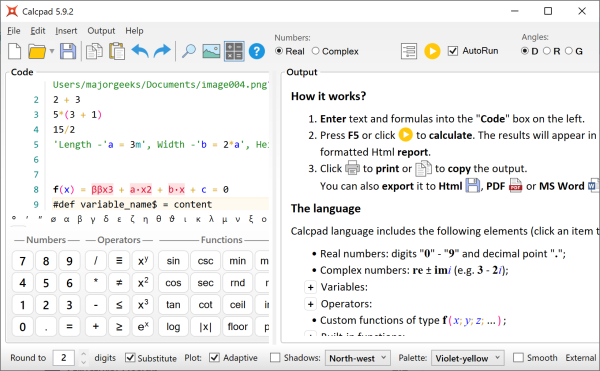
CalcPad is an advanced, free mathematical and engineering calculator that offers a programmable interface and a robust HTML report generator. This versatile tool is capable of managing both real and complex numbers, as well as custom variables with multiple parameters. It comes equipped with a comprehensive library that features standard mathematical functions, modules, macros, string variables, and various other sophisticated functionalities.
One of CalcPad's standout features is its built-in support for HTML and CSS, which facilitates the creation of professional reports. Users can include SVG drawings in their documentation, and reports can be saved in multiple formats, including HTML, .doc, and PDF. The user interface is designed for efficiency, with an input window on the left and an output window on the right. The output window also includes a helpful documentation feature that assists users in navigating the calculator's capabilities, making it easier for newcomers to get started.
To run CalcPad, users must have Microsoft .NET installed on their systems. This requirement ensures that the software operates smoothly and takes full advantage of its extensive features.
Extended Features and Potential Uses
In addition to its current capabilities, future updates to CalcPad could include enhanced support for data visualization tools, allowing users to create more dynamic and interactive reports. Integrating features such as machine learning algorithms could expand its functionality, enabling users to perform predictive analyses and complex simulations.
CalcPad could also benefit from collaborative features, allowing multiple users to work on calculations and reports in real-time, thus enhancing teamwork in educational and professional environments. Furthermore, expanding its library to include more specialized functions for fields such as finance, physics, and engineering could attract a broader user base.
With these potential enhancements, CalcPad could solidify its position as a leading tool in mathematical computing, appealing to both students and professionals in various disciplines
One of CalcPad's standout features is its built-in support for HTML and CSS, which facilitates the creation of professional reports. Users can include SVG drawings in their documentation, and reports can be saved in multiple formats, including HTML, .doc, and PDF. The user interface is designed for efficiency, with an input window on the left and an output window on the right. The output window also includes a helpful documentation feature that assists users in navigating the calculator's capabilities, making it easier for newcomers to get started.
To run CalcPad, users must have Microsoft .NET installed on their systems. This requirement ensures that the software operates smoothly and takes full advantage of its extensive features.
Extended Features and Potential Uses
In addition to its current capabilities, future updates to CalcPad could include enhanced support for data visualization tools, allowing users to create more dynamic and interactive reports. Integrating features such as machine learning algorithms could expand its functionality, enabling users to perform predictive analyses and complex simulations.
CalcPad could also benefit from collaborative features, allowing multiple users to work on calculations and reports in real-time, thus enhancing teamwork in educational and professional environments. Furthermore, expanding its library to include more specialized functions for fields such as finance, physics, and engineering could attract a broader user base.
With these potential enhancements, CalcPad could solidify its position as a leading tool in mathematical computing, appealing to both students and professionals in various disciplines
CalcPad 7.5.7 released
Calcpad is a free and flexible programmable mathematical and engineering calculator that includes an HTML report generator.