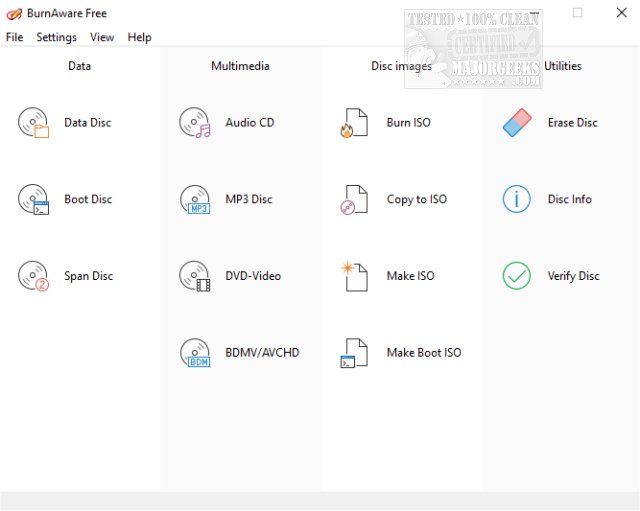
BurnAware Free, the complimentary version of BurnAware Premium, is a user-friendly software designed for burning CDs, DVDs, and Blu-ray Discs on Windows platforms. The latest release, version 19.0, continues to enhance its functionality, offering an array of features that cater to both casual users and more experienced individuals seeking reliable disc-burning solutions.
With BurnAware Free, users can effortlessly create and burn a variety of disc formats, including Audio CDs, MP3 CDs, Data DVDs, and DVD-Video discs. Additionally, the software allows users to create ISO and Cue images, format or erase rewritable discs, and copy existing CDs or DVDs to ISO files. Its capabilities extend to generating standard and bootable data discs across multiple formats, including BDMV and AVCHDPro.
The software is equipped with features such as the ability to create and record disc images, support for all modern hardware interfaces (IDE, SCSI, USB, 1394, SATA), and compatibility with various file systems (UDF, ISO9660, Joliet). Users can enjoy on-the-fly writing, auto-verification of written files, and support for CD-Text and Unicode characters, all contributing to a seamless burning experience.
For those requiring advanced functionalities, BurnAware Pro or Premium is available for a fee ranging from $19.95 to $39.95. This version includes features such as direct disc-to-disc copying, audio track extraction in multiple formats, recovery of files from unreadable discs, and the ability to burn ISO images to multiple drives simultaneously. It also supports commercial use, making it suitable for businesses.
In conclusion, BurnAware Free 19.0 offers a robust and versatile tool for managing disc burning tasks, making it an excellent choice for users looking for a reliable and feature-rich solution without any cost. As technology continues to evolve, we can expect future updates to further enhance its capabilities and improve user experience
With BurnAware Free, users can effortlessly create and burn a variety of disc formats, including Audio CDs, MP3 CDs, Data DVDs, and DVD-Video discs. Additionally, the software allows users to create ISO and Cue images, format or erase rewritable discs, and copy existing CDs or DVDs to ISO files. Its capabilities extend to generating standard and bootable data discs across multiple formats, including BDMV and AVCHDPro.
The software is equipped with features such as the ability to create and record disc images, support for all modern hardware interfaces (IDE, SCSI, USB, 1394, SATA), and compatibility with various file systems (UDF, ISO9660, Joliet). Users can enjoy on-the-fly writing, auto-verification of written files, and support for CD-Text and Unicode characters, all contributing to a seamless burning experience.
For those requiring advanced functionalities, BurnAware Pro or Premium is available for a fee ranging from $19.95 to $39.95. This version includes features such as direct disc-to-disc copying, audio track extraction in multiple formats, recovery of files from unreadable discs, and the ability to burn ISO images to multiple drives simultaneously. It also supports commercial use, making it suitable for businesses.
In conclusion, BurnAware Free 19.0 offers a robust and versatile tool for managing disc burning tasks, making it an excellent choice for users looking for a reliable and feature-rich solution without any cost. As technology continues to evolve, we can expect future updates to further enhance its capabilities and improve user experience
BurnAware Free 19.0 released
BurnAware Free is the free version of BurnAware Premium, an easy to use CD, DVD, Blu-ray Disc burning tool available for Windows.