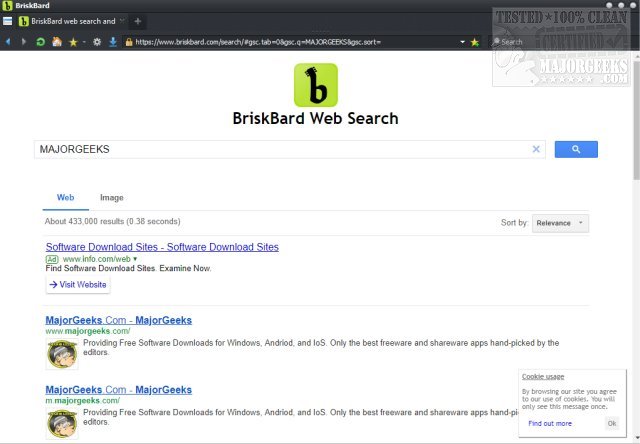
BriskBard has released version 4.9.0, enhancing its functionality as a fast, freeware web browser that combines the rendering engines Blink and Trident. This browser is designed for speed and security, while also integrating a suite of tools such as FTP, email, and RSS feeds, among others.
The user interface of BriskBard is noted for its simplicity and efficiency, featuring intuitive icons for navigation, bookmarking, settings, and downloads. However, it has been pointed out that the bookmark management could be improved, as bookmarks require a click to expand rather than allowing for a smoother scrolling experience. Additionally, the browser does not prompt users to import existing bookmarks, which is a significant oversight. The choice of a lightning bolt icon for bookmarks has also raised questions among users.
BriskBard's configuration settings include unique options like printing to PDF, managing private data, and checking for phishing threats. The browser offers a comprehensive menu that provides access to various features, including email, media playback, FTP, telnet, whois, and name resolution, which can all be opened in separate tabs. This integration of multiple tools within a single browser is a standout feature, especially considering the relatively small download size compared to other media players.
While BriskBard may not be without its flaws, it stands out as a compelling choice for users seeking a versatile web browser that combines multiple functionalities. The developers have packed a variety of features into BriskBard, making it a robust alternative for those who need more than just a browsing experience.
To further enhance the BriskBard experience, future updates could focus on improving bookmark management, refining the user interface, and perhaps adding more customization options for users. Additionally, better integration with popular cloud services and enhanced privacy features could help BriskBard maintain its competitive edge in the ever-evolving landscape of web browsers
The user interface of BriskBard is noted for its simplicity and efficiency, featuring intuitive icons for navigation, bookmarking, settings, and downloads. However, it has been pointed out that the bookmark management could be improved, as bookmarks require a click to expand rather than allowing for a smoother scrolling experience. Additionally, the browser does not prompt users to import existing bookmarks, which is a significant oversight. The choice of a lightning bolt icon for bookmarks has also raised questions among users.
BriskBard's configuration settings include unique options like printing to PDF, managing private data, and checking for phishing threats. The browser offers a comprehensive menu that provides access to various features, including email, media playback, FTP, telnet, whois, and name resolution, which can all be opened in separate tabs. This integration of multiple tools within a single browser is a standout feature, especially considering the relatively small download size compared to other media players.
While BriskBard may not be without its flaws, it stands out as a compelling choice for users seeking a versatile web browser that combines multiple functionalities. The developers have packed a variety of features into BriskBard, making it a robust alternative for those who need more than just a browsing experience.
To further enhance the BriskBard experience, future updates could focus on improving bookmark management, refining the user interface, and perhaps adding more customization options for users. Additionally, better integration with popular cloud services and enhanced privacy features could help BriskBard maintain its competitive edge in the ever-evolving landscape of web browsers
BriskBard 4.9.0 released
BriskBard is a fast freeware web browser using Blink and Trident that also has security features and numerous tools including FTP, email, RSS, and more.