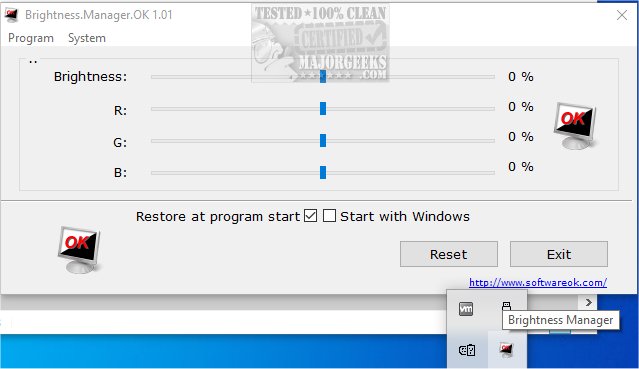
Brightness.Manager.OK version 1.55 has been released as an alternative solution for controlling screen brightness, especially useful when the standard controls fail to function properly. This software allows users to set their preferred brightness levels, which can be automatically applied upon launching the program or logging into Windows.
The application features a main controller for easy brightness adjustments, and it is particularly beneficial for users with older monitors that may display a color tinge, as it allows for fine-tuning of brightness through RGB color space adjustments. This level of customization ensures a more suitable display experience tailored to individual preferences.
The interface is user-friendly, featuring sliders for quick adjustments to brightness levels. Additionally, Brightness.Manager.OK integrates with various Windows functionalities, including screensaver settings, power options, and the mobility center, enhancing its convenience. Users can exit the program using the Exit button, but if they choose to close it using ALT + F4 or the Close button, it will minimize to the notification area of the Windows taskbar, allowing it to run in the background. However, it is important to note that Windows will reset the brightness values upon a system restart.
In addition to its core functionalities, users might find it helpful to explore related resources on managing adaptive brightness settings in Windows 10 and 11, methods for turning off the monitor on demand, and troubleshooting techniques for stuck or dead pixels on LCD monitors.
Extended Features and Future Updates:
Looking ahead, potential updates to Brightness.Manager.OK could include enhanced color calibration tools for even finer adjustments, integration with advanced hardware features for newer monitor models, and the ability to save multiple brightness profiles for different usage scenarios. Additionally, user feedback forums could be established to gather suggestions for future enhancements and to foster a community of users sharing their experiences and settings. This would not only improve the software but also create a platform for collaborative learning among users
The application features a main controller for easy brightness adjustments, and it is particularly beneficial for users with older monitors that may display a color tinge, as it allows for fine-tuning of brightness through RGB color space adjustments. This level of customization ensures a more suitable display experience tailored to individual preferences.
The interface is user-friendly, featuring sliders for quick adjustments to brightness levels. Additionally, Brightness.Manager.OK integrates with various Windows functionalities, including screensaver settings, power options, and the mobility center, enhancing its convenience. Users can exit the program using the Exit button, but if they choose to close it using ALT + F4 or the Close button, it will minimize to the notification area of the Windows taskbar, allowing it to run in the background. However, it is important to note that Windows will reset the brightness values upon a system restart.
In addition to its core functionalities, users might find it helpful to explore related resources on managing adaptive brightness settings in Windows 10 and 11, methods for turning off the monitor on demand, and troubleshooting techniques for stuck or dead pixels on LCD monitors.
Extended Features and Future Updates:
Looking ahead, potential updates to Brightness.Manager.OK could include enhanced color calibration tools for even finer adjustments, integration with advanced hardware features for newer monitor models, and the ability to save multiple brightness profiles for different usage scenarios. Additionally, user feedback forums could be established to gather suggestions for future enhancements and to foster a community of users sharing their experiences and settings. This would not only improve the software but also create a platform for collaborative learning among users
Brightness.Manager.OK 1.55 released
Brightness.Manager.OK provides a stand-in option to control screen brightness when default controls cease to work.