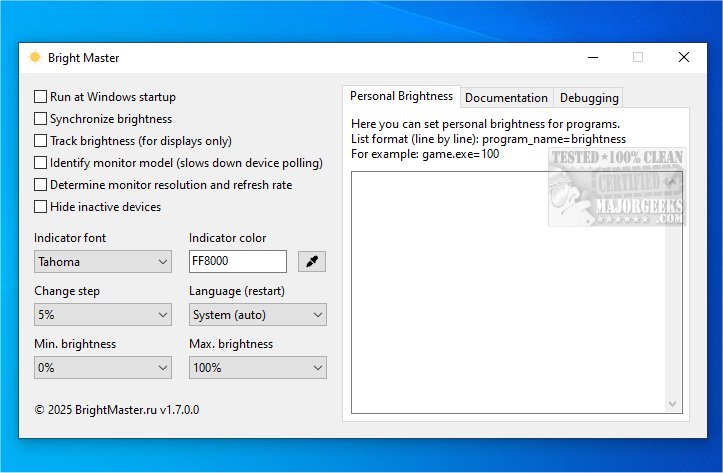
Bright Master is an innovative application designed to facilitate the adjustment of brightness levels across various screens, including external monitors that utilize the DDC/CI protocol, as well as built-in displays on laptops, all-in-one PCs, and Windows tablets. The latest version, Bright Master 1.8.1, enhances its functionality, ensuring a seamless experience for users.
What is Bright Master?
Bright Master serves as a versatile tool that simplifies brightness management for multiple monitors. It is essential to have the Windows Management Instrumentation (WMI) service enabled on your device to fully utilize its capabilities. The application caters to a wide range of devices, whether they are connected via standard cables or integrated into hardware, making it an ideal solution for users seeking to optimize their display settings.
Streamlined Process with Hotkey Support
While many modern monitors feature built-in brightness control options, Bright Master takes efficiency a step further by enabling users to adjust brightness levels using hotkeys. This functionality is particularly beneficial for those who require quick modifications, allowing for simultaneous adjustments across multiple monitors. The ease of dimming screens to comfortable levels is especially advantageous during late-night work sessions or in dimly lit environments. Bright Master appeals to a diverse audience, from gamers looking for enhanced immersion to professionals aiming for ergonomic viewing conditions.
Enhanced User Experience
Bright Master is designed to elevate the user experience by providing quick and convenient access to luminosity controls. During installation, the software demonstrated excellent compatibility by easily detecting both monitors, allowing for precise brightness adjustments tailored to individual preferences and environmental lighting. This level of responsiveness contributes to a more comfortable viewing experience, enabling users to customize their settings according to their unique needs.
Geek Verdict
In conclusion, Bright Master is an intuitive and user-friendly application that simplifies brightness adjustments for both single and multiple monitor setups. Its straightforward interface allows users to navigate easily and tailor their brightness settings effectively. With precise control over lighting conditions, Bright Master significantly enhances the overall viewing experience.
Future Enhancements and Features
Looking ahead, users can expect potential updates that may include additional features such as customizable profiles for different lighting environments, more advanced hotkey configurations, and integration with other display management tools. It would also be beneficial to see support for more display protocols, enhancing compatibility with a broader range of devices. Overall, Bright Master continues to be a powerful ally for optimizing display brightness and improving user comfort across various setups
What is Bright Master?
Bright Master serves as a versatile tool that simplifies brightness management for multiple monitors. It is essential to have the Windows Management Instrumentation (WMI) service enabled on your device to fully utilize its capabilities. The application caters to a wide range of devices, whether they are connected via standard cables or integrated into hardware, making it an ideal solution for users seeking to optimize their display settings.
Streamlined Process with Hotkey Support
While many modern monitors feature built-in brightness control options, Bright Master takes efficiency a step further by enabling users to adjust brightness levels using hotkeys. This functionality is particularly beneficial for those who require quick modifications, allowing for simultaneous adjustments across multiple monitors. The ease of dimming screens to comfortable levels is especially advantageous during late-night work sessions or in dimly lit environments. Bright Master appeals to a diverse audience, from gamers looking for enhanced immersion to professionals aiming for ergonomic viewing conditions.
Enhanced User Experience
Bright Master is designed to elevate the user experience by providing quick and convenient access to luminosity controls. During installation, the software demonstrated excellent compatibility by easily detecting both monitors, allowing for precise brightness adjustments tailored to individual preferences and environmental lighting. This level of responsiveness contributes to a more comfortable viewing experience, enabling users to customize their settings according to their unique needs.
Geek Verdict
In conclusion, Bright Master is an intuitive and user-friendly application that simplifies brightness adjustments for both single and multiple monitor setups. Its straightforward interface allows users to navigate easily and tailor their brightness settings effectively. With precise control over lighting conditions, Bright Master significantly enhances the overall viewing experience.
Future Enhancements and Features
Looking ahead, users can expect potential updates that may include additional features such as customizable profiles for different lighting environments, more advanced hotkey configurations, and integration with other display management tools. It would also be beneficial to see support for more display protocols, enhancing compatibility with a broader range of devices. Overall, Bright Master continues to be a powerful ally for optimizing display brightness and improving user comfort across various setups
Bright Master 1.8.1 released
Bright Master allows you to easily adjust the brightness of your monitors and displays. It is compatible with external monitors that utilize the DDC/CI protocol and built-in displays on laptops, all-in-one PCs, and Windows tablets.