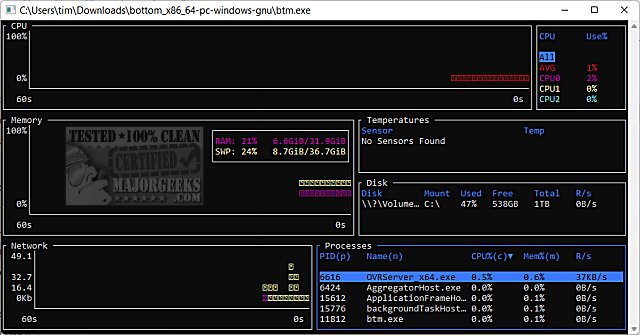
The latest release of bottom (btm) version 0.12.0 introduces an enhanced cross-platform monitoring application designed for users who need comprehensive system performance insights. This application includes graphical visualization widgets that track CPU usage over time, allowing users to view averages and per-core statistics. It also monitors RAM and swap usage, network I/O, and provides the capability to zoom in and out on the current time interval for detailed analysis.
In addition to these features, bottom (btm) offers widgets that display critical information about disk capacity and usage, temperature sensors, and battery usage. A dedicated process widget is included for users to display, sort, and search for specific processes, with added functionalities for sending kill signals and viewing processes in tree mode, facilitating better management of system resources.
To help users better understand and utilize their hardware, the application is complemented by several informative guides, such as checking memory (RAM) speed and available slots, identifying hard drive types (SSD or HDD), determining CPU core counts, and finding specifications for Intel processors and motherboards.
As monitoring needs grow, future updates could expand on these features by integrating more customizable options, enhancing user interface design, and providing additional analytics tools to further optimize system performance. Additionally, community-driven feedback could lead to the incorporation of advanced networking statistics and integration with cloud monitoring services, broadening the scope of bottom (btm) as a versatile system monitoring solution
In addition to these features, bottom (btm) offers widgets that display critical information about disk capacity and usage, temperature sensors, and battery usage. A dedicated process widget is included for users to display, sort, and search for specific processes, with added functionalities for sending kill signals and viewing processes in tree mode, facilitating better management of system resources.
To help users better understand and utilize their hardware, the application is complemented by several informative guides, such as checking memory (RAM) speed and available slots, identifying hard drive types (SSD or HDD), determining CPU core counts, and finding specifications for Intel processors and motherboards.
As monitoring needs grow, future updates could expand on these features by integrating more customizable options, enhancing user interface design, and providing additional analytics tools to further optimize system performance. Additionally, community-driven feedback could lead to the incorporation of advanced networking statistics and integration with cloud monitoring services, broadening the scope of bottom (btm) as a versatile system monitoring solution
bottom (btm) 0.12.0 released
bottom (btm) is a cross-platform monitoring app.