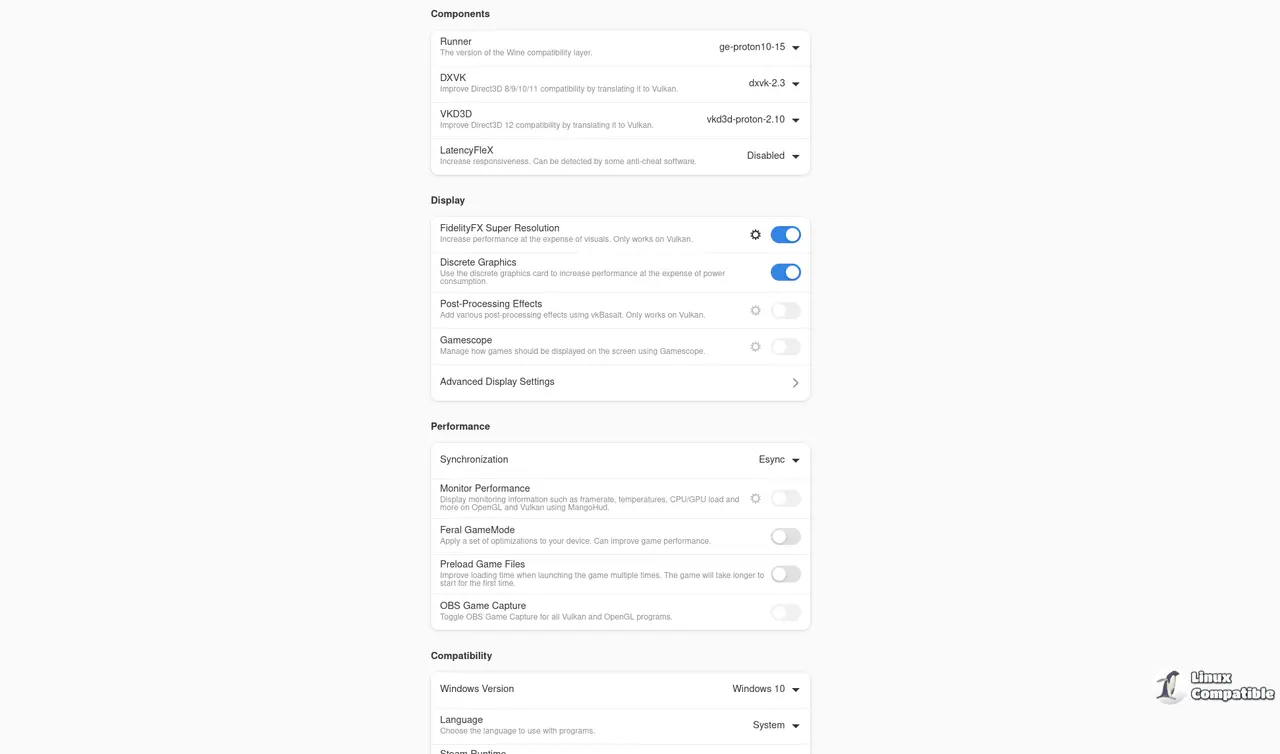
Bottles 61.0 has been released, significantly enhancing the experience of Windows gaming on Linux by providing a pre-configured Gaming Environment that integrates essential components such as DXVK, VKD3D, and gamemode. This version reduces the need for manual configurations, making it easier for users to launch most titles. The Installer system automates the download of community scripts for popular gaming stores like Epic and Battle.net, while the new Eagle scanner analyzes executables to identify necessary runtimes and potential anti-cheat issues. Users benefit from snapshot features that allow easy restoration of previous configurations, albeit with potential disk space concerns if not managed properly. The Flatpak sandboxing adds a layer of security but may require manual permission adjustments for games needing access beyond the container.
Bottles 61.0 aims to simplify the complex landscape of Windows gaming on Linux. With its easy setup process, users can create a bottle, select the Gaming environment, and have essential libraries automatically integrated—saving time and effort compared to manual installations. The Installer system further streamlines this by allowing one-click access to game store clients, setting up dependencies seamlessly. However, users may encounter issues with some anti-cheat modules that are incompatible with Wine, highlighting areas where the user interface could improve in providing clearer error messages.
The Eagle binary analyzer is a notable feature, capable of detecting the specific needs of Windows executables, which can help users avoid frustrating trial-and-error processes, particularly with games that have strict anti-cheat requirements. While Eagle's scanning process does introduce a slight delay for installations, its benefits often outweigh this minor inconvenience.
Snapshots offer a simple way to backtrack on changes, reinforcing system integrity by allowing users to restore previous configurations effortlessly. However, the accumulation of snapshot files can consume significant disk space, suggesting that a pruning option would be a valuable improvement.
The Flatpak sandboxing provides a secure environment for running Bottles but may complicate access for certain game features, indicating a need for better automation in permission management.
Overall, Bottles 61.0 brings significant improvements for casual Windows gamers on Linux, making the gaming experience smoother and more user-friendly. Despite some remaining challenges, such as potential snapshot bloat and incomplete error reporting, the productivity gains will likely resonate well with users.
For those interested in further details, the official announcement can be found on the Bottles project page. Happy gaming, and may your frame rates remain high!
- Installer System: One-click access to game store clients with automatic dependency management.
- Eagle Scanner: Automatic detection of executable requirements and anti-cheat incompatibilities.
- Snapshots: Easy restoration of previous configurations while managing disk space.
- Flatpak Sandboxing: Enhanced security with controlled access for game features
Bottles 61.0 aims to simplify the complex landscape of Windows gaming on Linux. With its easy setup process, users can create a bottle, select the Gaming environment, and have essential libraries automatically integrated—saving time and effort compared to manual installations. The Installer system further streamlines this by allowing one-click access to game store clients, setting up dependencies seamlessly. However, users may encounter issues with some anti-cheat modules that are incompatible with Wine, highlighting areas where the user interface could improve in providing clearer error messages.
The Eagle binary analyzer is a notable feature, capable of detecting the specific needs of Windows executables, which can help users avoid frustrating trial-and-error processes, particularly with games that have strict anti-cheat requirements. While Eagle's scanning process does introduce a slight delay for installations, its benefits often outweigh this minor inconvenience.
Snapshots offer a simple way to backtrack on changes, reinforcing system integrity by allowing users to restore previous configurations effortlessly. However, the accumulation of snapshot files can consume significant disk space, suggesting that a pruning option would be a valuable improvement.
The Flatpak sandboxing provides a secure environment for running Bottles but may complicate access for certain game features, indicating a need for better automation in permission management.
Overall, Bottles 61.0 brings significant improvements for casual Windows gamers on Linux, making the gaming experience smoother and more user-friendly. Despite some remaining challenges, such as potential snapshot bloat and incomplete error reporting, the productivity gains will likely resonate well with users.
For those interested in further details, the official announcement can be found on the Bottles project page. Happy gaming, and may your frame rates remain high!
Key Features of Bottles 61.0:
- Gaming Environment: Pre-configured libraries for easy game setup.- Installer System: One-click access to game store clients with automatic dependency management.
- Eagle Scanner: Automatic detection of executable requirements and anti-cheat incompatibilities.
- Snapshots: Easy restoration of previous configurations while managing disk space.
- Flatpak Sandboxing: Enhanced security with controlled access for game features
Bottles 61.0 released
Bottles 61.0 streamlines Windows gaming on Linux by offering a pre‑configured Gaming Environment with DXVK, VKD3D, gamemode and other tweaks that let most titles launch without manual setup. The Installer system pulls community scripts for stores like Epic and Battle.net, automatically handling dependencies, while the Eagle scanner analyses executables to flag needed runtimes and anti‑cheat incompatibilities. Snapshots give one‑click restore points after dependency changes, though they can consume disk space if left unchecked. Flatpak sandboxing keeps bottles isolated, but may require manual permission tweaks for games that need access outside the container.