BluetoothLEView has recently released version 1.03, a specialized utility designed to monitor and present the activity of Bluetooth Low Energy (BLE) devices in proximity. This tool offers real-time insights by scanning and listing nearby BLE devices, facilitating easy tracking of interactions with various gadgets such as fitness trackers, smart home devices, and medical equipment.
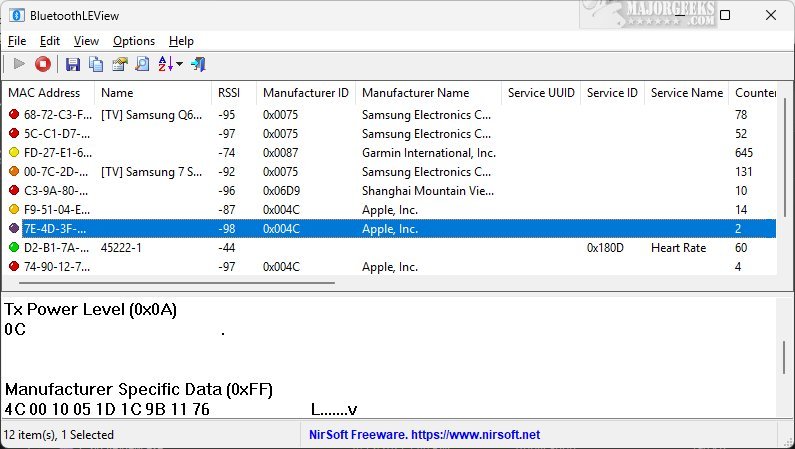
Upon detecting a BLE device, BluetoothLEView provides detailed information, including the MAC Address, device Name, Signal Strength (RSSI), Manufacturer ID, Manufacturer Name, Service UUID, and timestamps for the first and last detections. Additionally, users can see the total number of times a device has been detected, enriching their understanding of the Bluetooth network around them.
Using BluetoothLEView is straightforward. After launching the application, it actively scans for nearby BLE devices, displaying a comprehensive list that includes essential details like device names, addresses, signal strength, and connection status. This functionality enables users to monitor and interact with compatible devices effortlessly.
The software includes several useful features: users can pause and resume scanning, export lists of detected devices in various formats (CSV, XML, JSON, etc.), copy device lists to the clipboard, and run the application in the background by placing an icon in the system tray. Users can also clear the collected device list as needed.
Overall, BluetoothLEView serves as an essential monitoring tool for BLE devices, enhancing Bluetooth connectivity experiences with its intuitive interface and comprehensive reporting capabilities.
Future Enhancements:
To further improve BluetoothLEView, potential updates could include:
1. Enhanced Device Management: Allowing users to categorize devices based on type or usage frequency could streamline the monitoring process.
2. Alerts and Notifications: Implementing customizable alerts for specific devices when they come into range or go out of range could be beneficial for users needing to track particular devices, such as medical equipment.
3. Data Analytics Features: Integrating analytical tools that provide historical data trends on device interactions could help users understand usage patterns and optimize their BLE environment.
4. User Customization Options: Allowing users to customize the interface layout and the information displayed could enhance usability and cater to individual preferences.
5. Cross-Platform Compatibility: Expanding the application to support mobile platforms could allow users to monitor BLE devices on the go.
These enhancements could significantly enrich user experience and functionality, making BluetoothLEView an even more powerful tool for managing Bluetooth Low Energy devices
Upon detecting a BLE device, BluetoothLEView provides detailed information, including the MAC Address, device Name, Signal Strength (RSSI), Manufacturer ID, Manufacturer Name, Service UUID, and timestamps for the first and last detections. Additionally, users can see the total number of times a device has been detected, enriching their understanding of the Bluetooth network around them.
Using BluetoothLEView is straightforward. After launching the application, it actively scans for nearby BLE devices, displaying a comprehensive list that includes essential details like device names, addresses, signal strength, and connection status. This functionality enables users to monitor and interact with compatible devices effortlessly.
The software includes several useful features: users can pause and resume scanning, export lists of detected devices in various formats (CSV, XML, JSON, etc.), copy device lists to the clipboard, and run the application in the background by placing an icon in the system tray. Users can also clear the collected device list as needed.
Overall, BluetoothLEView serves as an essential monitoring tool for BLE devices, enhancing Bluetooth connectivity experiences with its intuitive interface and comprehensive reporting capabilities.
Future Enhancements:
To further improve BluetoothLEView, potential updates could include:
1. Enhanced Device Management: Allowing users to categorize devices based on type or usage frequency could streamline the monitoring process.
2. Alerts and Notifications: Implementing customizable alerts for specific devices when they come into range or go out of range could be beneficial for users needing to track particular devices, such as medical equipment.
3. Data Analytics Features: Integrating analytical tools that provide historical data trends on device interactions could help users understand usage patterns and optimize their BLE environment.
4. User Customization Options: Allowing users to customize the interface layout and the information displayed could enhance usability and cater to individual preferences.
5. Cross-Platform Compatibility: Expanding the application to support mobile platforms could allow users to monitor BLE devices on the go.
These enhancements could significantly enrich user experience and functionality, making BluetoothLEView an even more powerful tool for managing Bluetooth Low Energy devices
BluetoothLEView 1.03 released
BluetoothLEView is a specialized tool designed to monitor and display the activity of Bluetooth Low Energy (BLE) devices in your immediate vicinity.