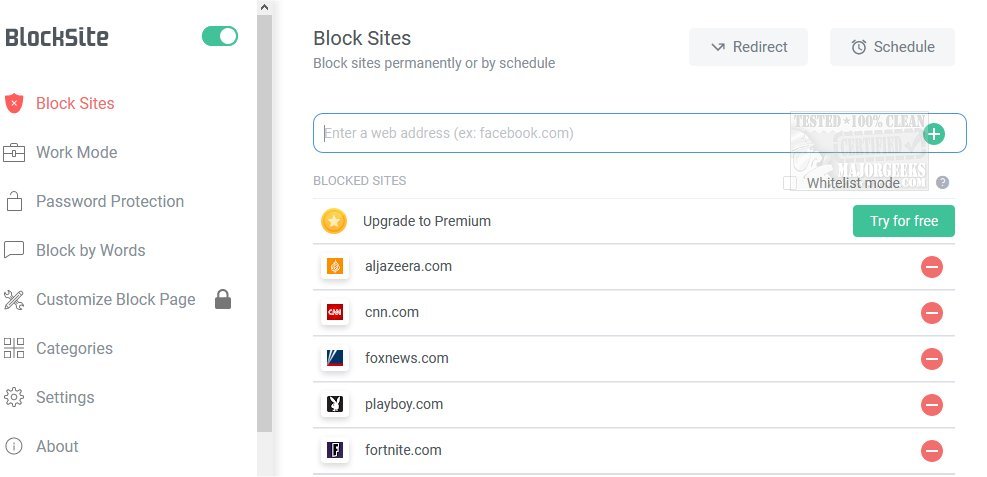
BlockSite has recently released version 7.0.0 for Chrome, Firefox, and Edge, providing users with a straightforward tool to block distracting websites and apps. This extension is tailored to enhance focus and productivity, particularly beneficial for those working or studying from home. Users can simply add unwanted sites to their block list, and BlockSite will prevent access while offering humorous images as a lighthearted reminder of the block.
Key features of BlockSite include:
- Stay Focused Extension: Effortlessly eliminate distractions and harmful sites to maintain productivity.
- Work Mode: Utilize the Pomodoro technique to set a timer for focused work sessions, automatically disabling distractions during work intervals.
- Adult Content Blocking: A built-in feature blocks all known adult sites to maintain a safe browsing experience.
- Scheduling: Customize daily schedules to control access to specific sites and apps, helping users adhere to routines.
- Time Management: The app's features support better time management, allowing users to balance tasks and leisure browsing.
- Password Protection: Users can set passcodes for blocked sites to deter procrastination and protect the settings.
- Customized Blocked Page: Personalize the blocked page by selecting images and text, with real-time previews to ensure satisfaction.
- Uninstall Prevention: This feature safeguards the app from being uninstalled without the user's knowledge, ensuring continued productivity.
Overall, BlockSite serves as an incredibly useful productivity tool, helping users manage their online habits effectively. With its combination of fun elements and serious productivity features, it appeals to a wide range of users looking to enhance focus and minimize distractions in their digital environments.
In the future, BlockSite could explore additional features such as integration with task management tools, enhanced analytics on browsing habits, or collaborative blocking for shared devices to further assist users in maintaining productivity
Key features of BlockSite include:
- Stay Focused Extension: Effortlessly eliminate distractions and harmful sites to maintain productivity.
- Work Mode: Utilize the Pomodoro technique to set a timer for focused work sessions, automatically disabling distractions during work intervals.
- Adult Content Blocking: A built-in feature blocks all known adult sites to maintain a safe browsing experience.
- Scheduling: Customize daily schedules to control access to specific sites and apps, helping users adhere to routines.
- Time Management: The app's features support better time management, allowing users to balance tasks and leisure browsing.
- Password Protection: Users can set passcodes for blocked sites to deter procrastination and protect the settings.
- Customized Blocked Page: Personalize the blocked page by selecting images and text, with real-time previews to ensure satisfaction.
- Uninstall Prevention: This feature safeguards the app from being uninstalled without the user's knowledge, ensuring continued productivity.
Overall, BlockSite serves as an incredibly useful productivity tool, helping users manage their online habits effectively. With its combination of fun elements and serious productivity features, it appeals to a wide range of users looking to enhance focus and minimize distractions in their digital environments.
In the future, BlockSite could explore additional features such as integration with task management tools, enhanced analytics on browsing habits, or collaborative blocking for shared devices to further assist users in maintaining productivity
BlockSite for Chrome, Firefox, and Edge 7.0.0 released
BlockSite for Chrome, Firefox, and Edge gives you an easy way to block distracting websites and apps.
BlockSite for Chrome, Firefox, and Edge 7.0.0 released @ MajorGeeks