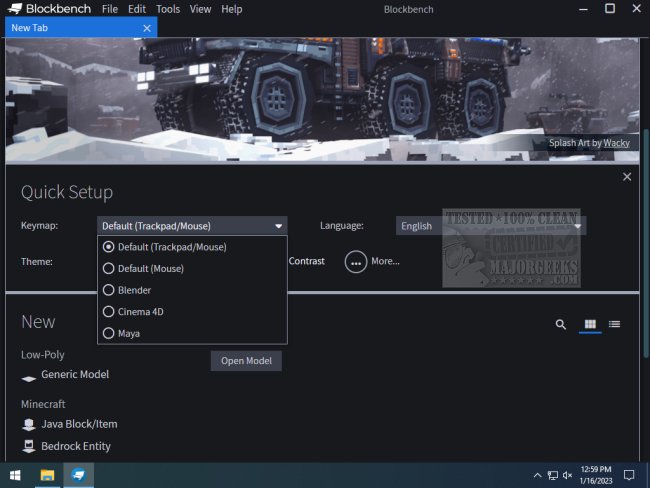
Blockbench 5.1.2 has been released, offering users an open-source model editor designed for creating low-poly and boxy models with pixel art textures. This tool is particularly popular among Minecraft enthusiasts due to its ease of use and direct integration for exporting models for mods, resource packs, and the Bedrock Edition.
Blockbench is highly accessible, catering to both beginners and experienced 3D modelers by eliminating complex menus and extensive tutorials in favor of a user-friendly interface. Whether you're interested in modding Minecraft, creating standalone projects, or even designing for game engines like Unity, Unreal, and Godot, Blockbench provides a versatile platform for various creative endeavors. It also supports 3D printing by allowing users to design custom figurines and gadgets, although exported files may require additional refinement in software like Blender or TinkerCad.
The software comes with built-in animation tools, making it a suitable choice for animators looking to create motion sequences with ease. Additionally, educators can leverage Blockbench as an introductory tool for teaching 3D modeling concepts due to its approachable design.
Key Features:
- User-Friendly Interface: Intuitive design that welcomes newcomers.
- Animation Tools: Simplified features for animating models.
- Minecraft Integration: Direct export options for Minecraft-related projects.
- Plugin Support: Community-created plugins enhance functionality.
- Cross-Platform Compatibility: Usable on Windows, macOS, and Linux.
Pros and Cons:
Pros:
- Free and open-source.
- Beginner-friendly yet capable of professional-grade outputs.
- Ideal for Minecraft creators with easy export options.
- Highly customizable through plugins.
- Smooth operation across various platforms.
Cons:
- Primarily focused on boxy, low-poly designs, which may limit some users.
- Lacks advanced features desired by professional modelers.
- Plugin development requires coding skills.
Geek Verdict:
Blockbench stands out as an exceptional tool for Minecraft creators and low-poly art enthusiasts, offering a flexible and enjoyable experience in 3D modeling. Its combination of accessibility, functionality, and cost-free usage makes it an attractive option for anyone looking to explore their creative ideas, whether through animation, modding, or prototyping.
Extension:
In addition to its current features, future updates to Blockbench could further enhance its appeal by incorporating advanced modeling techniques and tools that cater to professional modelers, such as improved texturing options and support for more complex geometry. Expanding its plugin ecosystem could also attract a broader user base. By continuously evolving and responding to user feedback, Blockbench has the potential to solidify its position as a leading tool in the realm of 3D modeling not only for Minecraft but for a variety of creative applications
Blockbench is highly accessible, catering to both beginners and experienced 3D modelers by eliminating complex menus and extensive tutorials in favor of a user-friendly interface. Whether you're interested in modding Minecraft, creating standalone projects, or even designing for game engines like Unity, Unreal, and Godot, Blockbench provides a versatile platform for various creative endeavors. It also supports 3D printing by allowing users to design custom figurines and gadgets, although exported files may require additional refinement in software like Blender or TinkerCad.
The software comes with built-in animation tools, making it a suitable choice for animators looking to create motion sequences with ease. Additionally, educators can leverage Blockbench as an introductory tool for teaching 3D modeling concepts due to its approachable design.
Key Features:
- User-Friendly Interface: Intuitive design that welcomes newcomers.
- Animation Tools: Simplified features for animating models.
- Minecraft Integration: Direct export options for Minecraft-related projects.
- Plugin Support: Community-created plugins enhance functionality.
- Cross-Platform Compatibility: Usable on Windows, macOS, and Linux.
Pros and Cons:
Pros:
- Free and open-source.
- Beginner-friendly yet capable of professional-grade outputs.
- Ideal for Minecraft creators with easy export options.
- Highly customizable through plugins.
- Smooth operation across various platforms.
Cons:
- Primarily focused on boxy, low-poly designs, which may limit some users.
- Lacks advanced features desired by professional modelers.
- Plugin development requires coding skills.
Geek Verdict:
Blockbench stands out as an exceptional tool for Minecraft creators and low-poly art enthusiasts, offering a flexible and enjoyable experience in 3D modeling. Its combination of accessibility, functionality, and cost-free usage makes it an attractive option for anyone looking to explore their creative ideas, whether through animation, modding, or prototyping.
Extension:
In addition to its current features, future updates to Blockbench could further enhance its appeal by incorporating advanced modeling techniques and tools that cater to professional modelers, such as improved texturing options and support for more complex geometry. Expanding its plugin ecosystem could also attract a broader user base. By continuously evolving and responding to user feedback, Blockbench has the potential to solidify its position as a leading tool in the realm of 3D modeling not only for Minecraft but for a variety of creative applications
Blockbench 5.1.2 released
Blockbench provides you with an Open Source model editor for low-poly and boxy models with pixel art textures.