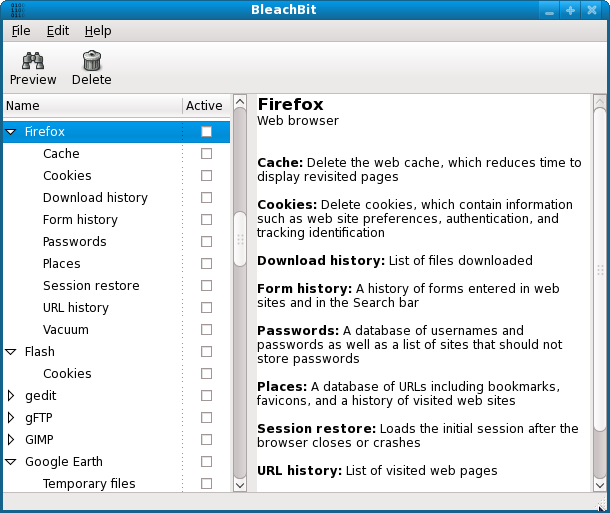
BleachBit has recently released its Beta version 5.1.1 and the stable version 5.0.2, offering enhanced functionality for Windows and Linux users. This free, open-source system cleaner serves as an essential tool for those looking to declutter their computers by deleting unnecessary files, thus freeing up disk space, safeguarding privacy, and eliminating digital clutter.
BleachBit stands out due to its focused approach to cleaning and privacy. It effectively performs deep system cleaning by removing cache, cookies, internet history, temporary files, logs, and junk from a wide range of applications, including web browsers and office software. For users concerned about privacy, it securely shreds files beyond recovery and wipes free disk space, ensuring that deleted data cannot be retrieved.
What makes BleachBit particularly appealing is its lightweight and fast performance, devoid of unnecessary features that can slow down your system. It is also cross-platform compatible, functioning seamlessly on both Windows and Linux, making it a versatile choice for various users. Additionally, as an open-source tool, it guarantees transparency and is free from ads and subscription fees, allowing users to clean their systems without any hidden costs.
BleachBit is especially beneficial for those who frequently deal with storage constraints, as it can reclaim significant amounts of space with just a few clicks. Privacy-conscious users will appreciate its ability to erase browsing history, chat logs, and sensitive documents, making it a valuable asset for anyone wary of their digital footprint. IT professionals and system administrators can leverage its command-line interface for automated cleaning tasks, simplifying system maintenance.
In summary, BleachBit is a powerful, no-nonsense tool designed for effective deep cleaning and privacy protection. Its robust feature set, open-source nature, and lightweight design make it an indispensable tool for anyone serious about maintaining a clean, secure, and high-performing computer system. If you're looking for an efficient cleaning solution, BleachBit is definitely worth trying out.
BleachBit stands out due to its focused approach to cleaning and privacy. It effectively performs deep system cleaning by removing cache, cookies, internet history, temporary files, logs, and junk from a wide range of applications, including web browsers and office software. For users concerned about privacy, it securely shreds files beyond recovery and wipes free disk space, ensuring that deleted data cannot be retrieved.
What makes BleachBit particularly appealing is its lightweight and fast performance, devoid of unnecessary features that can slow down your system. It is also cross-platform compatible, functioning seamlessly on both Windows and Linux, making it a versatile choice for various users. Additionally, as an open-source tool, it guarantees transparency and is free from ads and subscription fees, allowing users to clean their systems without any hidden costs.
BleachBit is especially beneficial for those who frequently deal with storage constraints, as it can reclaim significant amounts of space with just a few clicks. Privacy-conscious users will appreciate its ability to erase browsing history, chat logs, and sensitive documents, making it a valuable asset for anyone wary of their digital footprint. IT professionals and system administrators can leverage its command-line interface for automated cleaning tasks, simplifying system maintenance.
In summary, BleachBit is a powerful, no-nonsense tool designed for effective deep cleaning and privacy protection. Its robust feature set, open-source nature, and lightweight design make it an indispensable tool for anyone serious about maintaining a clean, secure, and high-performing computer system. If you're looking for an efficient cleaning solution, BleachBit is definitely worth trying out.
Extended Thoughts
In addition to its current features, future updates could include more advanced functionalities such as a scheduling option for automatic cleanings, enhanced user interface customization, and integration with cloud storage services for added convenience. Moreover, enhancing community engagement by allowing users to contribute to feature requests or bug fixes could further bolster its already strong community-driven development ethos. As technology evolves, BleachBit could also benefit from incorporating AI-driven recommendations for cleaning based on individual user habits, thus providing a more personalized cleaning experienceBleachBit 5.1.1 Beta / 5.0.2 released
BleachBit for Windows and Linux deletes unnecessary files to free valuable disk space, maintain privacy, and remove junk.