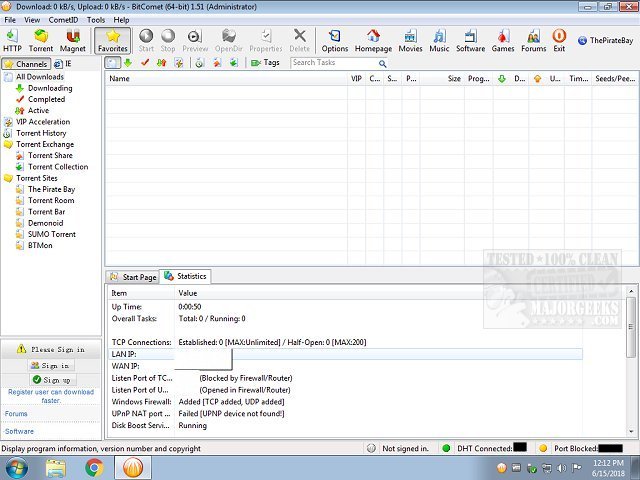
BitComet is a powerful, free peer-to-peer (p2p) file-sharing software that is fully compatible with the BitTorrent protocol. The latest release, version 2.20, enhances the user experience by providing an intuitive interface and advanced features that streamline the process of downloading large files such as movies, games, and software.
Key Features of BitComet:
- Multi-Protocol Support: Besides BitTorrent, BitComet can handle HTTP and FTP downloads, making it a versatile tool for various file transfers.
- Long-Term Seeding: The software employs unique technology to find additional seeders, ensuring that downloads complete efficiently, even with limited peer availability.
- Preview While Downloading: Users can preview video content by downloading the file's header and tail first.
- Intelligent Disk Caching: This feature minimizes hard disk usage and fragmentation, helping to prolong the lifespan of storage devices.
- Magnet Link and DHT Support: Enables immediate downloading without needing .torrent files and helps find peers on decentralized networks.
- Customizable Bandwidth Management: Users can set upload and download speed limits to optimize network usage.
- Multi-Torrent Management: Manage multiple downloads with detailed statistics and options to pause, resume, or prioritize files.
- Auto Shutdown: The application can automatically shut down the PC or enter sleep mode once downloads are completed.
Advanced Features:
- Smart Disk Allocation: Optimizes space allocation to avoid excessive disk fragmentation.
- Firewall and NAT Traversal: Facilitates seamless connections to peers, even behind firewalls or NAT.
- Detailed File Priority Settings: Users can select which files to download first, providing greater control.
- HTTP/FTP Download Manager: Efficiently manage non-torrent downloads with options for pausing, resuming, and scheduling.
User Interface:
BitComet features a clean, tab-based interface that is user-friendly for both beginners and advanced users. The Summary tab provides real-time metrics on download speeds and peer connections, while the Statistics tab offers insights into system resources and network performance. The customizable toolbar adds to the ease of navigation.
Why Choose BitComet?
BitComet is distinguished by its comprehensive feature set and user-friendliness. Its ability to manage casual torrenting as well as advanced file management tasks with minimal system impact makes it a popular choice. The long-term seeding technology ensures that downloads finish successfully, even when other clients may fail.
Pros and Cons:
- Pros:
- Free and ad-free
- Advanced seeding and caching technologies
- Support for multiple protocols
- Video preview functionality
- Comprehensive management options for files and bandwidth
- Cons:
- Can be overwhelming for absolute beginners
- Some advanced features require manual configuration
Conclusion:
BitComet is a leading BitTorrent client that combines power, speed, and reliability. Its intelligent design and advanced capabilities cater to a wide range of users, from casual downloaders to experienced file managers, ensuring a smooth and optimized file-sharing experience.
Related Resources:
- Tips on enhancing wireless network performance
- Guides on monitoring internet upload, download, and usage statistics
- Steps to check network adapter speed on Windows 10 & 11
- Solutions for addressing slow internet connectivity issues on Windows 10 & 11
In summary, BitComet 2.20 is a robust tool for anyone looking to optimize their file-sharing experience, and its continuous updates ensure it stays relevant in an ever-evolving digital landscape
Key Features of BitComet:
- Multi-Protocol Support: Besides BitTorrent, BitComet can handle HTTP and FTP downloads, making it a versatile tool for various file transfers.
- Long-Term Seeding: The software employs unique technology to find additional seeders, ensuring that downloads complete efficiently, even with limited peer availability.
- Preview While Downloading: Users can preview video content by downloading the file's header and tail first.
- Intelligent Disk Caching: This feature minimizes hard disk usage and fragmentation, helping to prolong the lifespan of storage devices.
- Magnet Link and DHT Support: Enables immediate downloading without needing .torrent files and helps find peers on decentralized networks.
- Customizable Bandwidth Management: Users can set upload and download speed limits to optimize network usage.
- Multi-Torrent Management: Manage multiple downloads with detailed statistics and options to pause, resume, or prioritize files.
- Auto Shutdown: The application can automatically shut down the PC or enter sleep mode once downloads are completed.
Advanced Features:
- Smart Disk Allocation: Optimizes space allocation to avoid excessive disk fragmentation.
- Firewall and NAT Traversal: Facilitates seamless connections to peers, even behind firewalls or NAT.
- Detailed File Priority Settings: Users can select which files to download first, providing greater control.
- HTTP/FTP Download Manager: Efficiently manage non-torrent downloads with options for pausing, resuming, and scheduling.
User Interface:
BitComet features a clean, tab-based interface that is user-friendly for both beginners and advanced users. The Summary tab provides real-time metrics on download speeds and peer connections, while the Statistics tab offers insights into system resources and network performance. The customizable toolbar adds to the ease of navigation.
Why Choose BitComet?
BitComet is distinguished by its comprehensive feature set and user-friendliness. Its ability to manage casual torrenting as well as advanced file management tasks with minimal system impact makes it a popular choice. The long-term seeding technology ensures that downloads finish successfully, even when other clients may fail.
Pros and Cons:
- Pros:
- Free and ad-free
- Advanced seeding and caching technologies
- Support for multiple protocols
- Video preview functionality
- Comprehensive management options for files and bandwidth
- Cons:
- Can be overwhelming for absolute beginners
- Some advanced features require manual configuration
Conclusion:
BitComet is a leading BitTorrent client that combines power, speed, and reliability. Its intelligent design and advanced capabilities cater to a wide range of users, from casual downloaders to experienced file managers, ensuring a smooth and optimized file-sharing experience.
Related Resources:
- Tips on enhancing wireless network performance
- Guides on monitoring internet upload, download, and usage statistics
- Steps to check network adapter speed on Windows 10 & 11
- Solutions for addressing slow internet connectivity issues on Windows 10 & 11
In summary, BitComet 2.20 is a robust tool for anyone looking to optimize their file-sharing experience, and its continuous updates ensure it stays relevant in an ever-evolving digital landscape
BitComet 2.20 released
BitComet is a p2p file-sharing freeware fully compatible with BitTorrent.