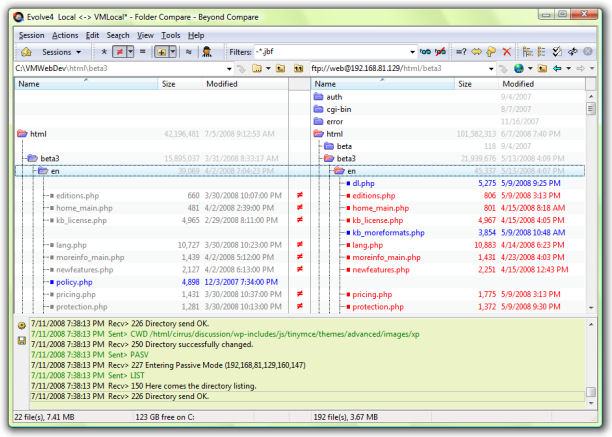
Beyond Compare 5.2.0 Build 31950 has been released, enhancing its reputation as a user-friendly file manager that simplifies the process of comparing files and folders. This software offers effective functionality that allows users to focus on the most relevant differences, facilitating easy merging of changes, file synchronization, and report generation for documentation purposes.
One of the standout features of Beyond Compare is its ability to compare entire drives and folders efficiently by checking file sizes and modified timestamps. For a more granular analysis, it also supports byte-by-byte comparisons of files. The tool's integration with FTP sites and zip files streamlines the process of updating websites, making it a versatile choice for users.
Beyond Compare employs an intuitive comparison and display process. When users select specific files, the software intelligently selects the best comparison method and display format. It includes features like syntax highlighting for text files and customizable rules for various document types, source code, and HTML. Moreover, it offers dedicated viewers for data files, executables, binary data, and images, which enhances the clarity of change examination.
The tool is highly regarded for its powerful visual interface, especially among developers and IT professionals who utilize it for code reviews, data migration, and backups. Although its extensive features are appreciated by many, some users might find the variety of options somewhat overwhelming. There are ongoing requests for improved AI-driven functionalities and better SVG viewing capabilities. Beyond Compare supports multiple platforms and efficiently handles large datasets, striking a balance between features and usability, albeit with a learning curve for new users.
In summary, Beyond Compare 5.2.0 continues to evolve as a robust file management tool, offering a combination of powerful features, user-friendly design, and extensive functionality. As it progresses, the integration of AI advancements and enhancements in visualization could further solidify its position as an essential tool for file comparison and management across various professional sectors
One of the standout features of Beyond Compare is its ability to compare entire drives and folders efficiently by checking file sizes and modified timestamps. For a more granular analysis, it also supports byte-by-byte comparisons of files. The tool's integration with FTP sites and zip files streamlines the process of updating websites, making it a versatile choice for users.
Beyond Compare employs an intuitive comparison and display process. When users select specific files, the software intelligently selects the best comparison method and display format. It includes features like syntax highlighting for text files and customizable rules for various document types, source code, and HTML. Moreover, it offers dedicated viewers for data files, executables, binary data, and images, which enhances the clarity of change examination.
The tool is highly regarded for its powerful visual interface, especially among developers and IT professionals who utilize it for code reviews, data migration, and backups. Although its extensive features are appreciated by many, some users might find the variety of options somewhat overwhelming. There are ongoing requests for improved AI-driven functionalities and better SVG viewing capabilities. Beyond Compare supports multiple platforms and efficiently handles large datasets, striking a balance between features and usability, albeit with a learning curve for new users.
In summary, Beyond Compare 5.2.0 continues to evolve as a robust file management tool, offering a combination of powerful features, user-friendly design, and extensive functionality. As it progresses, the integration of AI advancements and enhancements in visualization could further solidify its position as an essential tool for file comparison and management across various professional sectors
Beyond Compare 5.2.0 Build 31950 released
Beyond Compare is an easy-to-use file manager that allows you to quickly and easily compare your files and folders.