Battery Monitor 10.8 has been released, offering users enhanced insights into their battery status, such as voltage, charge rate, current charge, and maximum charge capacities. For those operating on Windows 8.1 or 10, compatibility issues may require the installation of Desktop Gadgets Revived or a similar application to utilize Battery Monitor effectively.
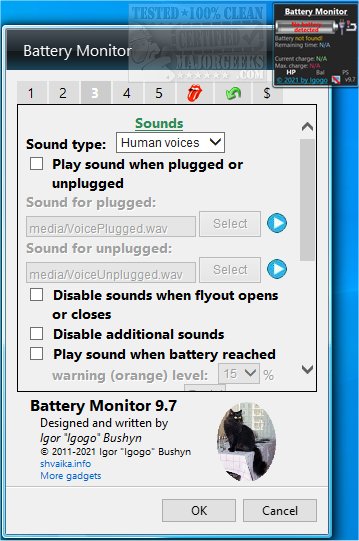
This app features graphical representations and animated indicators that visually alert users to their current battery levels. Additionally, it provides sound notifications for various charging states—when the laptop is plugged in, unplugged, or fully charged—allowing users to set two key battery levels for audible alerts. Users can also adjust their power plans directly from Battery Monitor's main interface, streamlining power management.
Battery Monitor is customizable, enabling users to modify aspects like color and background to suit their preferences while still delivering vital battery information.
To further enhance user experience, the app could benefit from additional features such as:
1. Battery Health Monitoring: Providing insights into battery wear and lifespan estimates.
2. Charging History: Allowing users to track their charging habits and performance over time.
3. Integration with Other Applications: Enabling notifications through other platforms or devices.
4. Energy Saving Tips: Offering suggestions tailored to the user's battery usage patterns to extend battery life.
For users seeking related content, resources include guides on troubleshooting laptops that are plugged in but not charging, creating notifications for when a laptop battery is fully charged, adjusting power plan settings in Windows, and checking the active power plan currently in use
This app features graphical representations and animated indicators that visually alert users to their current battery levels. Additionally, it provides sound notifications for various charging states—when the laptop is plugged in, unplugged, or fully charged—allowing users to set two key battery levels for audible alerts. Users can also adjust their power plans directly from Battery Monitor's main interface, streamlining power management.
Battery Monitor is customizable, enabling users to modify aspects like color and background to suit their preferences while still delivering vital battery information.
To further enhance user experience, the app could benefit from additional features such as:
1. Battery Health Monitoring: Providing insights into battery wear and lifespan estimates.
2. Charging History: Allowing users to track their charging habits and performance over time.
3. Integration with Other Applications: Enabling notifications through other platforms or devices.
4. Energy Saving Tips: Offering suggestions tailored to the user's battery usage patterns to extend battery life.
For users seeking related content, resources include guides on troubleshooting laptops that are plugged in but not charging, creating notifications for when a laptop battery is fully charged, adjusting power plan settings in Windows, and checking the active power plan currently in use
Battery Monitor 10.8 released
Battery Monitor gives you more details about your battery status, including voltage, charge rate, current charge, and max charge.