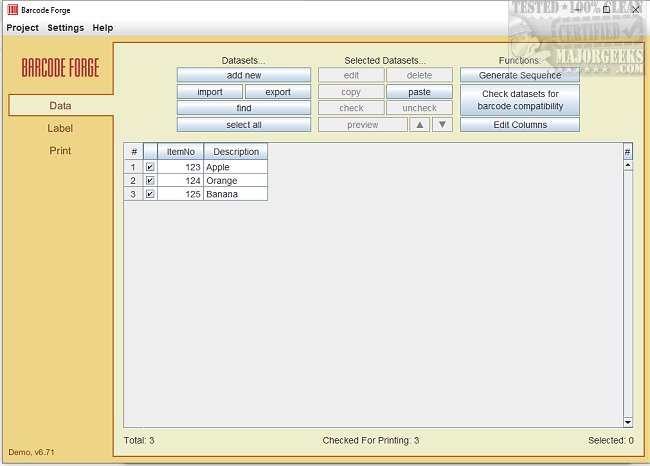
Barcode Forge has launched its latest version, 7.60, enhancing its reputation as a user-friendly and powerful software for creating and printing barcodes. This software is versatile, capable of working with various printers, including desktop and label printers, and supports the printing of continuous and roll labels, as well as label sheets featuring multiple peel-off labels on A4 pages.
A standout feature of Barcode Forge is its extensive range of pre-loaded templates for labels and stickers from well-known manufacturers such as Avery, Brother, and Dymo. This ensures users can achieve consistent and high-quality prints. The software is designed to cater to the needs of both small business owners and large corporations, making it an essential tool for anyone involved in product labeling or inventory management.
Key Features and Functionality
Barcode Forge supports all standard barcode types, including 1D barcodes like Code 128 and EAN, and 2D barcodes such as QR Codes and DataMatrix. Users can easily import data from various sources, including Excel, Access, MS SQL, ODBC, and CSV files, streamlining the barcode creation process. The software also automatically adjusts barcode lines to match the printer's resolution, ensuring flawless printing, particularly on lower-resolution label printers.
One of the notable features is the "On-Demand" print mode, which allows users to select specific datasets for immediate printing. This can be done by entering a key value through either a keyboard or barcode scanner, enhancing efficiency during label creation.
To facilitate integration with existing systems, such as ERP software and inventory management programs, the Developer Edition of Barcode Forge provides a Barcode Label API via an XML interface. This allows for seamless usage within different operational environments.
To address potential accuracy issues with PDF printers, Barcode Forge includes a dedicated PDF feature that maintains barcode line coordinates with precision up to six decimal places. This capability ensures reliable printing on laser or inkjet printers across various locations, balancing quality with file size.
Conclusion and Future Prospects
Overall, Barcode Forge 7.60 is poised to improve efficiency in barcode generation significantly. As businesses continue to rely on precise labeling for inventory and product management, the enhancements in Barcode Forge will likely lead to increased adoption across various industries. Continued updates and features may further strengthen its position in the market, making it a go-to solution for barcode printing needs
A standout feature of Barcode Forge is its extensive range of pre-loaded templates for labels and stickers from well-known manufacturers such as Avery, Brother, and Dymo. This ensures users can achieve consistent and high-quality prints. The software is designed to cater to the needs of both small business owners and large corporations, making it an essential tool for anyone involved in product labeling or inventory management.
Key Features and Functionality
Barcode Forge supports all standard barcode types, including 1D barcodes like Code 128 and EAN, and 2D barcodes such as QR Codes and DataMatrix. Users can easily import data from various sources, including Excel, Access, MS SQL, ODBC, and CSV files, streamlining the barcode creation process. The software also automatically adjusts barcode lines to match the printer's resolution, ensuring flawless printing, particularly on lower-resolution label printers.
One of the notable features is the "On-Demand" print mode, which allows users to select specific datasets for immediate printing. This can be done by entering a key value through either a keyboard or barcode scanner, enhancing efficiency during label creation.
To facilitate integration with existing systems, such as ERP software and inventory management programs, the Developer Edition of Barcode Forge provides a Barcode Label API via an XML interface. This allows for seamless usage within different operational environments.
To address potential accuracy issues with PDF printers, Barcode Forge includes a dedicated PDF feature that maintains barcode line coordinates with precision up to six decimal places. This capability ensures reliable printing on laser or inkjet printers across various locations, balancing quality with file size.
Conclusion and Future Prospects
Overall, Barcode Forge 7.60 is poised to improve efficiency in barcode generation significantly. As businesses continue to rely on precise labeling for inventory and product management, the enhancements in Barcode Forge will likely lead to increased adoption across various industries. Continued updates and features may further strengthen its position in the market, making it a go-to solution for barcode printing needs
Barcode Forge 7.60 released
Barcode Forge is a powerful and user-friendly software that allows you to easily create and print barcodes on various printers, including desktop and label printers.