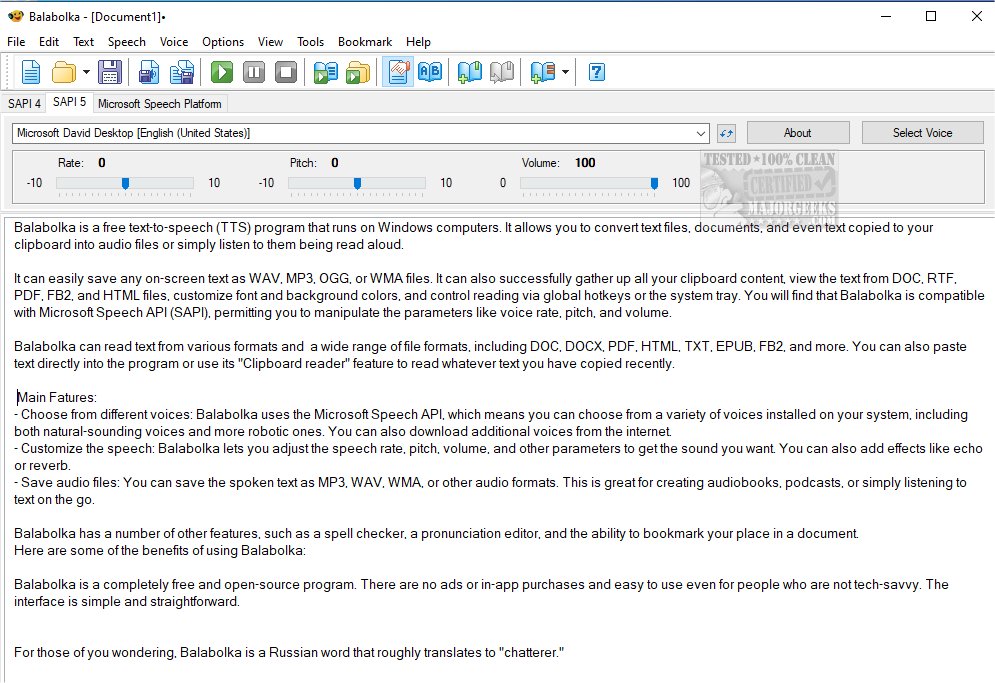
Balabolka version 2.15.0.912 has been released, enhancing its functionality as a versatile freeware text-to-speech (TTS) application for Windows computers. This program enables users to convert text from various sources—such as files, documents, or clipboard content—into audio formats like WAV, MP3, OGG, or WMA, allowing for easy listening or saving as audio files.
Balabolka supports a wide array of text formats, including DOC, DOCX, PDF, HTML, TXT, EPUB, and FB2, and offers customization features such as adjusting font and background colors. It integrates with the Microsoft Speech API (SAPI), enabling users to choose from multiple voices installed on their system and modify parameters like speech rate, pitch, and volume. Users can also enhance their audio experiences by applying effects such as echo and reverb.
Key features of Balabolka include:
- A variety of voice options, including natural-sounding and robotic voices, with the ability to download additional voices online.
- Customizable speech settings for a personalized audio experience.
- The capability to save text as audio files for convenient playback.
- Additional tools such as a spell checker, pronunciation editor, and bookmarking for document navigation.
The program is completely free and open-source, with no advertisements or hidden purchases, making it accessible for users of all technical backgrounds. The user-friendly interface further simplifies the experience. The name "Balabolka" translates from Russian to "chatterer," reflecting its purpose.
With the growing demand for TTS applications, Balabolka stands out for its robust features and ease of use, making it an excellent choice for individuals seeking to convert text to speech. Whether for creating audiobooks, assisting with learning, or enhancing accessibility, Balabolka offers valuable tools for a wide range of users.
Looking to the future, potential enhancements could include improved voice quality, more advanced customization options, and additional compatibility with emerging file formats, ensuring that Balabolka remains a leading choice in the TTS market
Balabolka supports a wide array of text formats, including DOC, DOCX, PDF, HTML, TXT, EPUB, and FB2, and offers customization features such as adjusting font and background colors. It integrates with the Microsoft Speech API (SAPI), enabling users to choose from multiple voices installed on their system and modify parameters like speech rate, pitch, and volume. Users can also enhance their audio experiences by applying effects such as echo and reverb.
Key features of Balabolka include:
- A variety of voice options, including natural-sounding and robotic voices, with the ability to download additional voices online.
- Customizable speech settings for a personalized audio experience.
- The capability to save text as audio files for convenient playback.
- Additional tools such as a spell checker, pronunciation editor, and bookmarking for document navigation.
The program is completely free and open-source, with no advertisements or hidden purchases, making it accessible for users of all technical backgrounds. The user-friendly interface further simplifies the experience. The name "Balabolka" translates from Russian to "chatterer," reflecting its purpose.
With the growing demand for TTS applications, Balabolka stands out for its robust features and ease of use, making it an excellent choice for individuals seeking to convert text to speech. Whether for creating audiobooks, assisting with learning, or enhancing accessibility, Balabolka offers valuable tools for a wide range of users.
Looking to the future, potential enhancements could include improved voice quality, more advanced customization options, and additional compatibility with emerging file formats, ensuring that Balabolka remains a leading choice in the TTS market
Balabolka 2.15.0.912 released
Balabolka is a mildly customizable freeware text-to-speech application capable of utilizing all the installed computer voices on your PC.