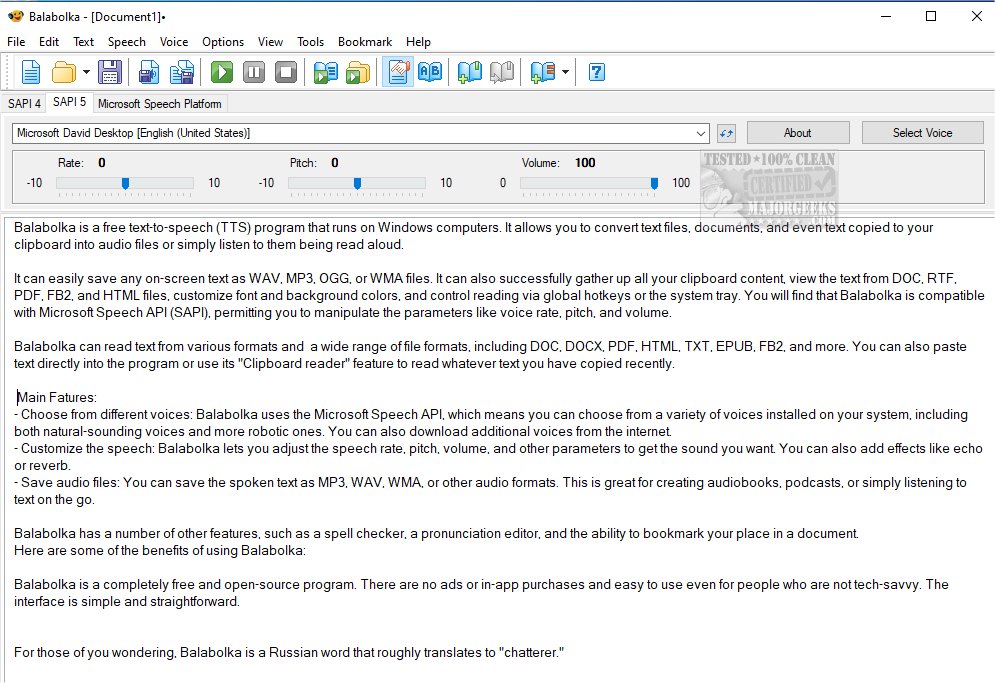
Balabolka 2.15.0.910 has been released, enhancing its capabilities as a customizable freeware text-to-speech (TTS) application for Windows users. This software can convert various text formats—including DOC, RTF, PDF, HTML, and EPUB—into audio files or read them aloud. Users can easily save the audio output in formats such as WAV, MP3, OGG, or WMA.
Balabolka utilizes the Microsoft Speech API (SAPI), allowing for a selection of different voices installed on the computer, which can be adjusted for speech rate, pitch, and volume. Additional features include the ability to customize font and background colors, global hotkey controls for reading, and a clipboard reader that can vocalize copied text. The application also offers a spell checker, pronunciation editor, and bookmarking for easy navigation within documents.
One of the standout benefits of Balabolka is that it is completely free and open-source, devoid of ads or in-app purchases, making it accessible for users of all technical levels. The user-friendly interface ensures that even those who are not technologically inclined can easily navigate the software.
The name "Balabolka" translates to "chatterer" in Russian, reflecting its primary function of converting text to speech.
Additionally, users can explore related topics, such as methods to obtain Microsoft Office for free, adding "Open With Notepad" options for context menus, and guidance on managing WordPad in Windows 10 and 11.
In summary, Balabolka continues to be a valuable tool for individuals looking to convert text to audio efficiently and at no cost, further widening its appeal for educational purposes, content creation, and personal convenience. Future updates may include even more voice options and enhanced customization features to improve user experience
Balabolka utilizes the Microsoft Speech API (SAPI), allowing for a selection of different voices installed on the computer, which can be adjusted for speech rate, pitch, and volume. Additional features include the ability to customize font and background colors, global hotkey controls for reading, and a clipboard reader that can vocalize copied text. The application also offers a spell checker, pronunciation editor, and bookmarking for easy navigation within documents.
One of the standout benefits of Balabolka is that it is completely free and open-source, devoid of ads or in-app purchases, making it accessible for users of all technical levels. The user-friendly interface ensures that even those who are not technologically inclined can easily navigate the software.
The name "Balabolka" translates to "chatterer" in Russian, reflecting its primary function of converting text to speech.
Additionally, users can explore related topics, such as methods to obtain Microsoft Office for free, adding "Open With Notepad" options for context menus, and guidance on managing WordPad in Windows 10 and 11.
In summary, Balabolka continues to be a valuable tool for individuals looking to convert text to audio efficiently and at no cost, further widening its appeal for educational purposes, content creation, and personal convenience. Future updates may include even more voice options and enhanced customization features to improve user experience
Balabolka 2.15.0.910 released
Balabolka is a mildly customizable freeware text-to-speech application capable of utilizing all the installed computer voices on your PC.