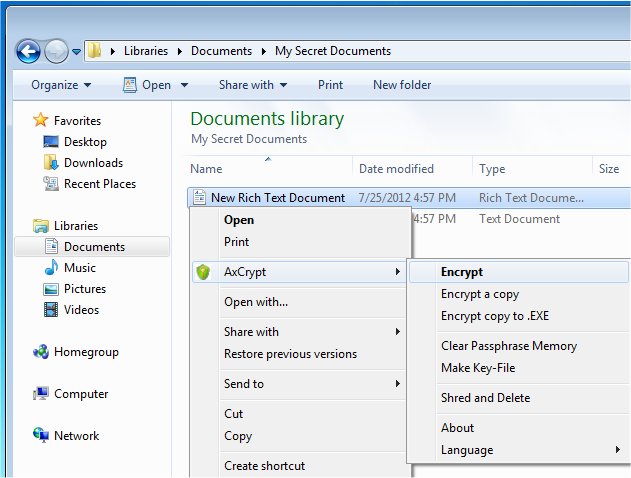
AxCrypt 3.0.0.83 has been released, offering a user-friendly open-source file encryption solution that integrates smoothly with Windows. This software enables users to encrypt, decrypt, compress, store, send, and manage individual files easily. Encrypted files receive a ".axx" extension and are marked with a new icon, which are typically hidden by default but can be made visible by altering Windows settings.
One of the standout features of AxCrypt is its ability to allow users to edit or view encrypted files by simply double-clicking them. After any modifications, AxCrypt automatically re-encrypts the files, ensuring ongoing security. The program employs AES encryption with 128-bit or optional 256-bit keys, and it includes a passphrase cache for user convenience, requiring a passphrase only once per session or reboot. This simplicity makes AxCrypt accessible to users of all skill levels, with no prior configuration needed.
Key features of AxCrypt include:
- Strong Encryption: Offers robust file security using 128-bit or 256-bit AES encryption.
- Ease of Use: Users can open and edit secured files directly with a double-click.
- Multilingual Support: The application is available in numerous languages, including English, Dutch, French, German, and more.
- Collaboration: Users can securely share files with other AxCrypt users, who can access them using their own passwords.
- Password Management: Provides seamless access to passwords from anywhere.
- Secured Folders: Allows users to automatically secure new files in designated folders with a single click.
- Master Key Feature: This is particularly beneficial for businesses, as it enables administrators to recover files for members who may leave or forget their passwords, ensuring critical documents are not lost.
In addition to these features, AxCrypt continues to evolve, and future updates may introduce even more enhancements and support for additional languages. For users looking to improve their file security, AxCrypt remains a compelling choice.
To learn more about AxCrypt and its features, consider checking out video tutorials, such as how to add the Encrypting File System (EFS) to the right-click context menu for added functionality
One of the standout features of AxCrypt is its ability to allow users to edit or view encrypted files by simply double-clicking them. After any modifications, AxCrypt automatically re-encrypts the files, ensuring ongoing security. The program employs AES encryption with 128-bit or optional 256-bit keys, and it includes a passphrase cache for user convenience, requiring a passphrase only once per session or reboot. This simplicity makes AxCrypt accessible to users of all skill levels, with no prior configuration needed.
Key features of AxCrypt include:
- Strong Encryption: Offers robust file security using 128-bit or 256-bit AES encryption.
- Ease of Use: Users can open and edit secured files directly with a double-click.
- Multilingual Support: The application is available in numerous languages, including English, Dutch, French, German, and more.
- Collaboration: Users can securely share files with other AxCrypt users, who can access them using their own passwords.
- Password Management: Provides seamless access to passwords from anywhere.
- Secured Folders: Allows users to automatically secure new files in designated folders with a single click.
- Master Key Feature: This is particularly beneficial for businesses, as it enables administrators to recover files for members who may leave or forget their passwords, ensuring critical documents are not lost.
In addition to these features, AxCrypt continues to evolve, and future updates may introduce even more enhancements and support for additional languages. For users looking to improve their file security, AxCrypt remains a compelling choice.
To learn more about AxCrypt and its features, consider checking out video tutorials, such as how to add the Encrypting File System (EFS) to the right-click context menu for added functionality
AxCrypt 3.0.0.83 released
AxCrypt provides easy-to-use Open Source file encryption that integrates seamlessly with Windows to encrypt, decrypt, compress, store, send and work with individual files.