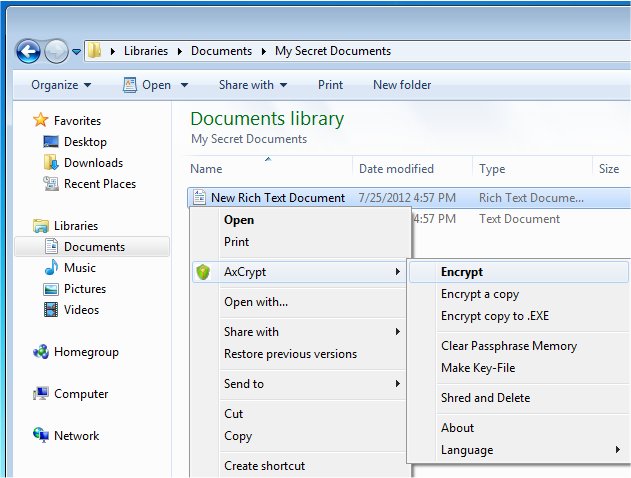
AxCrypt has released version 3.0.0.73, enhancing its capabilities as an easy-to-use open-source file encryption tool that integrates seamlessly with Windows. This software enables users to encrypt, decrypt, compress, store, send, and manage individual files effectively. When files are encrypted using AxCrypt, they will display a ".axx" extension and a unique icon, although these may be hidden by default in Windows settings. Users can choose to show these extensions by adjusting their display options.
One of AxCrypt's standout features is its double-click functionality, allowing users to open and edit secured files directly with any application. After modifications, the files are automatically re-encrypted, ensuring continuous protection. The software employs AES encryption with options for 128-bit and 256-bit keys, alongside a passphrase cache that can be used once per login or reboot. Its user-friendly design requires no configuration, making it accessible for individuals at all skill levels.
Key features of AxCrypt include:
- Robust Encryption: Provides strong file security using AES encryption.
- User-Friendly: Facilitates direct editing of secured files.
- Multilingual Support: Available in multiple languages, including English, Dutch, French, and more.
- Collaboration Features: Enables secure file sharing among AxCrypt users, each with their own passwords.
- Password Management: Allows users to manage and access passwords effortlessly.
- Secured Folders: Offers the ability to automatically secure new files in designated folders with a single click.
- Master Key Functionality: This feature is particularly beneficial for business administrators, allowing recovery of files from team members, thereby mitigating the risk of losing access to important documents when employees leave or forget their passwords.
In addition to these features, AxCrypt may also include tutorials, such as a video on adding the Encrypting File System (EFS) to the right-click context menu, to enhance user experience and provide additional functionality.
Overall, AxCrypt continues to be a reliable choice for individuals and businesses looking for straightforward and secure file encryption solutions. As it evolves, users can expect further enhancements and features that meet the growing demands for data security
One of AxCrypt's standout features is its double-click functionality, allowing users to open and edit secured files directly with any application. After modifications, the files are automatically re-encrypted, ensuring continuous protection. The software employs AES encryption with options for 128-bit and 256-bit keys, alongside a passphrase cache that can be used once per login or reboot. Its user-friendly design requires no configuration, making it accessible for individuals at all skill levels.
Key features of AxCrypt include:
- Robust Encryption: Provides strong file security using AES encryption.
- User-Friendly: Facilitates direct editing of secured files.
- Multilingual Support: Available in multiple languages, including English, Dutch, French, and more.
- Collaboration Features: Enables secure file sharing among AxCrypt users, each with their own passwords.
- Password Management: Allows users to manage and access passwords effortlessly.
- Secured Folders: Offers the ability to automatically secure new files in designated folders with a single click.
- Master Key Functionality: This feature is particularly beneficial for business administrators, allowing recovery of files from team members, thereby mitigating the risk of losing access to important documents when employees leave or forget their passwords.
In addition to these features, AxCrypt may also include tutorials, such as a video on adding the Encrypting File System (EFS) to the right-click context menu, to enhance user experience and provide additional functionality.
Overall, AxCrypt continues to be a reliable choice for individuals and businesses looking for straightforward and secure file encryption solutions. As it evolves, users can expect further enhancements and features that meet the growing demands for data security
AxCrypt 3.0.0.73 released
AxCrypt provides easy-to-use Open Source file encryption that integrates seamlessly with Windows to encrypt, decrypt, compress, store, send and work with individual files.