AutoPowerOptionsOK 6.29 has been released as a free power management application designed to enhance energy efficiency on your computer. This tool allows users to easily customize various power settings, including monitor shutdown times, sleep timers, and the ability to switch between different energy plans at specified intervals.
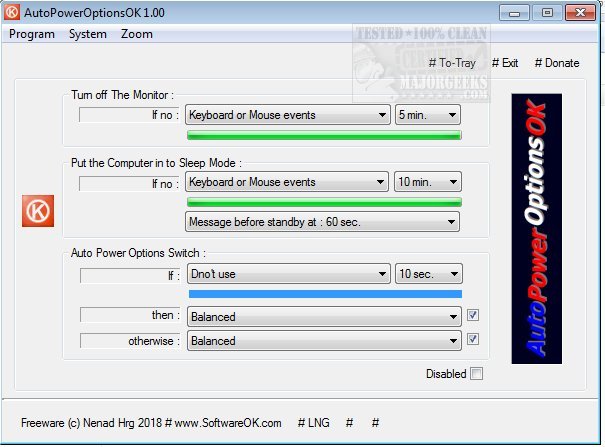
Upon launching AutoPowerOptionsOK, users are greeted by a user-friendly interface that clearly presents options for turning off the monitor, activating sleep mode, and automatically switching power plans if there is a lack of keyboard or mouse activity. This feature is particularly useful for saving energy when the computer is idle for extended periods. The app not only helps reduce energy consumption but also enables users to personalize their power settings to fit their specific needs.
In addition to its primary functionalities, AutoPowerOptionsOK provides quick access to essential system information tools, such as the Task Manager, System Information, and MSConfig, making it a versatile utility for both network administrators and everyday users.
Given the growing importance of energy efficiency in both personal and professional settings, AutoPowerOptionsOK serves as a practical solution for those looking to optimize their power management strategies.
Furthermore, users might find it beneficial to explore related topics, such as the differences between sleep, hibernate, and shut down modes, how to adjust power plan settings in Windows 10 and 11, and tips for enabling the Ultimate Performance Power Plan on these operating systems. Overall, AutoPowerOptionsOK is an excellent resource for anyone interested in enhancing their system's energy efficiency
Upon launching AutoPowerOptionsOK, users are greeted by a user-friendly interface that clearly presents options for turning off the monitor, activating sleep mode, and automatically switching power plans if there is a lack of keyboard or mouse activity. This feature is particularly useful for saving energy when the computer is idle for extended periods. The app not only helps reduce energy consumption but also enables users to personalize their power settings to fit their specific needs.
In addition to its primary functionalities, AutoPowerOptionsOK provides quick access to essential system information tools, such as the Task Manager, System Information, and MSConfig, making it a versatile utility for both network administrators and everyday users.
Given the growing importance of energy efficiency in both personal and professional settings, AutoPowerOptionsOK serves as a practical solution for those looking to optimize their power management strategies.
Furthermore, users might find it beneficial to explore related topics, such as the differences between sleep, hibernate, and shut down modes, how to adjust power plan settings in Windows 10 and 11, and tips for enabling the Ultimate Performance Power Plan on these operating systems. Overall, AutoPowerOptionsOK is an excellent resource for anyone interested in enhancing their system's energy efficiency
AutoPowerOptionsOK 6.29 released
AutoPowerOptionsOK is a free power management app that enables you to increase energy efficiency by providing quick access to customize monitor shutdown, the sleep timer, as well as toggling between energy plans at pre-determined times.