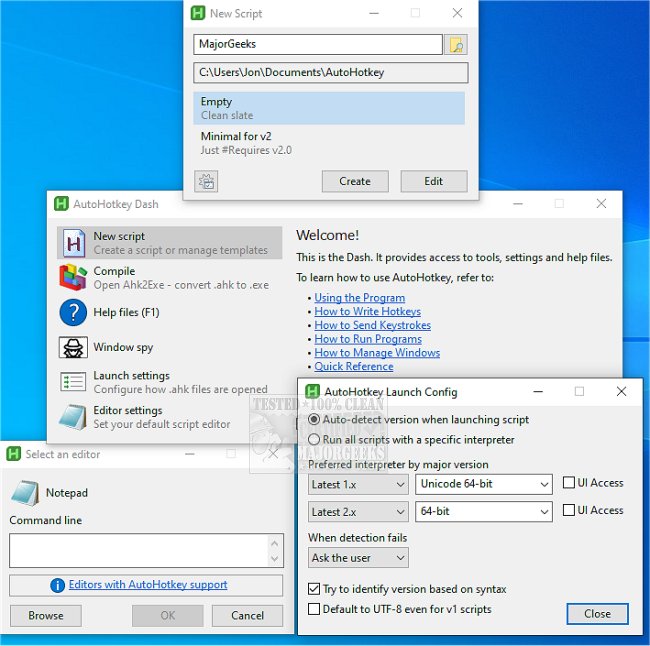
AutoHotkey has recently released updates for versions 2.0.23 and 1.1.37.02, enhancing its capabilities as a powerful, open-source scripting language designed for automating tasks on Windows. This free tool allows users to automate various functions, from simple hotkeys to complex macros, making it ideal for anyone looking to optimize their workflow and reduce repetitive actions.
With AutoHotkey, users can create custom keyboard shortcuts, automate mundane tasks, and even develop simple graphical user interfaces (GUIs) for their scripts. For instance, a user can script a hotkey combination, such as pressing the Windows key and "MG" to quickly open a website like majorgeeks.com. Additionally, gamers can utilize AutoHotkey to execute multiple commands simultaneously, enhancing gameplay efficiency.
The advantages of utilizing AutoHotkey include:
- Hotkeys & Shortcuts: Assign various actions to keys or mouse buttons.
- Text Expansion: Create shortcuts that automatically expand into longer phrases, beneficial for repetitive typing tasks.
- Macro Recording: Record and replay actions with ease.
- Script Flexibility: Adapt the tool to suit simple needs or more complex automation.
AutoHotkey shines in various environments, be it for gamers needing custom keybinds, office workers automating routine tasks like email responses, or tech enthusiasts crafting intricate scripts that manage multiple applications. Its user-friendly design and vast customization options make it accessible for beginners while still offering depth for experienced users.
In conclusion, AutoHotkey serves as a robust tool for anyone looking to streamline their computer tasks and enhance productivity. By automating repetitive actions, users can focus on more important work and reduce the risk of repetitive strain injuries. Whether for simple shortcuts or advanced programming, AutoHotkey is a versatile solution for maximizing efficiency on a PC.
For those interested in improving their productivity further, exploring additional keyboard shortcuts or learning how to customize features in Windows 10 and 11 can further augment the capabilities of AutoHotkey
With AutoHotkey, users can create custom keyboard shortcuts, automate mundane tasks, and even develop simple graphical user interfaces (GUIs) for their scripts. For instance, a user can script a hotkey combination, such as pressing the Windows key and "MG" to quickly open a website like majorgeeks.com. Additionally, gamers can utilize AutoHotkey to execute multiple commands simultaneously, enhancing gameplay efficiency.
The advantages of utilizing AutoHotkey include:
- Hotkeys & Shortcuts: Assign various actions to keys or mouse buttons.
- Text Expansion: Create shortcuts that automatically expand into longer phrases, beneficial for repetitive typing tasks.
- Macro Recording: Record and replay actions with ease.
- Script Flexibility: Adapt the tool to suit simple needs or more complex automation.
AutoHotkey shines in various environments, be it for gamers needing custom keybinds, office workers automating routine tasks like email responses, or tech enthusiasts crafting intricate scripts that manage multiple applications. Its user-friendly design and vast customization options make it accessible for beginners while still offering depth for experienced users.
In conclusion, AutoHotkey serves as a robust tool for anyone looking to streamline their computer tasks and enhance productivity. By automating repetitive actions, users can focus on more important work and reduce the risk of repetitive strain injuries. Whether for simple shortcuts or advanced programming, AutoHotkey is a versatile solution for maximizing efficiency on a PC.
For those interested in improving their productivity further, exploring additional keyboard shortcuts or learning how to customize features in Windows 10 and 11 can further augment the capabilities of AutoHotkey
AutoHotkey 2.0.23 / 1.1.37.02 released
AutoHotkey provides you with a fast, scriptable freeware desktop automation tool with hotkeys.