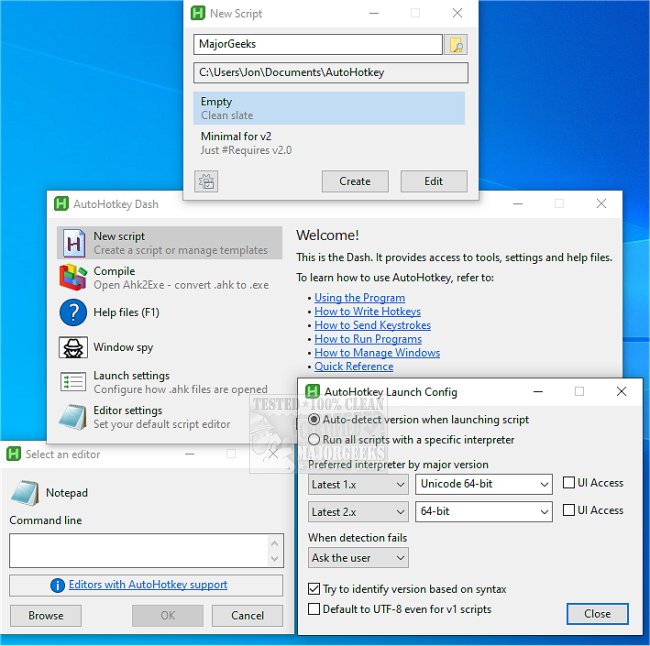
AutoHotkey has recently released versions 2.0.22 and 1.1.37.02, enhancing its functionality as a versatile, free, and open-source desktop automation tool designed for Windows users. This powerful scripting language allows users to simplify and automate a wide array of tasks, from basic hotkey assignments to intricate macros, making it ideal for anyone looking to increase productivity on their PC.
With AutoHotkey, users can create scripts that convert repetitive actions into streamlined processes. For instance, a simple script can bind the WIN key to open a specific website, while more advanced scripts can simulate complex actions in gaming, such as executing simultaneous commands for jumping and firing.
The appeal of AutoHotkey lies in its myriad features, including:
- Hotkeys & Shortcuts: Users can assign specific actions to keys or mouse buttons, making workflows more efficient.
- Text Expansion: Shortcuts that expand into full phrases can save time in coding or email correspondence.
- Macro Recording: The ability to record and replay mouse clicks and keystrokes enhances automation.
- GUI Creation: Users can build simple graphical interfaces for their scripts, broadening the scope of automation.
- Script Flexibility: AutoHotkey caters to both novice users and power users, allowing for simple key remapping as well as the creation of complex automation scripts.
Whether you're a gamer seeking to customize controls, an office worker aiming to automate tedious tasks, or a tech enthusiast looking to develop intricate scripts, AutoHotkey can significantly enhance your efficiency. The tool's versatility makes it perfect for handling repetitive tasks, ultimately reducing the risk of strain from excessive mouse clicking or typing.
In summary, AutoHotkey stands out as a unique solution for anyone looking to optimize their computer usage. Its ease of use, extensive customization options, and robust capabilities position it as an essential tool for boosting productivity in both personal and professional settings. Embracing AutoHotkey can lead to a more efficient workflow and a significant reduction in time spent on repetitive tasks. As the software continues to evolve, users can expect even more features and enhancements that will further streamline their automation processes
With AutoHotkey, users can create scripts that convert repetitive actions into streamlined processes. For instance, a simple script can bind the WIN key to open a specific website, while more advanced scripts can simulate complex actions in gaming, such as executing simultaneous commands for jumping and firing.
The appeal of AutoHotkey lies in its myriad features, including:
- Hotkeys & Shortcuts: Users can assign specific actions to keys or mouse buttons, making workflows more efficient.
- Text Expansion: Shortcuts that expand into full phrases can save time in coding or email correspondence.
- Macro Recording: The ability to record and replay mouse clicks and keystrokes enhances automation.
- GUI Creation: Users can build simple graphical interfaces for their scripts, broadening the scope of automation.
- Script Flexibility: AutoHotkey caters to both novice users and power users, allowing for simple key remapping as well as the creation of complex automation scripts.
Whether you're a gamer seeking to customize controls, an office worker aiming to automate tedious tasks, or a tech enthusiast looking to develop intricate scripts, AutoHotkey can significantly enhance your efficiency. The tool's versatility makes it perfect for handling repetitive tasks, ultimately reducing the risk of strain from excessive mouse clicking or typing.
In summary, AutoHotkey stands out as a unique solution for anyone looking to optimize their computer usage. Its ease of use, extensive customization options, and robust capabilities position it as an essential tool for boosting productivity in both personal and professional settings. Embracing AutoHotkey can lead to a more efficient workflow and a significant reduction in time spent on repetitive tasks. As the software continues to evolve, users can expect even more features and enhancements that will further streamline their automation processes
AutoHotkey 2.0.22 / 1.1.37.02 released
AutoHotkey provides you with a fast, scriptable freeware desktop automation tool with hotkeys.