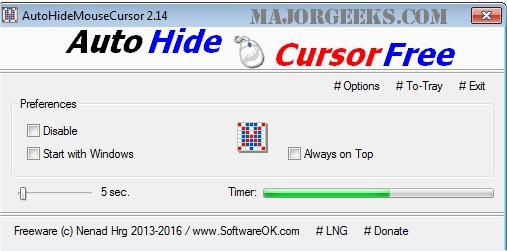
AutoHideMouseCursor version 6.16 has been released, offering users a lightweight and portable solution to hide their mouse cursor after a specific period of inactivity. This tool is particularly beneficial during presentations, as it minimizes distractions caused by a visible cursor, allowing the audience to focus on the content being displayed.
Setting up AutoHideMouseCursor is user-friendly: simply choose a time interval on the adjustable timer, and the countdown will commence. Any movement of the mouse will reset the timer, ensuring that the cursor remains visible as long as needed. The program is designed to be efficient, with low CPU usage and a minimal footprint.
Key features of AutoHideMouseCursor include:
- A very small program size, making it easy to download and run without installation.
- Low CPU usage, ensuring that system performance remains unaffected.
- An adjustable timer for customizing the duration before the cursor hides.
- An optional translation function for users in different languages.
In addition to its primary functionality, users may find related resources helpful, such as guides on fixing erratic mouse behavior, activating windows by hovering over them, enabling mouse pointer trails, and managing mouse pointer settings in Windows.
Overall, AutoHideMouseCursor is an essential tool for anyone looking to enhance their presentation experience or reduce distractions while using their computer
Setting up AutoHideMouseCursor is user-friendly: simply choose a time interval on the adjustable timer, and the countdown will commence. Any movement of the mouse will reset the timer, ensuring that the cursor remains visible as long as needed. The program is designed to be efficient, with low CPU usage and a minimal footprint.
Key features of AutoHideMouseCursor include:
- A very small program size, making it easy to download and run without installation.
- Low CPU usage, ensuring that system performance remains unaffected.
- An adjustable timer for customizing the duration before the cursor hides.
- An optional translation function for users in different languages.
In addition to its primary functionality, users may find related resources helpful, such as guides on fixing erratic mouse behavior, activating windows by hovering over them, enabling mouse pointer trails, and managing mouse pointer settings in Windows.
Overall, AutoHideMouseCursor is an essential tool for anyone looking to enhance their presentation experience or reduce distractions while using their computer
AutoHideMouseCursor 6.16 released
AutoHideMouseCursor is a small portable tool that allows you to set specific times for your mouse cursor to disappear from the screen.