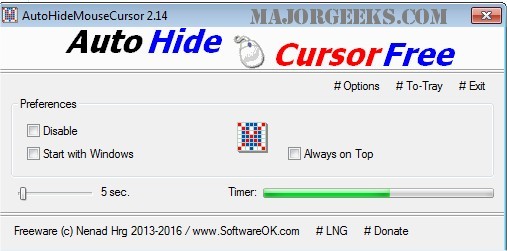
AutoHideMouseCursor version 5.99 has been released, enhancing the utility of this small, portable tool designed to manage mouse cursor visibility. With AutoHideMouseCursor, users can easily configure a timer that determines how long the mouse cursor remains visible on the screen. The setup process is user-friendly: simply select the desired countdown duration, and the timer will start. If the mouse is moved during the countdown, the timer resets, ensuring that the cursor only disappears for the specified period.
This tool is particularly beneficial for individuals delivering presentations, as it eliminates the distraction of a constantly visible cursor, allowing the audience to focus more on the content being presented.
Key features of AutoHideMouseCursor include:
- Minimal program size
- Low CPU consumption
- Customizable timer settings
- Option for translation functionality
Additionally, users may find related tools helpful, such as guides on resolving mouse cursor issues, activating windows by hovering, enabling mouse pointer trails, or adjusting the snap pointer settings in Windows.
In conclusion, AutoHideMouseCursor 5.99 is a valuable tool for anyone looking to streamline their computer experience, especially in professional settings where distractions should be minimized. Its lightweight design and simple functionality make it an excellent addition to any user’s toolkit. Future updates could include enhanced customization options or integration with other productivity applications
This tool is particularly beneficial for individuals delivering presentations, as it eliminates the distraction of a constantly visible cursor, allowing the audience to focus more on the content being presented.
Key features of AutoHideMouseCursor include:
- Minimal program size
- Low CPU consumption
- Customizable timer settings
- Option for translation functionality
Additionally, users may find related tools helpful, such as guides on resolving mouse cursor issues, activating windows by hovering, enabling mouse pointer trails, or adjusting the snap pointer settings in Windows.
In conclusion, AutoHideMouseCursor 5.99 is a valuable tool for anyone looking to streamline their computer experience, especially in professional settings where distractions should be minimized. Its lightweight design and simple functionality make it an excellent addition to any user’s toolkit. Future updates could include enhanced customization options or integration with other productivity applications
AutoHideMouseCursor 5.99 released
AutoHideMouseCursor is a small portable tool that allows you to set specific times for your mouse cursor to disappear from the screen.