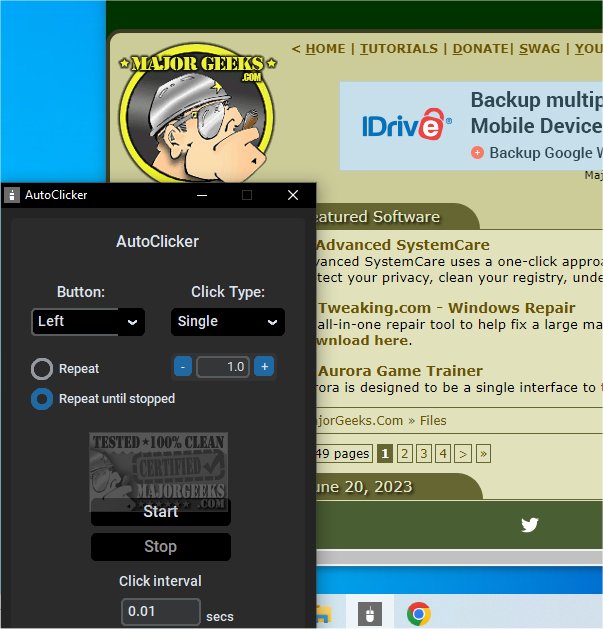
AutoClicker version 1.3.0 has been released, introducing a straightforward application to automate clicking and button-pressing tasks. With a focus on user-friendliness, AutoClicker boasts a powerful feature set and a modern graphical user interface (GUI). This application can perform rapid mouse clicks and can hold down mouse buttons, making it ideal for automating various tasks.
Users have the flexibility to choose which mouse button to automate, whether it be single, double, or triple clicks. Additionally, the application allows customization of the click interval and the number of repetitions. Notably, AutoClicker is free of advertisements and operates with minimal resource consumption, using 0% CPU and low RAM, ensuring it won't interfere with other applications. The hotkey functionality allows users to trigger clicks even while the application runs in the background.
During testing, the developers experienced an amusing mishap when they neglected to adjust the click interval, resulting in an overwhelming number of clicks. This serves as a reminder for users to be mindful of their settings, especially when starting the application.
In addition to its primary features, AutoClicker may also inspire users to explore related tools and tips, such as changing double clicks to single clicks for file access, enabling mouse pointer trails, enhancing mouse pointer precision, troubleshooting lagging mice, and utilizing Logitech's firmware update tools.
As AutoClicker continues to evolve, future updates could introduce even more features, such as advanced automation scripts, additional customization options, or integration with other software tools, making it an even more powerful resource for users looking to streamline their clicking tasks
Users have the flexibility to choose which mouse button to automate, whether it be single, double, or triple clicks. Additionally, the application allows customization of the click interval and the number of repetitions. Notably, AutoClicker is free of advertisements and operates with minimal resource consumption, using 0% CPU and low RAM, ensuring it won't interfere with other applications. The hotkey functionality allows users to trigger clicks even while the application runs in the background.
During testing, the developers experienced an amusing mishap when they neglected to adjust the click interval, resulting in an overwhelming number of clicks. This serves as a reminder for users to be mindful of their settings, especially when starting the application.
In addition to its primary features, AutoClicker may also inspire users to explore related tools and tips, such as changing double clicks to single clicks for file access, enabling mouse pointer trails, enhancing mouse pointer precision, troubleshooting lagging mice, and utilizing Logitech's firmware update tools.
As AutoClicker continues to evolve, future updates could introduce even more features, such as advanced automation scripts, additional customization options, or integration with other software tools, making it an even more powerful resource for users looking to streamline their clicking tasks
AutoClicker 1.3.0 released
AutoClicker offers a simple application that can automate clicking or button-pressing tasks.