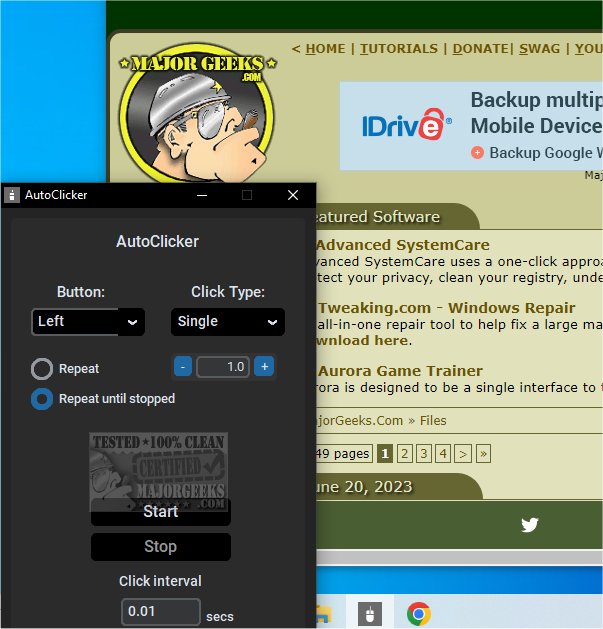
AutoClicker 1.0.6 has been released, introducing a user-friendly application designed to automate mouse clicking and keyboard tasks. This powerful tool features a modern graphical user interface (GUI) and allows users to customize their clicking experience. Users can choose between single, double, or triple clicks, set click intervals, and determine the number of repetitions. Notably, AutoClicker operates without ads, consumes minimal CPU resources, and has low RAM usage, making it efficient for multi-tasking. Its hotkey functionality allows it to work in the background without interrupting other activities.
During testing, the developers experienced an overwhelming number of clicks due to a lack of attention to the settings, leading to a humorous situation as AutoClicker continued to click uncontrollably. The sleek design of the app enhances usability, ensuring that users can easily navigate its features.
In addition to its core functionality, AutoClicker can be beneficial for various tasks, such as gaming, repetitive data entry, or any scenario where rapid clicking is advantageous. Users are encouraged to pay close attention to their configurations to avoid unexpected outcomes.
For those looking for additional mouse and keyboard enhancements, related topics include changing double clicks to single clicks for files and folders, enabling mouse pointer trails, adjusting mouse pointer precision, troubleshooting slow or lagging mice, and utilizing Logitech's firmware update and unifying software.
As AutoClicker continues to evolve, users can look forward to more features and updates that improve efficiency and performance
During testing, the developers experienced an overwhelming number of clicks due to a lack of attention to the settings, leading to a humorous situation as AutoClicker continued to click uncontrollably. The sleek design of the app enhances usability, ensuring that users can easily navigate its features.
In addition to its core functionality, AutoClicker can be beneficial for various tasks, such as gaming, repetitive data entry, or any scenario where rapid clicking is advantageous. Users are encouraged to pay close attention to their configurations to avoid unexpected outcomes.
For those looking for additional mouse and keyboard enhancements, related topics include changing double clicks to single clicks for files and folders, enabling mouse pointer trails, adjusting mouse pointer precision, troubleshooting slow or lagging mice, and utilizing Logitech's firmware update and unifying software.
As AutoClicker continues to evolve, users can look forward to more features and updates that improve efficiency and performance
AutoClicker 1.0.6 released
AutoClicker offers a simple application that can automate clicking or button-pressing tasks.