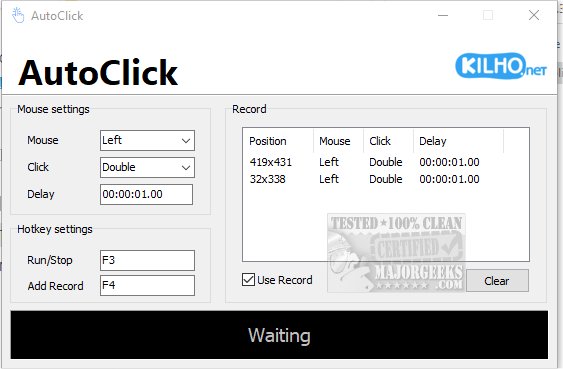
AutoClick 1.4.9 has been released, enhancing its capabilities as a user-friendly application designed to automate mouse clicks for repetitive tasks. This tool is particularly beneficial for gamers, data entry professionals, or anyone engaged in activities that require frequent clicking. With AutoClick, users can customize clicking speed and patterns, allowing for precise control over their clicking sequences.
Key features of AutoClick include the ability to set specific time intervals and geographic coordinates for clicking patterns. This functionality is especially advantageous in click-intensive gaming scenarios, where quick and repeated clicks can significantly impact performance. Additionally, AutoClick helps keep computers awake during extended tasks, preventing interruptions and ensuring continuity.
Using AutoClick is straightforward. Users can create a click sequence by specifying the mouse button (left, right, or wheel), the type of click (single, double, or wheel action), and the timing between clicks. Once the parameters are set, the process can be initiated with a designated hotkey, and all actions are displayed in an organized table for easy reference. Although users can clear and redefine sequences, the absence of a click profile saving feature is a notable limitation.
Overall, AutoClick is an effective solution for those seeking a simple and efficient auto-clicking tool. Its ease of use makes it accessible for users of all skill levels, and it stands out in the market for automating repetitive clicking tasks.
To extend the functionality of AutoClick, future updates could incorporate features such as saving multiple click profiles for different tasks, adding advanced scripting options for complex automation, and improving user interface elements for better navigation. Furthermore, integrating compatibility with various operating systems and devices could broaden its user base, making AutoClick a versatile tool for automation across different platforms
Key features of AutoClick include the ability to set specific time intervals and geographic coordinates for clicking patterns. This functionality is especially advantageous in click-intensive gaming scenarios, where quick and repeated clicks can significantly impact performance. Additionally, AutoClick helps keep computers awake during extended tasks, preventing interruptions and ensuring continuity.
Using AutoClick is straightforward. Users can create a click sequence by specifying the mouse button (left, right, or wheel), the type of click (single, double, or wheel action), and the timing between clicks. Once the parameters are set, the process can be initiated with a designated hotkey, and all actions are displayed in an organized table for easy reference. Although users can clear and redefine sequences, the absence of a click profile saving feature is a notable limitation.
Overall, AutoClick is an effective solution for those seeking a simple and efficient auto-clicking tool. Its ease of use makes it accessible for users of all skill levels, and it stands out in the market for automating repetitive clicking tasks.
To extend the functionality of AutoClick, future updates could incorporate features such as saving multiple click profiles for different tasks, adding advanced scripting options for complex automation, and improving user interface elements for better navigation. Furthermore, integrating compatibility with various operating systems and devices could broaden its user base, making AutoClick a versatile tool for automation across different platforms
AutoClick 1.4.9 released
AutoClick is a straightforward app designed to automate mouse clicks, allowing you to perform repetitive clicking tasks effortlessly.