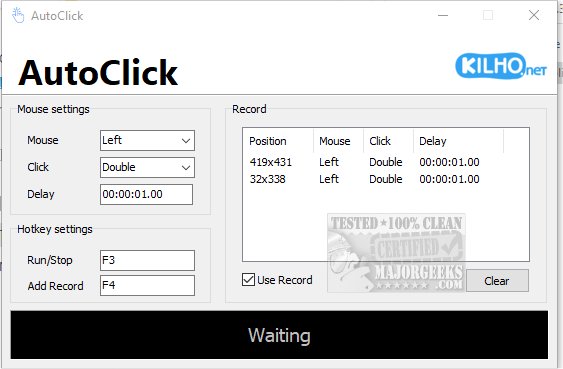
AutoClick is a user-friendly application designed to streamline mouse click automation, making repetitive clicking tasks a breeze. The app features an intuitive interface that allows users to customize clicking speed and patterns, catering to various needs such as gaming, data entry, or any task that demands frequent mouse interactions.
The latest version, AutoClick 1.4.7, introduces advanced functionalities that let users set specific time intervals and geographic coordinates for their clicking sequences. This is particularly beneficial for gamers facing intricate challenges that require rapid clicks for success. Furthermore, AutoClick helps prevent your computer from entering idle mode during lengthy tasks, ensuring uninterrupted workflow.
Using AutoClick is a simple process. Users begin by creating a custom click sequence, specifying the exact clicks, timing, and order. The application requires you to position your cursor at the desired target on the screen and select the appropriate mouse button—left, right, or wheel—depending on the action needed. You can choose from single clicks, double clicks, or mouse wheel actions, with the option to set delays between actions for enhanced precision.
Once the parameters are in place, the user can activate the sequence using a designated hotkey, adding the action to a list for potential future use. All recorded actions are displayed in a clear table format, allowing for easy review of mouse positions and click types. If necessary, users can clear the current sequence and start anew; however, the lack of a feature to save click profiles is a noted limitation.
In summary, AutoClick is an excellent choice for anyone seeking a straightforward auto-clicking solution. Its ease of use makes it suitable for users of all skill levels, and its effective automation capabilities can significantly enhance productivity.
Future Enhancements:
Looking ahead, it would be advantageous for the developers to consider incorporating a profile-saving feature, allowing users to store and quickly access their customized click sequences. Additionally, adding support for more complex automation scripts could broaden the app's appeal, making it beneficial for advanced users who require more intricate task automation
The latest version, AutoClick 1.4.7, introduces advanced functionalities that let users set specific time intervals and geographic coordinates for their clicking sequences. This is particularly beneficial for gamers facing intricate challenges that require rapid clicks for success. Furthermore, AutoClick helps prevent your computer from entering idle mode during lengthy tasks, ensuring uninterrupted workflow.
Using AutoClick is a simple process. Users begin by creating a custom click sequence, specifying the exact clicks, timing, and order. The application requires you to position your cursor at the desired target on the screen and select the appropriate mouse button—left, right, or wheel—depending on the action needed. You can choose from single clicks, double clicks, or mouse wheel actions, with the option to set delays between actions for enhanced precision.
Once the parameters are in place, the user can activate the sequence using a designated hotkey, adding the action to a list for potential future use. All recorded actions are displayed in a clear table format, allowing for easy review of mouse positions and click types. If necessary, users can clear the current sequence and start anew; however, the lack of a feature to save click profiles is a noted limitation.
In summary, AutoClick is an excellent choice for anyone seeking a straightforward auto-clicking solution. Its ease of use makes it suitable for users of all skill levels, and its effective automation capabilities can significantly enhance productivity.
Future Enhancements:
Looking ahead, it would be advantageous for the developers to consider incorporating a profile-saving feature, allowing users to store and quickly access their customized click sequences. Additionally, adding support for more complex automation scripts could broaden the app's appeal, making it beneficial for advanced users who require more intricate task automation
AutoClick 1.4.7 released
AutoClick is a straightforward app designed to automate mouse clicks, allowing you to perform repetitive clicking tasks effortlessly.