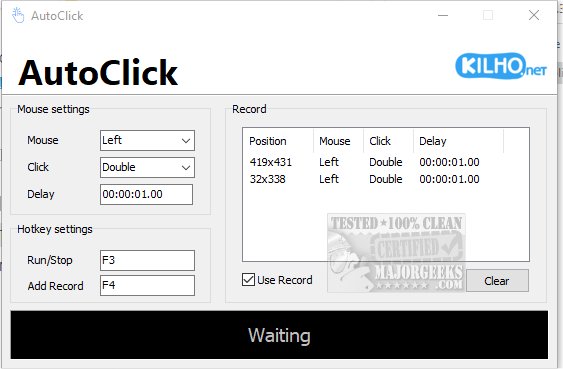
AutoClick 1.4.5 is a user-friendly application designed to automate mouse clicks, simplifying the execution of repetitive clicking tasks. Its intuitive interface allows users to customize clicking speed and patterns, making it particularly beneficial for gamers, data entry professionals, or anyone needing frequent mouse interactions. Users can define precise time intervals and geographic coordinates for various clicking patterns, which is especially advantageous in scenarios requiring rapid clicks, such as completing challenging levels in click-heavy games. Additionally, AutoClick helps prevent computers from entering idle mode during extended tasks, ensuring uninterrupted progress.
Using AutoClick is straightforward: users set up a click sequence by specifying the series of clicks, timing, and order. To initiate clicking, users move the cursor to the desired screen position and select the appropriate mouse button—left, right, or wheel—depending on the intended action. They can choose between single clicks, double clicks, or mouse wheel actions, with the option to set delays between actions for better control. Once the parameters are configured, users can activate the process via a designated hotkey, and all recorded clicks are displayed in a clear table format for easy reference.
While the application excels in simplicity and usability, it currently lacks a feature to save click profiles, which could enhance its functionality. Overall, AutoClick is an excellent choice for users of all skill levels seeking a basic auto-clicking tool.
Using AutoClick is straightforward: users set up a click sequence by specifying the series of clicks, timing, and order. To initiate clicking, users move the cursor to the desired screen position and select the appropriate mouse button—left, right, or wheel—depending on the intended action. They can choose between single clicks, double clicks, or mouse wheel actions, with the option to set delays between actions for better control. Once the parameters are configured, users can activate the process via a designated hotkey, and all recorded clicks are displayed in a clear table format for easy reference.
While the application excels in simplicity and usability, it currently lacks a feature to save click profiles, which could enhance its functionality. Overall, AutoClick is an excellent choice for users of all skill levels seeking a basic auto-clicking tool.
Extension
To further enhance the user experience, future updates could consider implementing the ability to save and load click profiles, allowing users to easily switch between different sequences without having to recreate them each time. Additionally, an option to record clicks in real-time could streamline the setup process, making it even more intuitive. As the application continues to evolve, incorporating features such as customizable hotkeys, advanced scripting capabilities for complex tasks, and integration with other software could significantly broaden its application and appeal to a wider audience. This could especially benefit professionals working in fields that require extensive data manipulation or gaming enthusiasts looking for an edge in competitive environmentsAutoClick 1.4.5 released
AutoClick is a straightforward app designed to automate mouse clicks, allowing you to perform repetitive clicking tasks effortlessly.