AUTO THEME is an innovative PowerShell script designed to enhance the Windows user experience by automatically adjusting system themes in accordance with sunrise and sunset times or customizable hours. This functionality allows for a smooth transition between light and dark themes, improving visibility and comfort depending on the time of day.
How AUTO THEME Works
Unlike traditional methods that rely on registry or system settings, AUTO THEME activates specific `.theme` files for a more customized user experience. This approach not only enhances compatibility across various systems but also allows users to easily modify their theme settings without altering core system configurations. By focusing on individual theme files, users can personalize their interface more effectively.
Background Operation
AUTO THEME operates in the background as a scheduled task, autonomously updating the system theme without user intervention. It creates temporary tasks aligned with daylight events, ensuring that the task list remains manageable by routinely overwriting tasks designated for "Sunrise theme" and "Sunset theme."
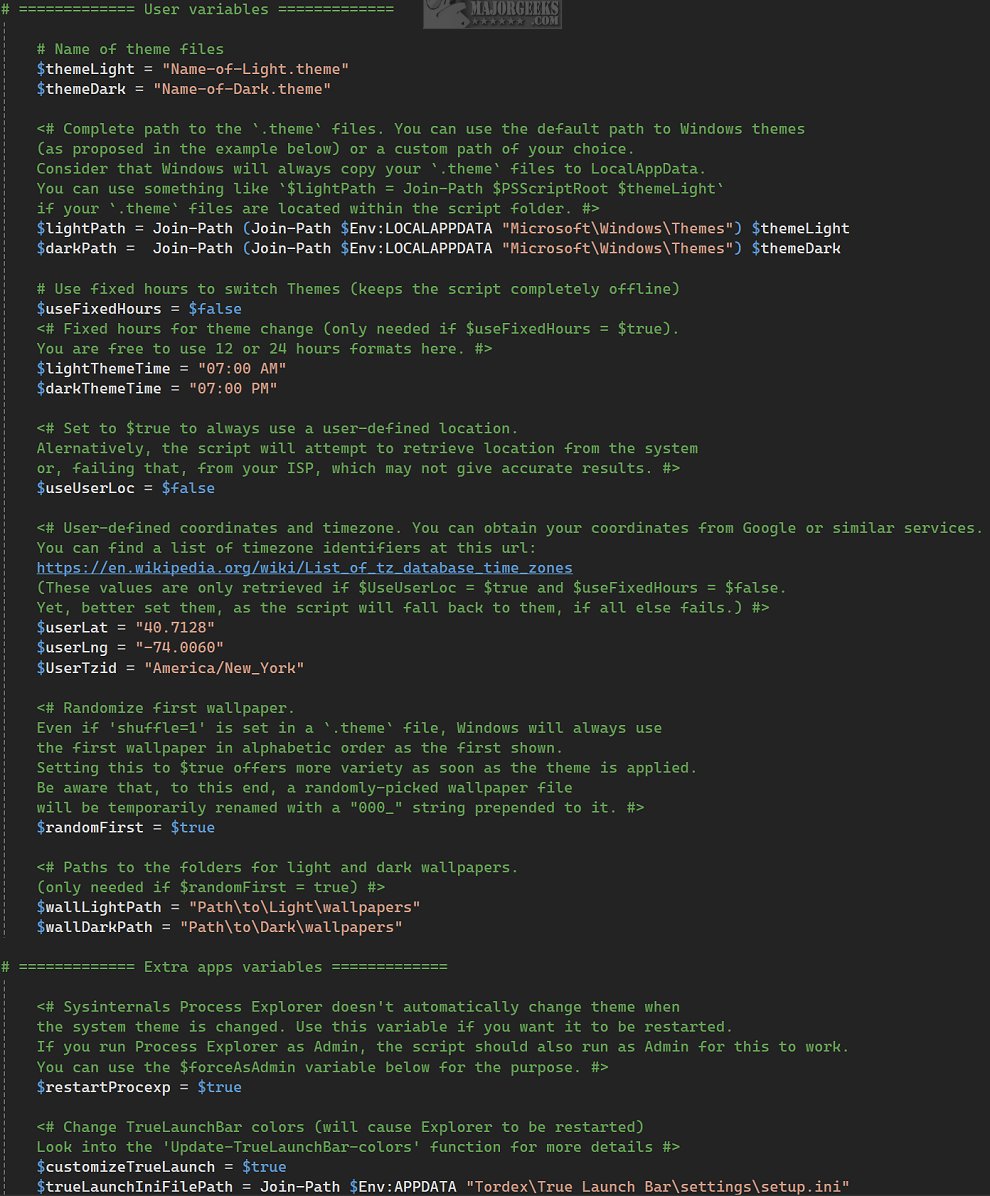
Users can set up the script using the Setup.ps1 file, which facilitates the configuration of scheduled tasks according to personal preferences. Additional modifications can also be made through Windows Task Scheduler. Running the command `./AutoTheme.ps1` from the terminal or a desktop shortcut will toggle between themes, while configuration settings are found in the Config.ps1 file, which comes with detailed explanations. For users who prefer offline operation, AUTO THEME can function without an internet connection by relying on fixed hours that users specify.
User Experience and Verdict
AUTO THEME offers significant advantages for those looking for automated theme changes that sync with the natural progression of the day. This tool enriches the user interface by adapting visual elements to changing lighting conditions, creating a captivating atmosphere. However, it may pose a learning curve for average users due to its reliance on configuration files.
Conclusion and Extensions
The release of AUTO THEME 1.0.45 marks a step forward in user interface customization, providing an appealing solution for managing themes. As digital environments increasingly reflect personal and contextual aesthetics, tools like AUTO THEME can enhance overall productivity and enjoyment. Future enhancements could include more intuitive user interfaces for configuration, potentially integrating machine learning to predict user preferences and automate theme adjustments even further. Additionally, providing a built-in tutorial could help bridge the gap for less tech-savvy individuals. Embracing such advancements can pave the way for even more personalized and adaptive computing experiences
How AUTO THEME Works
Unlike traditional methods that rely on registry or system settings, AUTO THEME activates specific `.theme` files for a more customized user experience. This approach not only enhances compatibility across various systems but also allows users to easily modify their theme settings without altering core system configurations. By focusing on individual theme files, users can personalize their interface more effectively.
Background Operation
AUTO THEME operates in the background as a scheduled task, autonomously updating the system theme without user intervention. It creates temporary tasks aligned with daylight events, ensuring that the task list remains manageable by routinely overwriting tasks designated for "Sunrise theme" and "Sunset theme."
Users can set up the script using the Setup.ps1 file, which facilitates the configuration of scheduled tasks according to personal preferences. Additional modifications can also be made through Windows Task Scheduler. Running the command `./AutoTheme.ps1` from the terminal or a desktop shortcut will toggle between themes, while configuration settings are found in the Config.ps1 file, which comes with detailed explanations. For users who prefer offline operation, AUTO THEME can function without an internet connection by relying on fixed hours that users specify.
User Experience and Verdict
AUTO THEME offers significant advantages for those looking for automated theme changes that sync with the natural progression of the day. This tool enriches the user interface by adapting visual elements to changing lighting conditions, creating a captivating atmosphere. However, it may pose a learning curve for average users due to its reliance on configuration files.
Conclusion and Extensions
The release of AUTO THEME 1.0.45 marks a step forward in user interface customization, providing an appealing solution for managing themes. As digital environments increasingly reflect personal and contextual aesthetics, tools like AUTO THEME can enhance overall productivity and enjoyment. Future enhancements could include more intuitive user interfaces for configuration, potentially integrating machine learning to predict user preferences and automate theme adjustments even further. Additionally, providing a built-in tutorial could help bridge the gap for less tech-savvy individuals. Embracing such advancements can pave the way for even more personalized and adaptive computing experiences
AUTO THEME 1.0.45 released
AUTO THEME is an advanced PowerShell script designed to enhance your Windows experience by automatically changing the system theme based on sunrise and sunset times, or according to specific hours that you configure.