AUTO THEME is an innovative PowerShell script aimed at enhancing the Windows user experience by automatically adjusting system themes based on natural lighting conditions, specifically sunrise and sunset times, or user-defined hours. This functionality allows for a smooth transition between light and dark themes, improving visibility and comfort throughout the day.
How It Works
Unlike conventional methods that rely on registry or system settings, AUTO THEME utilizes specific `.theme` files. This unique approach not only offers extensive customization options but also ensures compatibility across various systems and environments. By focusing on individual theme files, users can customize their interface to meet personal preferences without altering the core system settings, making theme adjustments simpler and more flexible.
Background Operation
The script operates as a scheduled task running in the background, automatically updating the system theme without requiring user intervention. It autonomously creates temporary tasks aligned with upcoming daylight changes, overwriting tasks designated for "Sunrise theme" and "Sunset theme" to keep the task list organized.
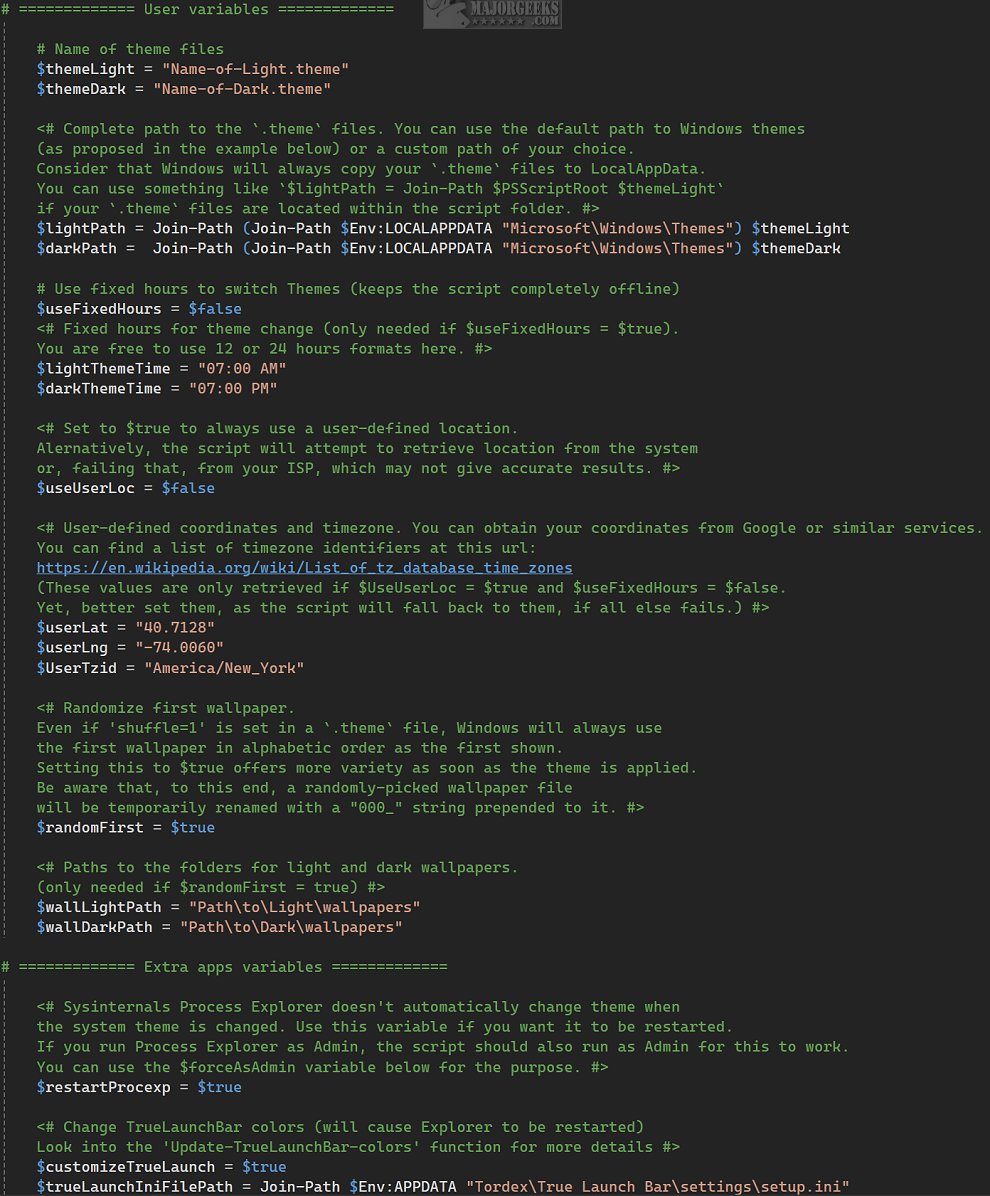
Users can set up the script using the `Setup.ps1` file, which allows for the configuration of scheduled tasks according to personal needs. Additional tasks can be added or modified through the Windows Task Scheduler, with a detailed guide available in the developer's repository. When executed with the command `./AutoTheme.ps1`, the script toggles between themes. It is crucial to edit the `Config.ps1` file for proper configuration, as it contains all necessary instructions. Users can also run `Setup.ps1` to create the main Scheduled Task or set one up directly in Task Scheduler.
Offline Functionality
While AUTO THEME can access the internet to verify location and determine accurate sunrise and sunset times, it also offers an offline mode. Users can configure the script to operate based solely on fixed hours, providing flexibility for those with limited internet access.
Geek Verdict
AUTO THEME stands out as a remarkable tool for users looking for an automated and visually harmonious way to change themes in sync with the time of day. It enhances the user experience by aligning visual elements with changing light conditions, creating a captivating digital atmosphere. However, users should note that the script may be complex for those unfamiliar with configuration files.
Extension Ideas
To further enhance the functionality of AUTO THEME, future updates could include:
1. User-Friendly Interface: Developing a graphical user interface (GUI) to simplify the configuration process for non-technical users.
2. Theme Library Integration: Allowing users to download and integrate additional theme files directly through the script.
3. Mobile Compatibility: Creating a version of the script that can function on mobile devices, providing a seamless theme experience across platforms.
4. Community Features: Implementing a community-driven aspect where users can share their custom themes and settings, fostering collaboration and creativity.
5. AI-Driven Adaptations: Introducing machine learning algorithms to analyze user behavior and preferences, automatically adjusting themes for optimal comfort based on individual usage patterns.
These enhancements could make AUTO THEME not only more accessible but also a more powerful tool for personalizing the Windows experience
How It Works
Unlike conventional methods that rely on registry or system settings, AUTO THEME utilizes specific `.theme` files. This unique approach not only offers extensive customization options but also ensures compatibility across various systems and environments. By focusing on individual theme files, users can customize their interface to meet personal preferences without altering the core system settings, making theme adjustments simpler and more flexible.
Background Operation
The script operates as a scheduled task running in the background, automatically updating the system theme without requiring user intervention. It autonomously creates temporary tasks aligned with upcoming daylight changes, overwriting tasks designated for "Sunrise theme" and "Sunset theme" to keep the task list organized.
Users can set up the script using the `Setup.ps1` file, which allows for the configuration of scheduled tasks according to personal needs. Additional tasks can be added or modified through the Windows Task Scheduler, with a detailed guide available in the developer's repository. When executed with the command `./AutoTheme.ps1`, the script toggles between themes. It is crucial to edit the `Config.ps1` file for proper configuration, as it contains all necessary instructions. Users can also run `Setup.ps1` to create the main Scheduled Task or set one up directly in Task Scheduler.
Offline Functionality
While AUTO THEME can access the internet to verify location and determine accurate sunrise and sunset times, it also offers an offline mode. Users can configure the script to operate based solely on fixed hours, providing flexibility for those with limited internet access.
Geek Verdict
AUTO THEME stands out as a remarkable tool for users looking for an automated and visually harmonious way to change themes in sync with the time of day. It enhances the user experience by aligning visual elements with changing light conditions, creating a captivating digital atmosphere. However, users should note that the script may be complex for those unfamiliar with configuration files.
Extension Ideas
To further enhance the functionality of AUTO THEME, future updates could include:
1. User-Friendly Interface: Developing a graphical user interface (GUI) to simplify the configuration process for non-technical users.
2. Theme Library Integration: Allowing users to download and integrate additional theme files directly through the script.
3. Mobile Compatibility: Creating a version of the script that can function on mobile devices, providing a seamless theme experience across platforms.
4. Community Features: Implementing a community-driven aspect where users can share their custom themes and settings, fostering collaboration and creativity.
5. AI-Driven Adaptations: Introducing machine learning algorithms to analyze user behavior and preferences, automatically adjusting themes for optimal comfort based on individual usage patterns.
These enhancements could make AUTO THEME not only more accessible but also a more powerful tool for personalizing the Windows experience
AUTO THEME 1.0.26 released
AUTO THEME is an advanced PowerShell script designed to enhance your Windows experience by automatically changing the system theme based on sunrise and sunset times, or according to specific hours that you configure.