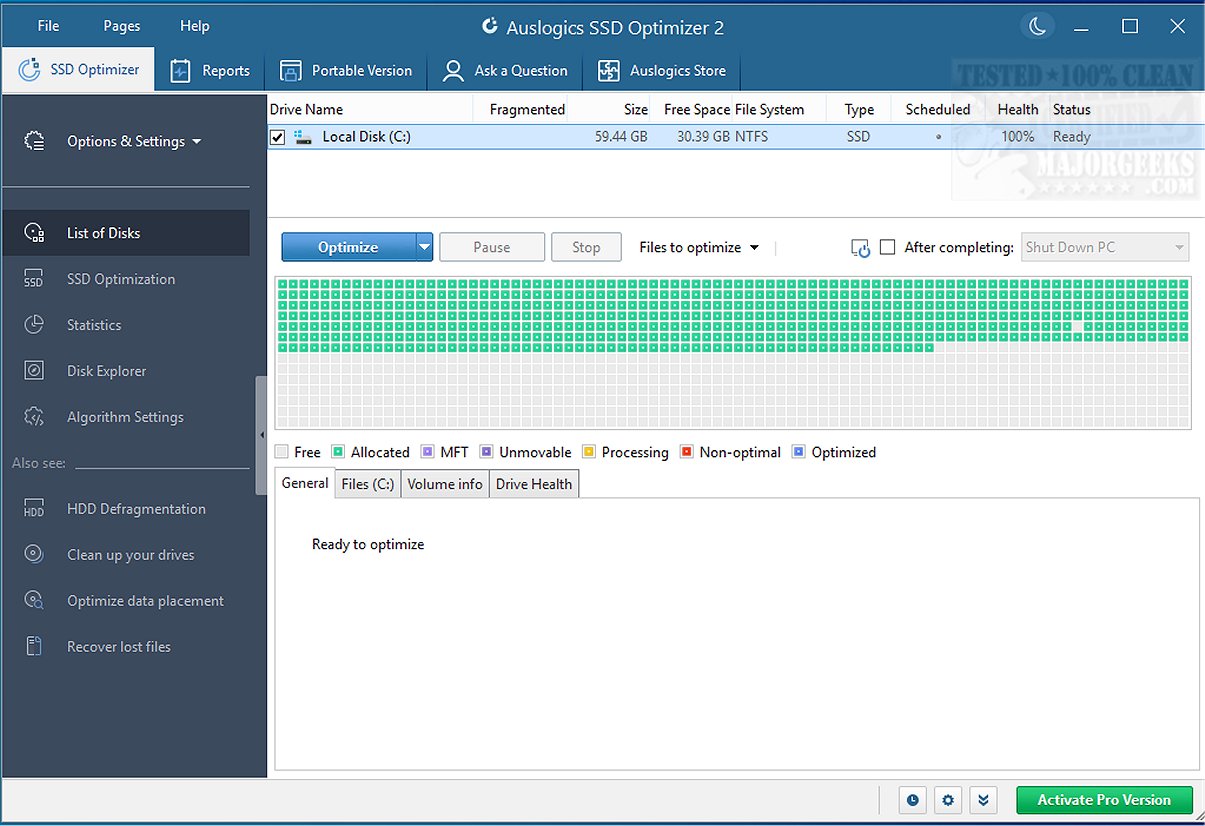
Auslogics has unveiled version 2.1.0.1 of its SSD Optimizer, a free tool designed specifically for Windows users to optimize their solid-state drives (SSDs). This program helps users clean up unnecessary files, consolidate free space, and monitor the health of their SSDs in real-time, making it an essential utility for those looking to improve the performance and longevity of their drives.
The SSD Optimizer focuses on addressing the common issues associated with SSDs, such as performance degradation over time due to fragmented writes and accumulated junk files. By optimizing file placement, minimizing unnecessary write cycles, and disabling Windows features that do not benefit SSDs, the tool significantly enhances both speed and lifespan. It provides real-time statistics, including drive wear metrics, ensuring users remain informed about the health of their SSD.
For everyday users, the SSD Optimizer can be particularly beneficial for managing the primary SSD where the operating system, applications, and important work files reside. Over time, these drives can become cluttered with temporary files and scattered writes, leading to slower performance. The Disk Explorer feature allows users to easily identify large files that consume space, enabling efficient cleanup and optimization. For those who opt for the Pro version, automated optimization can be scheduled to run during idle times, ensuring continuous peak performance without manual intervention. This is especially advantageous for users who frequently handle large files or engage in tasks like high-resolution video editing.
- Disk Explorer: Simplifies the process of locating large files, eliminating the need for tedious manual searches.
- Comprehensive Stats: Provides in-depth real-time monitoring of read/write cycles, temperature, power cycles, and estimated lifespan, which is uncommon in free software.
- Affordable Pro Version: Offers enhanced automation and customization options for a reasonable fee, typically under $40.
- Data Safety: Implements a copy-on-write method during optimization to mitigate the risk of data loss in case of process interruption.
While the interface of the SSD Optimizer is user-friendly, some optimization features may seem overly simplistic for advanced users who prefer more control over settings. Additionally, if you already utilize comprehensive system optimization tools like BoostSpeed or Disk Toolkit, you might find overlapping functionalities. It is important to note that this software is exclusively tailored for SSDs and does not include HDD defragmentation features, automatically bypassing non-SSD drives.
Auslogics SSD Optimizer exceeds expectations as a lightweight yet powerful utility dedicated to the optimal care of SSDs. Unlike traditional defragmentation tools, it utilizes safe and innovative methods that enhance performance while extending the lifespan of the drive. With Auslogics SSD Optimizer, users can enjoy sustained speed and reliability, ensuring their SSDs remain in excellent condition for years to come.
Looking forward, Auslogics could consider integrating features such as cloud storage optimization and support for a wider range of SSD brands and models. Additionally, enhancing user education through tutorials on maximizing the tool's capabilities could further empower users to achieve optimal SSD maintenance and performance
Purpose and Benefits
The SSD Optimizer focuses on addressing the common issues associated with SSDs, such as performance degradation over time due to fragmented writes and accumulated junk files. By optimizing file placement, minimizing unnecessary write cycles, and disabling Windows features that do not benefit SSDs, the tool significantly enhances both speed and lifespan. It provides real-time statistics, including drive wear metrics, ensuring users remain informed about the health of their SSD.
Everyday Applications
For everyday users, the SSD Optimizer can be particularly beneficial for managing the primary SSD where the operating system, applications, and important work files reside. Over time, these drives can become cluttered with temporary files and scattered writes, leading to slower performance. The Disk Explorer feature allows users to easily identify large files that consume space, enabling efficient cleanup and optimization. For those who opt for the Pro version, automated optimization can be scheduled to run during idle times, ensuring continuous peak performance without manual intervention. This is especially advantageous for users who frequently handle large files or engage in tasks like high-resolution video editing.
Positive Features
- Disk Explorer: Simplifies the process of locating large files, eliminating the need for tedious manual searches.
- Comprehensive Stats: Provides in-depth real-time monitoring of read/write cycles, temperature, power cycles, and estimated lifespan, which is uncommon in free software.
- Affordable Pro Version: Offers enhanced automation and customization options for a reasonable fee, typically under $40.
- Data Safety: Implements a copy-on-write method during optimization to mitigate the risk of data loss in case of process interruption.
Considerations and Limitations
While the interface of the SSD Optimizer is user-friendly, some optimization features may seem overly simplistic for advanced users who prefer more control over settings. Additionally, if you already utilize comprehensive system optimization tools like BoostSpeed or Disk Toolkit, you might find overlapping functionalities. It is important to note that this software is exclusively tailored for SSDs and does not include HDD defragmentation features, automatically bypassing non-SSD drives.
Conclusion
Auslogics SSD Optimizer exceeds expectations as a lightweight yet powerful utility dedicated to the optimal care of SSDs. Unlike traditional defragmentation tools, it utilizes safe and innovative methods that enhance performance while extending the lifespan of the drive. With Auslogics SSD Optimizer, users can enjoy sustained speed and reliability, ensuring their SSDs remain in excellent condition for years to come.
Future Enhancements
Looking forward, Auslogics could consider integrating features such as cloud storage optimization and support for a wider range of SSD brands and models. Additionally, enhancing user education through tutorials on maximizing the tool's capabilities could further empower users to achieve optimal SSD maintenance and performance
Auslogics SSD Optimizer 2.1.0.1 released
Auslogics SSD Optimizer is a free Windows tool that focuses on SSD optimization, helping you clean out junk, consolidate free space, and monitor SSD health in real-time.