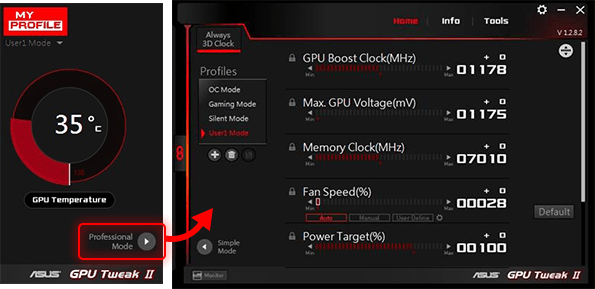
ASUS has recently released updates for its GPU Tweak software, introducing versions III 2.0.8.5 and 2.3.9.0. This software is specifically designed to optimize and enhance the performance of ASUS graphics cards, allowing users to tweak various settings and overclock their GPUs for improved performance in gaming and other graphics-heavy applications.
The latest version of ASUS GPU Tweak III features a refined and user-friendly interface, making it easier for users to access essential functions. Significant improvements have been made to the VF Tuner, simplifying manual overclocking processes. Additionally, the software now includes advanced features like 0dB fan technology with automatic profile switching and detailed session logging for better performance tracking.
Monitoring capabilities have also been enhanced through a plugin feature, enabling users to personalize their interface with custom backgrounds and color schemes. The software provides two operational modes—Standard and Advanced—catering to varying levels of user expertise. Users can easily unlock maximum performance with the Overclock Mode, while Gaming Mode offers a hassle-free way to engage with default settings. The Silent Mode ensures an uninterrupted experience for media consumption, and the My Profile feature allows users to save and switch between custom settings seamlessly.
Beyond optimizing the graphics card, ASUS GPU Tweak III can also fine-tune other system components that may impact gaming performance. Users can disable unnecessary Windows visual effects, manage services and processes, and optimize system memory without needing to close any applications.
Overall, ASUS GPU Tweak has significantly evolved, providing users with powerful tools to fine-tune their graphics cards and optimize their systems for a superior gaming experience.
Extended View:
In addition to the features highlighted, ASUS GPU Tweak III positions itself as an essential tool for gamers and power users looking to maximize their hardware's potential. The integration of user customization options not only makes the experience more visually appealing but also allows users to create a workspace that enhances productivity and comfort while gaming.
Furthermore, with the increasing demand for high-performance gaming and professional graphics work, the ability to monitor and adjust performance dynamically can be a game-changer. The software's capacity to integrate with various system components provides a holistic approach to performance tuning, ensuring that users can enjoy seamless gameplay without lag or performance drops.
The continuous updates and improvements to the GPU Tweak software reflect ASUS's commitment to its user base, ensuring that enthusiasts have access to the latest technologies and functionalities that enhance their gaming and graphics performance. As gaming technology evolves, tools like ASUS GPU Tweak III will likely become even more integral in optimizing user experience and pushing the boundaries of what is possible with ASUS graphics cards
The latest version of ASUS GPU Tweak III features a refined and user-friendly interface, making it easier for users to access essential functions. Significant improvements have been made to the VF Tuner, simplifying manual overclocking processes. Additionally, the software now includes advanced features like 0dB fan technology with automatic profile switching and detailed session logging for better performance tracking.
Monitoring capabilities have also been enhanced through a plugin feature, enabling users to personalize their interface with custom backgrounds and color schemes. The software provides two operational modes—Standard and Advanced—catering to varying levels of user expertise. Users can easily unlock maximum performance with the Overclock Mode, while Gaming Mode offers a hassle-free way to engage with default settings. The Silent Mode ensures an uninterrupted experience for media consumption, and the My Profile feature allows users to save and switch between custom settings seamlessly.
Beyond optimizing the graphics card, ASUS GPU Tweak III can also fine-tune other system components that may impact gaming performance. Users can disable unnecessary Windows visual effects, manage services and processes, and optimize system memory without needing to close any applications.
Overall, ASUS GPU Tweak has significantly evolved, providing users with powerful tools to fine-tune their graphics cards and optimize their systems for a superior gaming experience.
Extended View:
In addition to the features highlighted, ASUS GPU Tweak III positions itself as an essential tool for gamers and power users looking to maximize their hardware's potential. The integration of user customization options not only makes the experience more visually appealing but also allows users to create a workspace that enhances productivity and comfort while gaming.
Furthermore, with the increasing demand for high-performance gaming and professional graphics work, the ability to monitor and adjust performance dynamically can be a game-changer. The software's capacity to integrate with various system components provides a holistic approach to performance tuning, ensuring that users can enjoy seamless gameplay without lag or performance drops.
The continuous updates and improvements to the GPU Tweak software reflect ASUS's commitment to its user base, ensuring that enthusiasts have access to the latest technologies and functionalities that enhance their gaming and graphics performance. As gaming technology evolves, tools like ASUS GPU Tweak III will likely become even more integral in optimizing user experience and pushing the boundaries of what is possible with ASUS graphics cards
ASUS GPU Tweak III 2.0.8.5 / 2.3.9.0 Tweak II released
ASUS GPU Tweak III is a powerful tool designed to enhance and optimize the performance of your ASUS video cards. It enables users to adjust various settings and overclock their graphics cards, ensuring they achieve optimal performance in gaming and other graphics-intensive applications.
ASUS GPU Tweak III 2.0.8.5 / 2.3.9.0 Tweak II released @ MajorGeeks