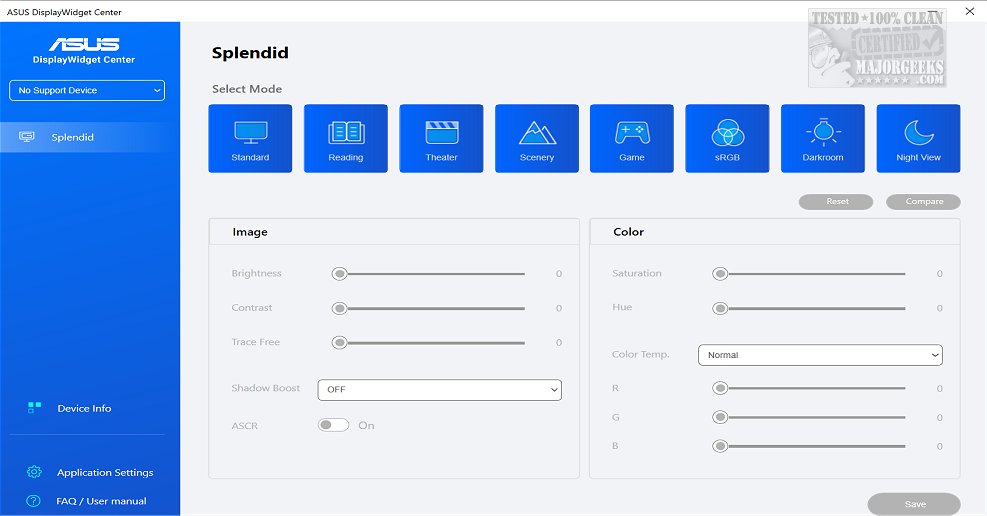
ASUS has released version 1.3.1.5 of the DisplayWidget Center, a specialized software designed exclusively for ASUS monitors. This application serves as a comprehensive monitor management tool, enabling users to optimize and personalize their display settings, including adjustments to brightness, contrast, and color temperature. This is particularly advantageous for designers, gamers, and anyone who spends long hours in front of screens. The user-friendly interface makes it easy for individuals to customize their settings according to personal preferences.
The DisplayWidget Center features an innovative MultiScreen capability that streamlines workflow by providing customizable window layouts, enhancing connectivity and simplifying system control. This allows users to maximize productivity by utilizing a variety of templates for different tasks. Additionally, the software supports Picture-in-Picture (PIP) and Picture-by-Picture (PBP) functionalities, enabling users to view multiple input sources simultaneously and tailor layouts to fit their workflow.
Another significant feature is the KVM (Keyboard, Video, Mouse) functionality, which allows users to control two systems using a single monitor, keyboard, and mouse. This Smart KVM feature facilitates file transfer and seamless management of both systems, though users should ensure their monitor specifications support this capability.
The included App Tweaker further enhances the user experience by allowing customization for different activities, such as optimizing web browsers for cinema viewing or optimizing FPS games for better performance.
Additionally, the DisplayWidget Center incorporates OLED Care, a feature dedicated to preserving the lifespan of OLED monitors. This includes pixel cleaning processes and customizable reminders to help prevent burn-in and image retention issues, ensuring that users can maintain their monitor in optimal condition.
In summary, the ASUS DisplayWidget Center is a powerful tool that offers extensive control and customization for ASUS monitor users, enhancing both productivity and viewing experiences. With features tailored to various user needs, it promises to improve efficiency and protect the longevity of displays. As technology continues to evolve, ASUS may further expand the capabilities of DisplayWidget Center, potentially integrating more advanced features for an even greater user experience
The DisplayWidget Center features an innovative MultiScreen capability that streamlines workflow by providing customizable window layouts, enhancing connectivity and simplifying system control. This allows users to maximize productivity by utilizing a variety of templates for different tasks. Additionally, the software supports Picture-in-Picture (PIP) and Picture-by-Picture (PBP) functionalities, enabling users to view multiple input sources simultaneously and tailor layouts to fit their workflow.
Another significant feature is the KVM (Keyboard, Video, Mouse) functionality, which allows users to control two systems using a single monitor, keyboard, and mouse. This Smart KVM feature facilitates file transfer and seamless management of both systems, though users should ensure their monitor specifications support this capability.
The included App Tweaker further enhances the user experience by allowing customization for different activities, such as optimizing web browsers for cinema viewing or optimizing FPS games for better performance.
Additionally, the DisplayWidget Center incorporates OLED Care, a feature dedicated to preserving the lifespan of OLED monitors. This includes pixel cleaning processes and customizable reminders to help prevent burn-in and image retention issues, ensuring that users can maintain their monitor in optimal condition.
In summary, the ASUS DisplayWidget Center is a powerful tool that offers extensive control and customization for ASUS monitor users, enhancing both productivity and viewing experiences. With features tailored to various user needs, it promises to improve efficiency and protect the longevity of displays. As technology continues to evolve, ASUS may further expand the capabilities of DisplayWidget Center, potentially integrating more advanced features for an even greater user experience
ASUS DisplayWidget Center 1.3.1.5 released
ASUS DisplayWidget Center offers a comprehensive monitor management solution that allows you to optimize, personalize, and fully utilize your display to suit your needs and preferences.