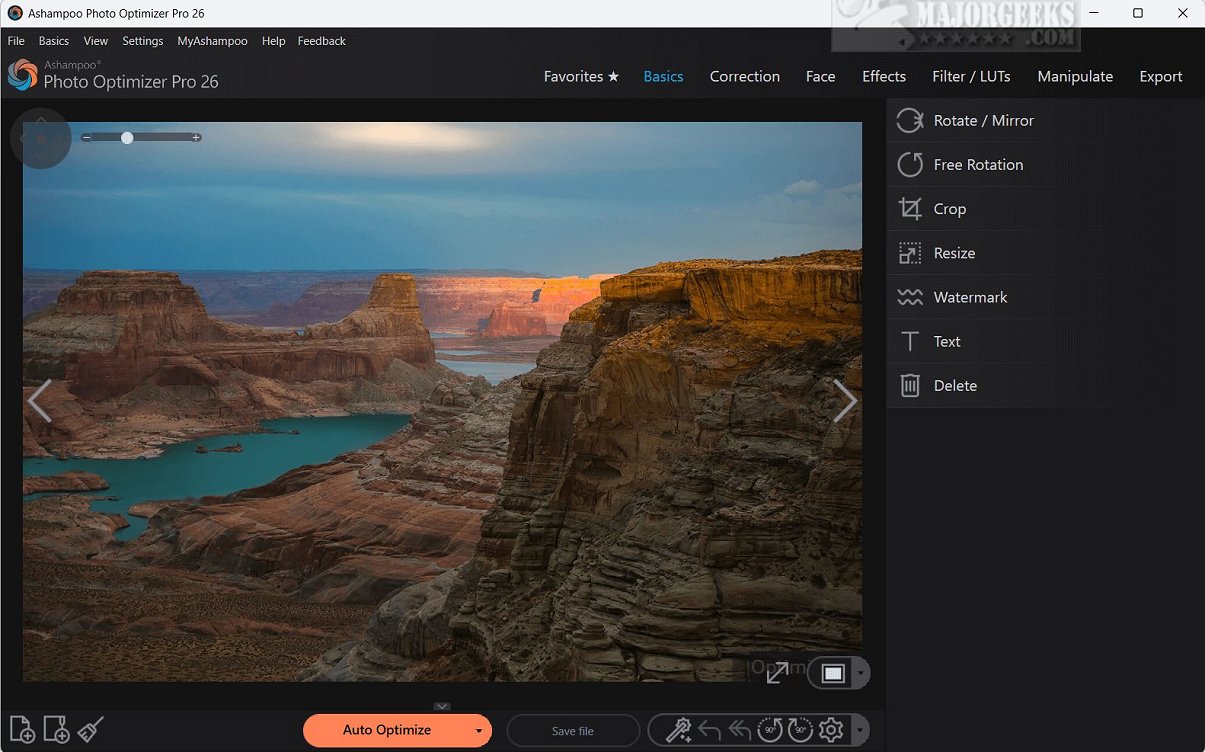
Ashampoo Photo Optimizer Pro 26.0.0 has recently been released, enhancing its status as a leading photo-editing software that simplifies image enhancement through a one-click solution. This software employs state-of-the-art auto-optimization technology that analyzes photographs to identify and correct various imperfections. By adjusting critical parameters such as exposure, color temperature, sharpness, and contrast, it transforms mediocre images into captivating high-quality visuals. Users can expect to see improvements in poorly exposed images, enhanced contrast, and reduced noise.
A notable feature of Ashampoo Photo Optimizer Pro is the Straighten Horizon tool, which helps photographers correct perspective distortions and align images for a polished finish. Additionally, the software allows users to personalize their photos by adding custom text.
Beyond its speedy and efficient performance, Ashampoo Photo Optimizer Pro includes essential features typical of lightweight image-editing tools. It offers built-in color correction capabilities for brightness, contrast, gamma, lighting, and saturation adjustments. Users can also crop, mirror, rotate, and resize images, giving them flexibility in the editing process.
Key features of Ashampoo Photo Optimizer Pro include:
- One-click photo editing
- Photo sharpening
- Rotation and mirroring options
- Cropping and resizing functionality
- Printing capabilities
- Horizon straightening
- Text addition
- And more!
The software also includes sophisticated editing tools, such as an adaptive softening feature that smooths out irregularities for a more balanced appearance and a sharpening feature that enhances detail in photos. With a user-friendly interface, Ashampoo Photo Optimizer Pro makes the image editing process accessible and efficient for users of all skill levels.
In conclusion, Ashampoo Photo Optimizer Pro is a versatile and user-friendly tool ideal for amateur photographers looking to enhance their images effortlessly. Its automatic improvement features for lighting, color, and contrast are particularly beneficial, and the batch processing capability allows users to edit multiple images simultaneously, streamlining the workflow for those managing extensive photo collections.
As digital photography continues to grow in popularity, tools like Ashampoo Photo Optimizer Pro are invaluable for both casual users and photography enthusiasts aiming to elevate their image quality with minimal effort
A notable feature of Ashampoo Photo Optimizer Pro is the Straighten Horizon tool, which helps photographers correct perspective distortions and align images for a polished finish. Additionally, the software allows users to personalize their photos by adding custom text.
Beyond its speedy and efficient performance, Ashampoo Photo Optimizer Pro includes essential features typical of lightweight image-editing tools. It offers built-in color correction capabilities for brightness, contrast, gamma, lighting, and saturation adjustments. Users can also crop, mirror, rotate, and resize images, giving them flexibility in the editing process.
Key features of Ashampoo Photo Optimizer Pro include:
- One-click photo editing
- Photo sharpening
- Rotation and mirroring options
- Cropping and resizing functionality
- Printing capabilities
- Horizon straightening
- Text addition
- And more!
The software also includes sophisticated editing tools, such as an adaptive softening feature that smooths out irregularities for a more balanced appearance and a sharpening feature that enhances detail in photos. With a user-friendly interface, Ashampoo Photo Optimizer Pro makes the image editing process accessible and efficient for users of all skill levels.
In conclusion, Ashampoo Photo Optimizer Pro is a versatile and user-friendly tool ideal for amateur photographers looking to enhance their images effortlessly. Its automatic improvement features for lighting, color, and contrast are particularly beneficial, and the batch processing capability allows users to edit multiple images simultaneously, streamlining the workflow for those managing extensive photo collections.
As digital photography continues to grow in popularity, tools like Ashampoo Photo Optimizer Pro are invaluable for both casual users and photography enthusiasts aiming to elevate their image quality with minimal effort
Ashampoo Photo Optimizer Pro 26.0.0 released
Ashampoo Photo Optimizer Pro is an advanced photo-editing software that provides a seamless one-click solution for quick, efficient image enhancements.