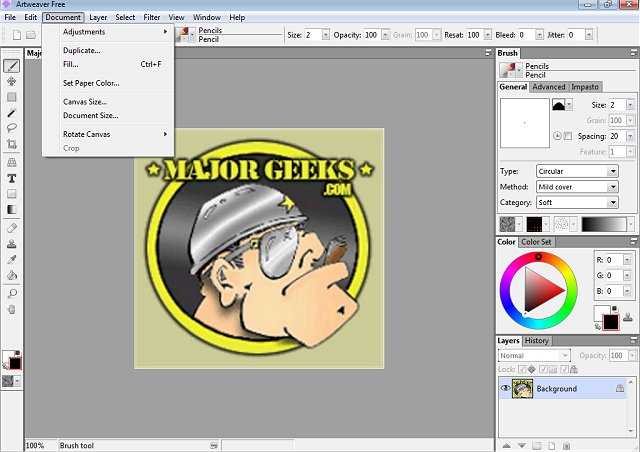
Artweaver Free 8.1.4 has recently been released, offering an accessible digital painting solution for artists of all levels. This software provides an extensive array of painting tools, enabling users to create sketches from photos or explore color combinations without the financial burden associated with premium programs like Photoshop.
Artweaver Free is designed to empower users to unleash their creativity without the high costs typically associated with professional-grade software. It features an impressive range of brushes—such as pencils, airbrushes, sponges, and oil brushes—allowing for extensive customization of settings like pressure, size, and opacity. This versatility caters to both beginners and experienced artists alike.
The application supports layers and grouping, facilitating complex compositions similar to those achievable in Photoshop. This functionality allows for easy blending, adjustment, and editing of specific artwork sections without affecting the entire piece, granting users comprehensive control over their creative process. Additionally, Artweaver Free's compatibility with PSD files ensures seamless collaboration with those using Photoshop, while also supporting various Photoshop-compatible filters to enhance creative options.
Artists utilizing drawing tablets will find Artweaver Free particularly beneficial as it offers pressure-sensitive input, resulting in smooth, natural strokes that respond intuitively to hand movements.
For those interested in collaboration, the premium Artweaver Plus version introduces a real-time collaboration mode, allowing multiple artists to work on the same project concurrently—ideal for team projects, art classes, or brainstorming sessions. Artweaver comes in two versions: the free version, which provides essential features, and the Plus version, which offers advanced tools, improved performance, and a free 14-day trial without restrictions.
Pros:
- Free and user-friendly for casual artists
- Layer support, PSD file compatibility, and Photoshop plug-in support
- Customizable brush engine with pressure sensitivity
- Compatible with drawing tablets
- 14-day trial of Artweaver Plus available
Cons:
- The interface may appear outdated to some users
- Lacks certain high-end tools found in premium software like Photoshop or Corel Painter
- The free version does not include real-time collaboration features
Conclusion:
Artweaver Free is an excellent choice for beginners and casual artists seeking a budget-friendly digital painting tool. With its array of features—including layering, customizable brushes, and tablet support—it provides everything necessary to start creating digital art. For those who desire more advanced functionalities, the Plus version enhances the experience with real-time collaboration and additional features. In summary, Artweaver Free is a powerful tool that offers great value for aspiring digital artists.
As digital art continues to gain popularity, tools like Artweaver Free may play a crucial role in democratizing access to creative software, allowing more individuals to explore their artistic capabilities without financial constraints. In the future, we may see Artweaver expand its offerings, potentially incorporating AI-enhanced features or more advanced collaboration tools to keep pace with evolving user needs
Artweaver Free is designed to empower users to unleash their creativity without the high costs typically associated with professional-grade software. It features an impressive range of brushes—such as pencils, airbrushes, sponges, and oil brushes—allowing for extensive customization of settings like pressure, size, and opacity. This versatility caters to both beginners and experienced artists alike.
The application supports layers and grouping, facilitating complex compositions similar to those achievable in Photoshop. This functionality allows for easy blending, adjustment, and editing of specific artwork sections without affecting the entire piece, granting users comprehensive control over their creative process. Additionally, Artweaver Free's compatibility with PSD files ensures seamless collaboration with those using Photoshop, while also supporting various Photoshop-compatible filters to enhance creative options.
Artists utilizing drawing tablets will find Artweaver Free particularly beneficial as it offers pressure-sensitive input, resulting in smooth, natural strokes that respond intuitively to hand movements.
For those interested in collaboration, the premium Artweaver Plus version introduces a real-time collaboration mode, allowing multiple artists to work on the same project concurrently—ideal for team projects, art classes, or brainstorming sessions. Artweaver comes in two versions: the free version, which provides essential features, and the Plus version, which offers advanced tools, improved performance, and a free 14-day trial without restrictions.
Pros:
- Free and user-friendly for casual artists
- Layer support, PSD file compatibility, and Photoshop plug-in support
- Customizable brush engine with pressure sensitivity
- Compatible with drawing tablets
- 14-day trial of Artweaver Plus available
Cons:
- The interface may appear outdated to some users
- Lacks certain high-end tools found in premium software like Photoshop or Corel Painter
- The free version does not include real-time collaboration features
Conclusion:
Artweaver Free is an excellent choice for beginners and casual artists seeking a budget-friendly digital painting tool. With its array of features—including layering, customizable brushes, and tablet support—it provides everything necessary to start creating digital art. For those who desire more advanced functionalities, the Plus version enhances the experience with real-time collaboration and additional features. In summary, Artweaver Free is a powerful tool that offers great value for aspiring digital artists.
As digital art continues to gain popularity, tools like Artweaver Free may play a crucial role in democratizing access to creative software, allowing more individuals to explore their artistic capabilities without financial constraints. In the future, we may see Artweaver expand its offerings, potentially incorporating AI-enhanced features or more advanced collaboration tools to keep pace with evolving user needs
Artweaver Free 8.1.4 released
Artweaver Free lets you paint creatively with the help of a vast range of painting tools so you can create sketches from photos or experiment with colors.