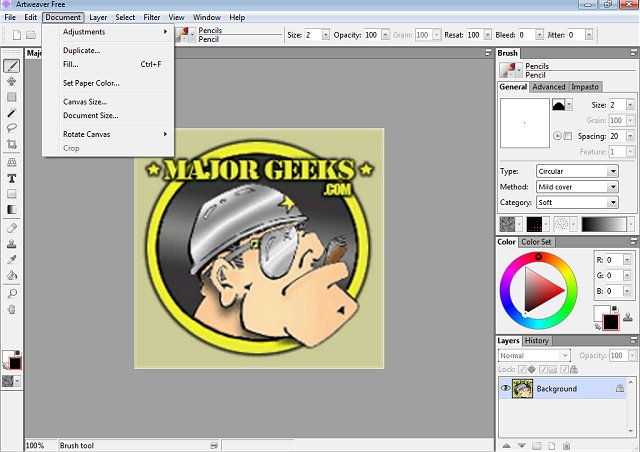
Artweaver Free 8.1.2 has been released, providing a dynamic digital painting platform that caters to both amateurs and seasoned artists. This software is designed to facilitate creative expression through an extensive array of painting tools, allowing users to transform photos into sketches or explore color experimentation without the financial burden associated with premium software like Photoshop.
Unleash Your Inner Digital Artist with Artweaver Free
Artweaver Free is an accessible alternative for those who aspire to create professional-grade artwork without the accompanying costs. It combines a user-friendly interface with powerful features, equipping artists with a comprehensive suite of brushes, effects, and layering options ideal for producing captivating visuals. Whether you're interested in sketching, airbrushing, or texture experimentation, Artweaver Free serves as a complete digital art studio on your PC.
Feature-Rich for All Skill Levels
The software boasts a highly customizable brush system that includes various tools such as pencils, airbrushes, sponges, and oil brushes. Users can adjust settings like pressure, size, and opacity to achieve their desired effects, making it a versatile choice for digital art creation. Layer support and grouping capabilities enable artists to build intricate compositions, facilitating adjustments without affecting the entire piece—a feature reminiscent of more advanced tools like Photoshop.
Artweaver Free is compatible with PSD files, allowing users to easily open, edit, and save projects within this format. This ensures compatibility and collaboration with other Photoshop users, while also supporting various Photoshop-compatible filters to enhance creative options further.
For those using drawing tablets, Artweaver Free offers pressure-sensitive input, providing a natural and fluid experience that enhances precision and control, making it especially suitable for digital painting.
Collaboration and Enhanced Features with Artweaver Plus
For users interested in collaborative projects, the premium Artweaver Plus version includes a real-time collaboration feature, enabling multiple artists to work on the same project simultaneously—perfect for team endeavors, art classes, or brainstorming sessions. Artweaver comes in two versions: the free variant, which includes essential features, and the Plus version (Shareware), which unlocks advanced tools and capabilities. Notably, users can experience a 14-day trial of the Plus version at no cost, allowing them to explore its full potential before making a purchase decision.
Pros & Cons
Pros:
- Free, feature-rich tool for casual artists
- Supports layers, PSD files, and Photoshop plugins
- Customizable brush engine with pressure sensitivity
- Excellent compatibility with drawing tablets
- 14-day free trial of Artweaver Plus
Cons:
- Outdated interface may not appeal to everyone
- Lacks some advanced features found in premium software like Photoshop or Corel Painter
- The free version does not include real-time collaboration
Geek Verdict
Artweaver Free is an excellent option for beginners and hobbyist artists seeking a straightforward digital painting tool that covers all the essentials, including layer support, custom brushes, and compatibility with PSD files. The Plus version offers additional features, including real-time collaboration, making it a powerful tool for more serious projects. For a free application, Artweaver Free delivers impressive performance and capabilities.
Future Enhancements
As digital art continues to evolve, Artweaver could expand its features further, potentially incorporating more advanced tools and a more modern interface to appeal to a broader audience. Additionally, increasing the range of supported plugins and enhancing collaboration features could solidify its standing in the competitive landscape of digital art software
Unleash Your Inner Digital Artist with Artweaver Free
Artweaver Free is an accessible alternative for those who aspire to create professional-grade artwork without the accompanying costs. It combines a user-friendly interface with powerful features, equipping artists with a comprehensive suite of brushes, effects, and layering options ideal for producing captivating visuals. Whether you're interested in sketching, airbrushing, or texture experimentation, Artweaver Free serves as a complete digital art studio on your PC.
Feature-Rich for All Skill Levels
The software boasts a highly customizable brush system that includes various tools such as pencils, airbrushes, sponges, and oil brushes. Users can adjust settings like pressure, size, and opacity to achieve their desired effects, making it a versatile choice for digital art creation. Layer support and grouping capabilities enable artists to build intricate compositions, facilitating adjustments without affecting the entire piece—a feature reminiscent of more advanced tools like Photoshop.
Artweaver Free is compatible with PSD files, allowing users to easily open, edit, and save projects within this format. This ensures compatibility and collaboration with other Photoshop users, while also supporting various Photoshop-compatible filters to enhance creative options further.
For those using drawing tablets, Artweaver Free offers pressure-sensitive input, providing a natural and fluid experience that enhances precision and control, making it especially suitable for digital painting.
Collaboration and Enhanced Features with Artweaver Plus
For users interested in collaborative projects, the premium Artweaver Plus version includes a real-time collaboration feature, enabling multiple artists to work on the same project simultaneously—perfect for team endeavors, art classes, or brainstorming sessions. Artweaver comes in two versions: the free variant, which includes essential features, and the Plus version (Shareware), which unlocks advanced tools and capabilities. Notably, users can experience a 14-day trial of the Plus version at no cost, allowing them to explore its full potential before making a purchase decision.
Pros & Cons
Pros:
- Free, feature-rich tool for casual artists
- Supports layers, PSD files, and Photoshop plugins
- Customizable brush engine with pressure sensitivity
- Excellent compatibility with drawing tablets
- 14-day free trial of Artweaver Plus
Cons:
- Outdated interface may not appeal to everyone
- Lacks some advanced features found in premium software like Photoshop or Corel Painter
- The free version does not include real-time collaboration
Geek Verdict
Artweaver Free is an excellent option for beginners and hobbyist artists seeking a straightforward digital painting tool that covers all the essentials, including layer support, custom brushes, and compatibility with PSD files. The Plus version offers additional features, including real-time collaboration, making it a powerful tool for more serious projects. For a free application, Artweaver Free delivers impressive performance and capabilities.
Future Enhancements
As digital art continues to evolve, Artweaver could expand its features further, potentially incorporating more advanced tools and a more modern interface to appeal to a broader audience. Additionally, increasing the range of supported plugins and enhancing collaboration features could solidify its standing in the competitive landscape of digital art software
Artweaver Free 8.1.2 released
Artweaver Free lets you paint creatively with the help of a vast range of painting tools so you can create sketches from photos or experiment with colors.