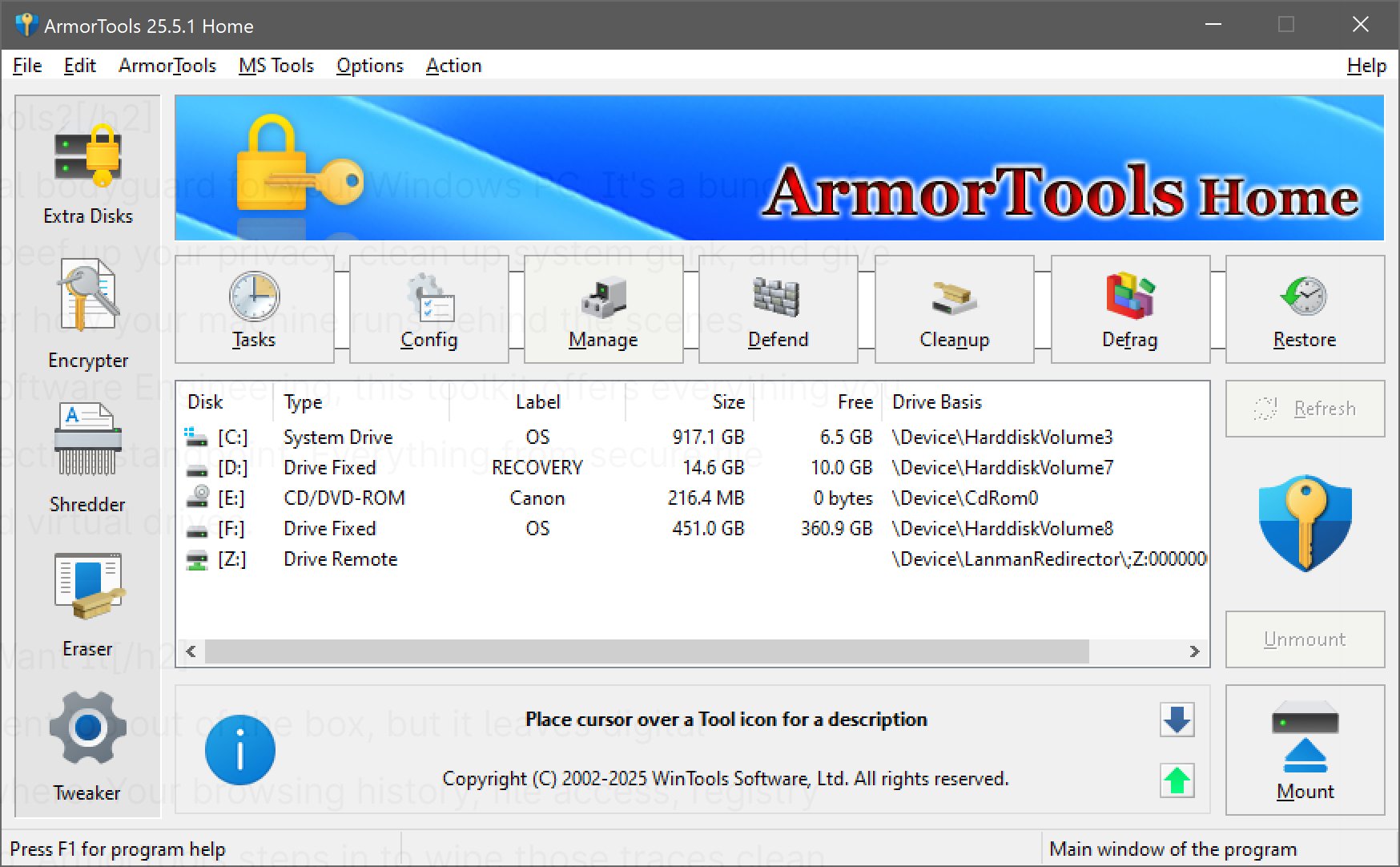
ArmorTools 26.2.1 has been released, enhancing its suite of utilities aimed at improving system privacy and control for Windows users. Developed by WinTools Software Engineering, ArmorTools acts as a digital bodyguard for your PC, providing essential tools for system tweaking, privacy protection, and file management.
What Is ArmorTools?
ArmorTools serves as a comprehensive toolkit designed to enhance privacy and system performance. It tackles issues like digital breadcrumb trails left by Windows, including browsing histories, registry clutter, and file access logs. This utility is ideal for users who prioritize privacy, need to clean up after uninstalling software, or simply seek to optimize their system's performance.
Key Features:
Some notable tools within ArmorTools include:
- File Shredder: Permanently deletes files beyond recovery.
- File Encryptor: Utilizes AES128/256 encryption to secure files.
- Invisibility Feature: Allows users to operate in stealth mode, rolling back changes made during a session.
The interface includes convenient access to essential tools like task manager and registry editor, and the System Tweaker unlocks hidden Windows settings for enhanced customization.
Editions: Home vs. Professional
ArmorTools is available in two versions:
1. Home Edition: This version covers essential privacy and cleanup features, including:
- Extra Disks for creating virtual and encrypted disks.
- File Shredder for secure file deletion.
- Objects Eraser to clean browsing history and recent documents.
- System Tweaker for performance and UI adjustments.
2. Professional Edition: This version includes all Home features, plus:
- Scan Files and Folders to eliminate junk files.
- Scan Registry to clean up the Windows Registry, improving system speed and reliability.
Compatibility and Installation:
ArmorTools is compatible with Windows Vista through Windows 11 (both 32 and 64-bit) and is lightweight, requiring minimal installation space. While it is not portable, it offers a quick setup process.
Areas for Improvement:
While ArmorTools provides a functional and straightforward interface, it may feel outdated, resembling Windows XP aesthetics. However, its simplicity allows for quick navigation and access to features without unnecessary distractions.
Conclusion:
For users focused on system optimization and privacy, ArmorTools presents a robust toolkit that is effective without being overwhelming. Despite its less-than-modern design, it effectively caters to power users and privacy advocates, making it a worthwhile addition to any Windows setup. As updates continue, users can expect further enhancements to its functionality and usability
What Is ArmorTools?
ArmorTools serves as a comprehensive toolkit designed to enhance privacy and system performance. It tackles issues like digital breadcrumb trails left by Windows, including browsing histories, registry clutter, and file access logs. This utility is ideal for users who prioritize privacy, need to clean up after uninstalling software, or simply seek to optimize their system's performance.
Key Features:
Some notable tools within ArmorTools include:
- File Shredder: Permanently deletes files beyond recovery.
- File Encryptor: Utilizes AES128/256 encryption to secure files.
- Invisibility Feature: Allows users to operate in stealth mode, rolling back changes made during a session.
The interface includes convenient access to essential tools like task manager and registry editor, and the System Tweaker unlocks hidden Windows settings for enhanced customization.
Editions: Home vs. Professional
ArmorTools is available in two versions:
1. Home Edition: This version covers essential privacy and cleanup features, including:
- Extra Disks for creating virtual and encrypted disks.
- File Shredder for secure file deletion.
- Objects Eraser to clean browsing history and recent documents.
- System Tweaker for performance and UI adjustments.
2. Professional Edition: This version includes all Home features, plus:
- Scan Files and Folders to eliminate junk files.
- Scan Registry to clean up the Windows Registry, improving system speed and reliability.
Compatibility and Installation:
ArmorTools is compatible with Windows Vista through Windows 11 (both 32 and 64-bit) and is lightweight, requiring minimal installation space. While it is not portable, it offers a quick setup process.
Areas for Improvement:
While ArmorTools provides a functional and straightforward interface, it may feel outdated, resembling Windows XP aesthetics. However, its simplicity allows for quick navigation and access to features without unnecessary distractions.
Conclusion:
For users focused on system optimization and privacy, ArmorTools presents a robust toolkit that is effective without being overwhelming. Despite its less-than-modern design, it effectively caters to power users and privacy advocates, making it a worthwhile addition to any Windows setup. As updates continue, users can expect further enhancements to its functionality and usability
ArmorTools 26.2.1 released
ArmorTools is a system-tweaking and privacy-focused utility for Windows that gives you control over how your operating system stores, processes, and exposes data.