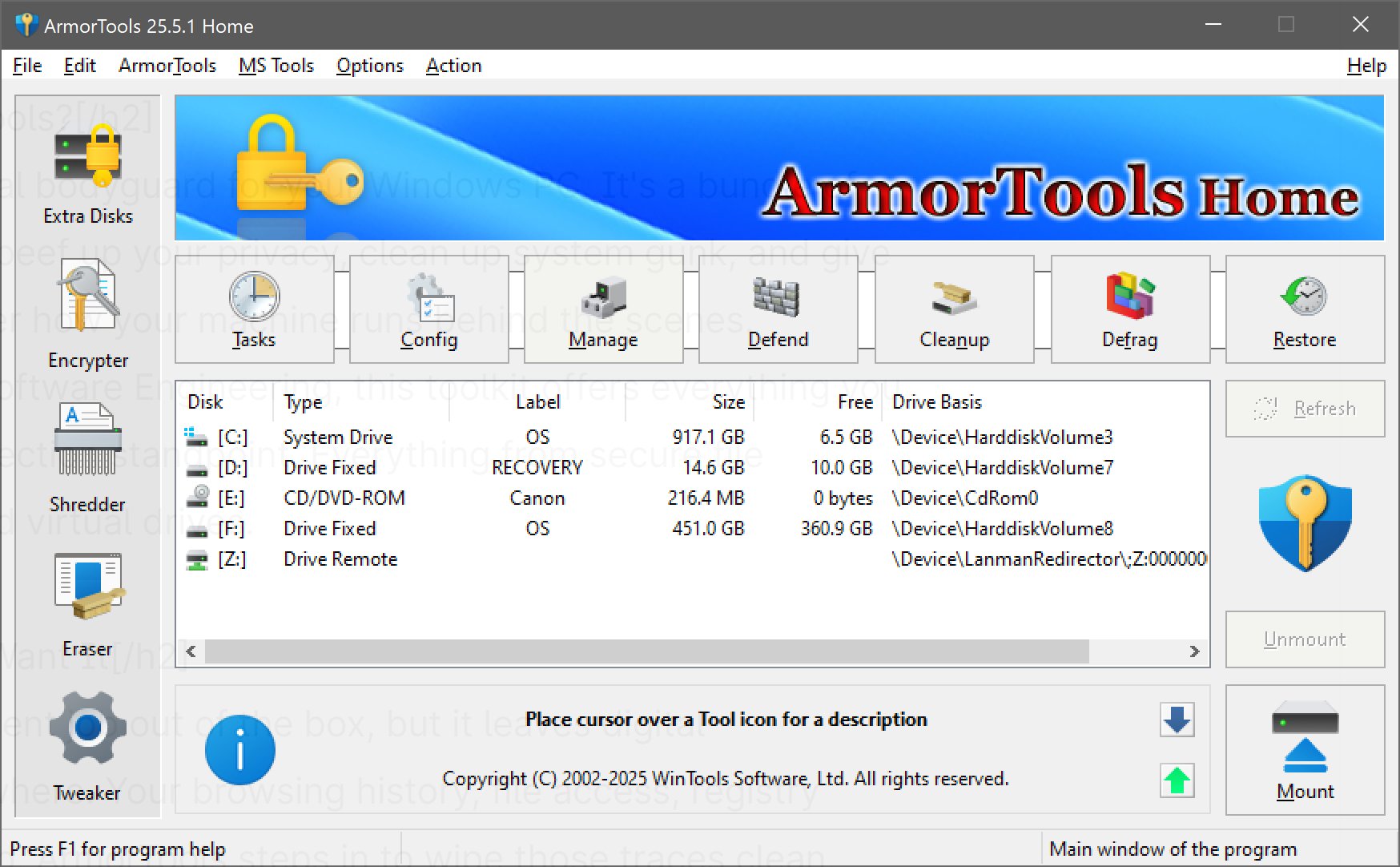
ArmorTools is a comprehensive system-tweaking and privacy-centric utility for Windows, designed to give users enhanced control over their operating system's data management and privacy practices. Developed by WinTools Software Engineering, ArmorTools acts as a digital bodyguard for your PC, offering a suite of utilities to enhance privacy, optimize system performance, and facilitate secure file management.
Overview of ArmorTools
ArmorTools is essentially a toolkit that strengthens your system's privacy and cleanliness. It caters to users who are concerned about the digital footprints they leave behind—such as browsing history, file access records, and clutter in the Windows registry. By utilizing ArmorTools, users can effectively eliminate these traces, making it ideal for privacy-conscious individuals and those looking to maintain a well-organized system. Key features include:
- File Shredder: Permanently deletes files, ensuring that they cannot be recovered.
- File Encryptor: Provides AES128/256 encryption for securing sensitive files.
- Invisibility Feature: Allows users to operate in a stealth mode, rolling back all actions once the session ends.
The user-friendly interface includes essential tools like a task manager, registry editor, and scheduler for daily use, while the System Tweaker feature unlocks hidden Windows settings for advanced users.
Editions of ArmorTools
ArmorTools comes in two versions: Home and Professional.
- Home Edition: Ideal for beginners, this version includes essential tools such as:
- Extra Disks: Create virtual and encrypted disks for sensitive data.
- Objects Eraser: Cleans usage history effectively.
- System Tweaker: Reveals hidden Windows settings for better performance.
- Professional Edition: Builds on the Home Edition with additional features for those who prefer a consistently optimized system, including:
- Scan Files and Folders: Cleans up junk and orphaned links.
- Scan Registry: Deep-cleans the Windows Registry to enhance speed and stability.
Compatibility and Installation
ArmorTools is compatible with Windows Vista through Windows 11 (both 32 and 64-bit) and is lightweight, requiring minimal installation space. The setup is straightforward, though the application is not portable by default.
Areas for Improvement
While ArmorTools functions effectively, its interface is somewhat outdated, reminiscent of older Windows versions rather than modern design aesthetics. Despite this, the simplicity may appeal to users who prefer practicality over flashy graphics.
Conclusion
For those interested in optimizing their system's performance and minimizing their digital footprint, ArmorTools offers a well-rounded toolkit that balances functionality and ease of use without overwhelming users. Although its design may not be cutting-edge, the utility's effectiveness makes it a valuable asset for privacy enthusiasts and power users alike. The choice between Home and Professional editions allows users to select the level of functionality that best suits their needs, ensuring that ArmorTools remains a relevant tool for maintaining a clean and efficient Windows environment.
Future Extensions
As digital privacy becomes increasingly vital, future updates to ArmorTools could include enhancements such as improved user interface designs, additional automation features, and integration with cloud-based storage solutions for file management. Additionally, incorporating real-time monitoring for potential privacy breaches and providing users with alerts could further elevate its utility, ensuring that ArmorTools stays at the forefront of system privacy and optimization tools
Overview of ArmorTools
ArmorTools is essentially a toolkit that strengthens your system's privacy and cleanliness. It caters to users who are concerned about the digital footprints they leave behind—such as browsing history, file access records, and clutter in the Windows registry. By utilizing ArmorTools, users can effectively eliminate these traces, making it ideal for privacy-conscious individuals and those looking to maintain a well-organized system. Key features include:
- File Shredder: Permanently deletes files, ensuring that they cannot be recovered.
- File Encryptor: Provides AES128/256 encryption for securing sensitive files.
- Invisibility Feature: Allows users to operate in a stealth mode, rolling back all actions once the session ends.
The user-friendly interface includes essential tools like a task manager, registry editor, and scheduler for daily use, while the System Tweaker feature unlocks hidden Windows settings for advanced users.
Editions of ArmorTools
ArmorTools comes in two versions: Home and Professional.
- Home Edition: Ideal for beginners, this version includes essential tools such as:
- Extra Disks: Create virtual and encrypted disks for sensitive data.
- Objects Eraser: Cleans usage history effectively.
- System Tweaker: Reveals hidden Windows settings for better performance.
- Professional Edition: Builds on the Home Edition with additional features for those who prefer a consistently optimized system, including:
- Scan Files and Folders: Cleans up junk and orphaned links.
- Scan Registry: Deep-cleans the Windows Registry to enhance speed and stability.
Compatibility and Installation
ArmorTools is compatible with Windows Vista through Windows 11 (both 32 and 64-bit) and is lightweight, requiring minimal installation space. The setup is straightforward, though the application is not portable by default.
Areas for Improvement
While ArmorTools functions effectively, its interface is somewhat outdated, reminiscent of older Windows versions rather than modern design aesthetics. Despite this, the simplicity may appeal to users who prefer practicality over flashy graphics.
Conclusion
For those interested in optimizing their system's performance and minimizing their digital footprint, ArmorTools offers a well-rounded toolkit that balances functionality and ease of use without overwhelming users. Although its design may not be cutting-edge, the utility's effectiveness makes it a valuable asset for privacy enthusiasts and power users alike. The choice between Home and Professional editions allows users to select the level of functionality that best suits their needs, ensuring that ArmorTools remains a relevant tool for maintaining a clean and efficient Windows environment.
Future Extensions
As digital privacy becomes increasingly vital, future updates to ArmorTools could include enhancements such as improved user interface designs, additional automation features, and integration with cloud-based storage solutions for file management. Additionally, incorporating real-time monitoring for potential privacy breaches and providing users with alerts could further elevate its utility, ensuring that ArmorTools stays at the forefront of system privacy and optimization tools
ArmorTools 26.1.1 released
ArmorTools is a system-tweaking and privacy-focused utility for Windows that gives you control over how your operating system stores, processes, and exposes data.