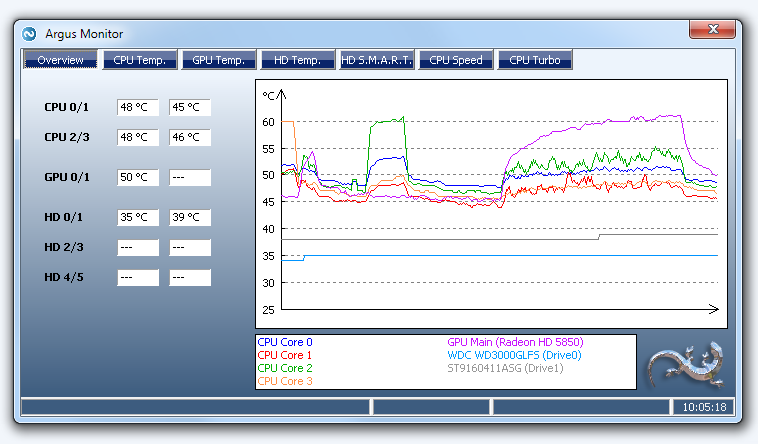
Argus Monitor is a lightweight utility designed to run quietly in the background, continuously monitoring the health of your hard disks, CPU, GPU, and overall system performance. It serves as an early-warning system for hard drive failures by tracking S.M.A.R.T. (Self-Monitoring, Analysis, and Reporting Technology) attributes. Unlike Windows, which typically alerts users only when a drive is already failing, Argus Monitor proactively assesses various health indicators, allowing users to receive warnings well in advance—often up to 24 hours—before a potential failure occurs.
- Failure Prediction: Capable of predicting drive failures with up to a 70% probability, giving users ample time to back up critical data.
- Historical Data Tracking: Saves S.M.A.R.T. history for all drives, including those that are only occasionally connected, such as spare SATA drives or external bays.
- Graphical Temperature Charts: Offers clear visual representations of temperature trends for HDDs, SSDs, CPUs, and GPUs, which can assist in airflow troubleshooting.
- CPU Monitoring: Tracks CPU core frequencies to ensure that turbo modes and power management settings are functioning correctly.
- GPU Monitoring: Supports temperature monitoring for both NVIDIA and AMD graphics cards without the need for heavy drivers or bloatware.
- Individuals with aging hard drives.
- Users seeking a straightforward monitoring tool without excess features.
- Builders and enthusiasts who need to monitor temperatures during gaming or stress testing.
- Those who frequently swap SATA drives and desire a historical record of their health.
- Professionals responsible for maintaining critical systems.
- How to check if your hard drive is SSD or HDD.
- Using Storage Sense to delete unnecessary files in Windows 10 & 11 automatically.
- Troubleshooting issues with incorrect free space reporting on hard drives.
In summary, Argus Monitor is a robust solution for proactive system health monitoring, ensuring that users can maintain their hardware effectively and avoid unexpected failures
Key Features of Argus Monitor:
- Continuous Monitoring: Tracks S.M.A.R.T. health attributes and drive temperatures in real-time, providing early warnings for any anomalies.- Failure Prediction: Capable of predicting drive failures with up to a 70% probability, giving users ample time to back up critical data.
- Historical Data Tracking: Saves S.M.A.R.T. history for all drives, including those that are only occasionally connected, such as spare SATA drives or external bays.
- Graphical Temperature Charts: Offers clear visual representations of temperature trends for HDDs, SSDs, CPUs, and GPUs, which can assist in airflow troubleshooting.
- CPU Monitoring: Tracks CPU core frequencies to ensure that turbo modes and power management settings are functioning correctly.
- GPU Monitoring: Supports temperature monitoring for both NVIDIA and AMD graphics cards without the need for heavy drivers or bloatware.
Licensing and Pricing:
Argus Monitor operates on a trial basis, allowing users to experience its features before committing to a purchase. A full license costs a modest fee and is valid for three years, during which users receive all updates and new versions. After the license period, the software continues to function, but updates will be unavailable unless renewed. This pricing model is seen as reasonable, particularly for a tool that remains actively developed and lightweight, avoiding the pitfalls of unnecessary bloat.Ideal Users:
Argus Monitor is particularly beneficial for:- Individuals with aging hard drives.
- Users seeking a straightforward monitoring tool without excess features.
- Builders and enthusiasts who need to monitor temperatures during gaming or stress testing.
- Those who frequently swap SATA drives and desire a historical record of their health.
- Professionals responsible for maintaining critical systems.
Conclusion:
Overall, Argus Monitor is a highly effective and focused monitoring tool that excels in its primary function without unnecessary additions. Its reliable S.M.A.R.T. tracking, useful graphical data, and non-panic-inducing alerts make it a valuable asset for anyone concerned with drive longevity and system temperature management. While some may view the paid licensing as a downside, the three-year plan offers an economical option for serious users.Further Reading:
For additional guidance and tips, you might explore topics such as:- How to check if your hard drive is SSD or HDD.
- Using Storage Sense to delete unnecessary files in Windows 10 & 11 automatically.
- Troubleshooting issues with incorrect free space reporting on hard drives.
In summary, Argus Monitor is a robust solution for proactive system health monitoring, ensuring that users can maintain their hardware effectively and avoid unexpected failures
Argus Monitor 7.3.5.3150 released
Argus Monitor quietly runs as a background task constantly monitoring the health status of your hard disks.