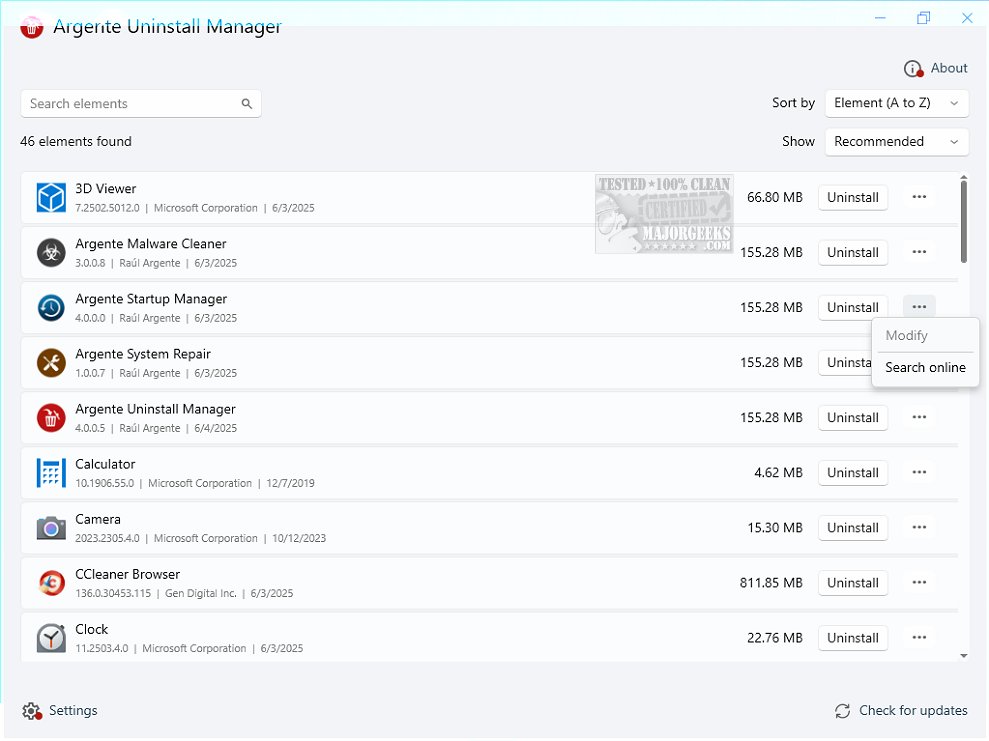
Argente Uninstall Manager 4.0.5.0 has been released as a robust tool aimed at streamlining the uninstallation of programs and managing leftover data effectively. This application is a component of Argente Utilities and serves as a user-friendly alternative to the standard Add/Remove Programs feature in Windows.
Key Features of Argente Uninstall Manager:
- Efficient Uninstallation: Users can easily navigate through a refreshed list of installed applications to select and uninstall specific programs.
- Leftover Data Removal: After uninstallation, the tool can scan for and eliminate residual files that may remain, ensuring a cleaner system.
- Backup Management: The application allows users to create, restore, and delete backups of applications, providing a safety net during the uninstallation process.
- Information Access: It offers insights into installed apps, including online searches for additional details on the software.
- User Experience Enhancements: The interface is designed for ease of use, accommodating users of all skill levels. Customizable window positions and sizes ensure a personalized experience, with the application maintaining these settings upon reopening.
- System Safety: The tool creates a restore point before proceeding with any uninstallation, offering a precautionary measure in case of complications.
Conclusion:
While Argente Uninstall Manager may not be groundbreaking in its approach, it presents a reliable solution for users seeking to manage their installed software more effectively. The application empowers users to understand their software landscape better, allowing them to make informed decisions regarding the programs they use. As it continues to evolve within Argente Utilities, users are encouraged to explore its features and see how it can enhance their software management experience.
For those looking for similar resources, the tool complements guides on how to uninstall programs manually and manage application entries within the Windows Apps & Features list, making it a handy addition to any user's toolkit
Key Features of Argente Uninstall Manager:
- Efficient Uninstallation: Users can easily navigate through a refreshed list of installed applications to select and uninstall specific programs.
- Leftover Data Removal: After uninstallation, the tool can scan for and eliminate residual files that may remain, ensuring a cleaner system.
- Backup Management: The application allows users to create, restore, and delete backups of applications, providing a safety net during the uninstallation process.
- Information Access: It offers insights into installed apps, including online searches for additional details on the software.
- User Experience Enhancements: The interface is designed for ease of use, accommodating users of all skill levels. Customizable window positions and sizes ensure a personalized experience, with the application maintaining these settings upon reopening.
- System Safety: The tool creates a restore point before proceeding with any uninstallation, offering a precautionary measure in case of complications.
Conclusion:
While Argente Uninstall Manager may not be groundbreaking in its approach, it presents a reliable solution for users seeking to manage their installed software more effectively. The application empowers users to understand their software landscape better, allowing them to make informed decisions regarding the programs they use. As it continues to evolve within Argente Utilities, users are encouraged to explore its features and see how it can enhance their software management experience.
For those looking for similar resources, the tool complements guides on how to uninstall programs manually and manage application entries within the Windows Apps & Features list, making it a handy addition to any user's toolkit
Argente Uninstall Manager 4.0.5.0 released
Argente Uninstall Manager is a comprehensive tool designed to help you efficiently uninstall programs, remove leftover data, and more. This app is part of Argente Utilities.