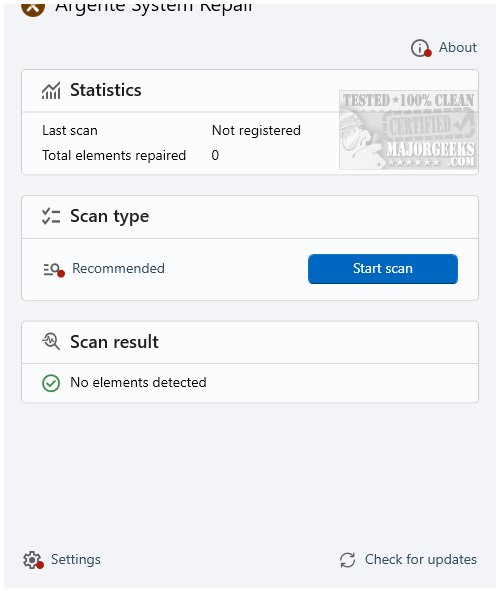
Argente System Repair version 1.0.5.5 has been released, serving as a streamlined utility designed to identify and fix common issues within Windows operating systems. This tool, part of the Argente Utilities suite, can also function independently, making it ideal for users looking to resolve problems without navigating through complex settings or commands.
The primary function of Argente System Repair is to conduct thorough scans for prevalent Windows problems, offering targeted solutions. It is particularly beneficial following malware removal, problematic software installations, or when Windows features such as the Control Panel or Windows Update malfunction.
Key features of Argente System Repair include:
- One-click repair: Users can easily launch the tool, initiate a scan, and apply fixes without wading through complicated menus.
- Standalone functionality: It can be used independently of the full Argente Utilities suite.
- Lightweight design: The tool is efficient and does not consume excessive system resources.
- User-friendly interface with no steep learning curve.
- Swift scans and repairs enhance user experience.
Cons:
- Limited in scope; it does not serve as a comprehensive system optimizer.
- Lacks backup prompts, meaning users should manually create restore points before use.
Extension: As technology continues to evolve, tools like Argente System Repair may need to adapt to address emerging Windows challenges, such as compatibility with new operating system updates or advanced malware threats. Future versions could benefit from expanded functionality, including enhanced optimization features and automatic backup creation to further safeguard user systems. Additionally, as more users adopt cloud-based solutions, integrating cloud support for data restoration and backup could enhance the tool's appeal and effectiveness in a rapidly changing digital landscape
The primary function of Argente System Repair is to conduct thorough scans for prevalent Windows problems, offering targeted solutions. It is particularly beneficial following malware removal, problematic software installations, or when Windows features such as the Control Panel or Windows Update malfunction.
Key features of Argente System Repair include:
- One-click repair: Users can easily launch the tool, initiate a scan, and apply fixes without wading through complicated menus.
- Standalone functionality: It can be used independently of the full Argente Utilities suite.
- Lightweight design: The tool is efficient and does not consume excessive system resources.
Advantages and Disadvantages
Pros:- User-friendly interface with no steep learning curve.
- Swift scans and repairs enhance user experience.
Cons:
- Limited in scope; it does not serve as a comprehensive system optimizer.
- Lacks backup prompts, meaning users should manually create restore points before use.
Conclusion
Overall, Argente System Repair is an effective tool for quickly resolving common Windows issues with minimal effort from the user. Its ability to perform deep scans and restore system settings makes it a valuable asset for anyone experiencing technical difficulties. However, users should be mindful of its limitations and take precautions by creating restore points prior to use.Extension: As technology continues to evolve, tools like Argente System Repair may need to adapt to address emerging Windows challenges, such as compatibility with new operating system updates or advanced malware threats. Future versions could benefit from expanded functionality, including enhanced optimization features and automatic backup creation to further safeguard user systems. Additionally, as more users adopt cloud-based solutions, integrating cloud support for data restoration and backup could enhance the tool's appeal and effectiveness in a rapidly changing digital landscape
Argente System Repair 1.0.5.5 released
Argente System Repair is a lightweight, no-nonsense tool that scans your system for common Windows problems and applies targeted fixes. This tool is a part of Argente Utilities.