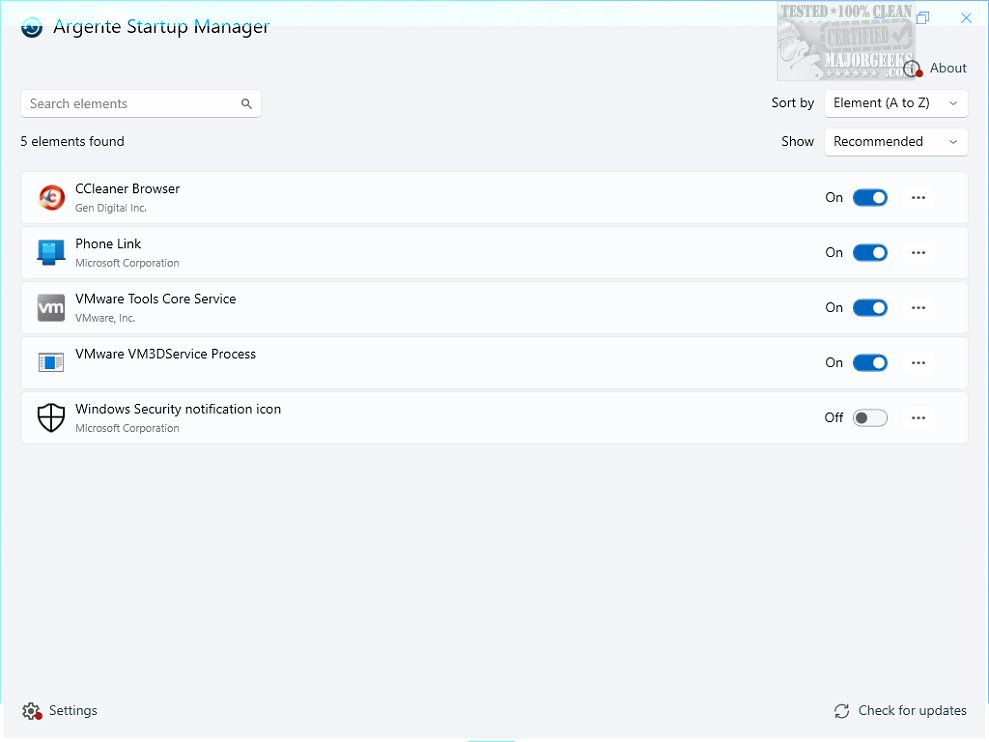
Argente Startup Manager 4.0.5.0 has been released as part of the Argente Utilities suite, offering users a powerful tool for managing the applications that automatically launch during system startup. This software streamlines the startup process by allowing users to easily view, edit, and control startup entries, thus optimizing system performance and enhancing overall efficiency.
With a user-friendly interface, Argente Startup Manager presents a comprehensive list of all startup applications, displaying not just the program name but also its complete file path. This feature provides users with clear visibility into what is configured to run at startup. Users can customize their experience by disabling unwanted entries, adding new applications to the startup list, or editing existing ones to better suit their needs. The application even supports advanced configurations, allowing modifications to application paths and the addition of command-line arguments.
To facilitate ease of use, the software includes quick access features such as opening the folder of a startup program for easier management and a real-time refresh function that ensures users have the most up-to-date information. A powerful search function also helps users quickly locate specific startup items within lengthy lists.
The Argente Startup Manager is designed to enhance Windows boot times with minimal impact on system resources, operating with low CPU and RAM usage. While it may not offer an extensive range of features, its intuitive design provides an efficient solution for users seeking to streamline their startup processes.
In summary, Argente Startup Manager is a valuable tool for improving the startup routine of Windows users, making it a worthwhile addition for those looking to enhance their computer's performance.
- User Experiences: Collect user testimonials to highlight how the software has improved their system performance and efficiency.
- Integration with Other Tools: Explore how Argente Startup Manager can be integrated with other Argente Utilities or third-party applications for comprehensive system maintenance.
- Tutorials and Guides: Create detailed tutorials on how to utilize the software effectively for new users, including common pitfalls to avoid.
- Comparison with Competitors: Analyze how Argente Startup Manager stacks up against other startup management tools in terms of usability, features, and performance
With a user-friendly interface, Argente Startup Manager presents a comprehensive list of all startup applications, displaying not just the program name but also its complete file path. This feature provides users with clear visibility into what is configured to run at startup. Users can customize their experience by disabling unwanted entries, adding new applications to the startup list, or editing existing ones to better suit their needs. The application even supports advanced configurations, allowing modifications to application paths and the addition of command-line arguments.
To facilitate ease of use, the software includes quick access features such as opening the folder of a startup program for easier management and a real-time refresh function that ensures users have the most up-to-date information. A powerful search function also helps users quickly locate specific startup items within lengthy lists.
The Argente Startup Manager is designed to enhance Windows boot times with minimal impact on system resources, operating with low CPU and RAM usage. While it may not offer an extensive range of features, its intuitive design provides an efficient solution for users seeking to streamline their startup processes.
In summary, Argente Startup Manager is a valuable tool for improving the startup routine of Windows users, making it a worthwhile addition for those looking to enhance their computer's performance.
Potential Extensions:
- Future Updates: Anticipate future updates that could introduce more features or enhanced customization options.- User Experiences: Collect user testimonials to highlight how the software has improved their system performance and efficiency.
- Integration with Other Tools: Explore how Argente Startup Manager can be integrated with other Argente Utilities or third-party applications for comprehensive system maintenance.
- Tutorials and Guides: Create detailed tutorials on how to utilize the software effectively for new users, including common pitfalls to avoid.
- Comparison with Competitors: Analyze how Argente Startup Manager stacks up against other startup management tools in terms of usability, features, and performance
Argente Startup Manager 4.0.5.0 released
Argente Startup Manager allows you to manage the applications that launch automatically at startup and more. This tool is included in Argente Utilities.