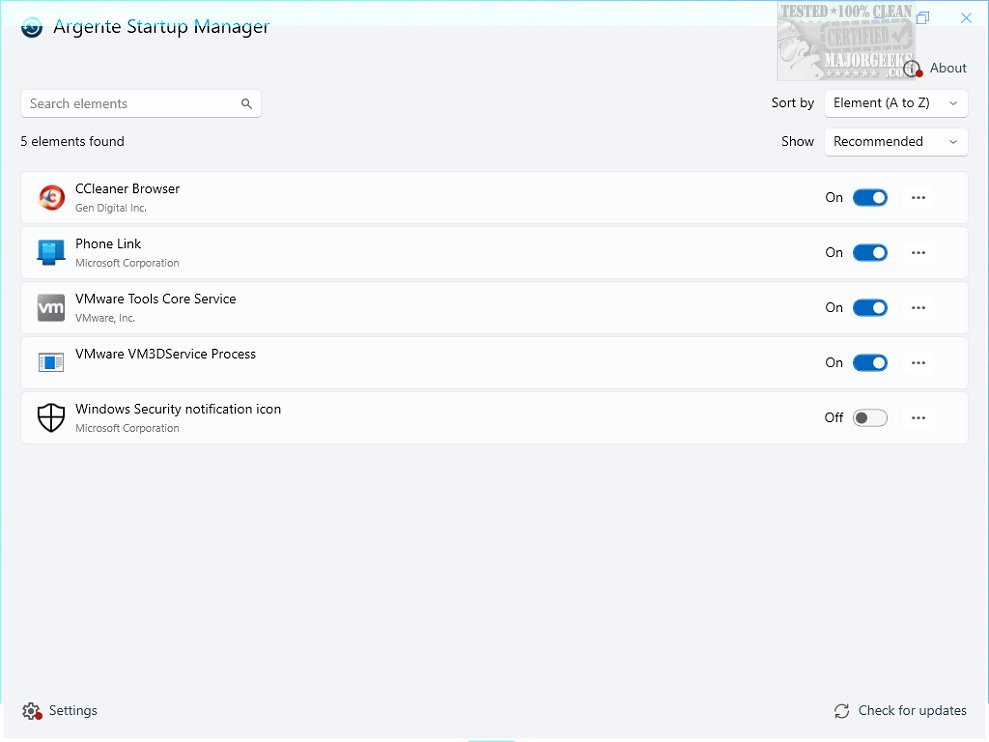
The latest version of Argente Startup Manager, 4.0.3.5, has been released, offering an effective tool for managing applications that automatically launch during system startup. This software is part of the Argente Utilities suite and is designed to optimize system performance by allowing users to control their startup programs.
Key Features and Functionality
Argente Startup Manager provides users with an easy-to-navigate interface that displays a comprehensive list of all startup applications, including their names and file paths. Users can effortlessly delay launch times, remove unnecessary programs, and add new applications to the startup sequence. The tool's flexibility allows for customization by disabling specific entries and editing existing ones to better suit user preferences. Advanced users can modify application paths and add command-line arguments for more refined configurations.
To enhance usability, the software includes features such as quick access to program folders and a real-time refresh option to ensure users have the most current information. Additionally, a powerful search function simplifies locating specific startup items, making it easier to manage a long list of applications.
Performance and Usability
Argente Startup Manager is designed with system efficiency in mind, operating with low CPU and RAM usage, thus minimizing its impact on overall performance. While it may not offer an extensive array of features, its straightforward interface and efficient management capabilities make it a valuable tool for users looking to streamline their computer's startup process.
Conclusion
In summary, Argente Startup Manager 4.0.3.5 is a user-friendly application that enhances Windows boot times by allowing users to efficiently manage autostart entries. With its intuitive design and effective functionality, this tool can significantly improve the startup experience for users, transforming what can often be a sluggish process into a swift and seamless one.
Further Resources and Similar Tools
For those interested in optimizing their system further, additional resources include guides on managing startup apps in Windows 10 and 11, restoring default services in various Windows versions, and methods to access Task Manager. These resources can complement the benefits gained from using Argente Startup Manager and help users achieve a well-optimized system performance
Key Features and Functionality
Argente Startup Manager provides users with an easy-to-navigate interface that displays a comprehensive list of all startup applications, including their names and file paths. Users can effortlessly delay launch times, remove unnecessary programs, and add new applications to the startup sequence. The tool's flexibility allows for customization by disabling specific entries and editing existing ones to better suit user preferences. Advanced users can modify application paths and add command-line arguments for more refined configurations.
To enhance usability, the software includes features such as quick access to program folders and a real-time refresh option to ensure users have the most current information. Additionally, a powerful search function simplifies locating specific startup items, making it easier to manage a long list of applications.
Performance and Usability
Argente Startup Manager is designed with system efficiency in mind, operating with low CPU and RAM usage, thus minimizing its impact on overall performance. While it may not offer an extensive array of features, its straightforward interface and efficient management capabilities make it a valuable tool for users looking to streamline their computer's startup process.
Conclusion
In summary, Argente Startup Manager 4.0.3.5 is a user-friendly application that enhances Windows boot times by allowing users to efficiently manage autostart entries. With its intuitive design and effective functionality, this tool can significantly improve the startup experience for users, transforming what can often be a sluggish process into a swift and seamless one.
Further Resources and Similar Tools
For those interested in optimizing their system further, additional resources include guides on managing startup apps in Windows 10 and 11, restoring default services in various Windows versions, and methods to access Task Manager. These resources can complement the benefits gained from using Argente Startup Manager and help users achieve a well-optimized system performance
Argente Startup Manager 4.0.3.5 released
Argente Startup Manager allows you to manage the applications that launch automatically at startup and more. This tool is included in Argente Utilities.