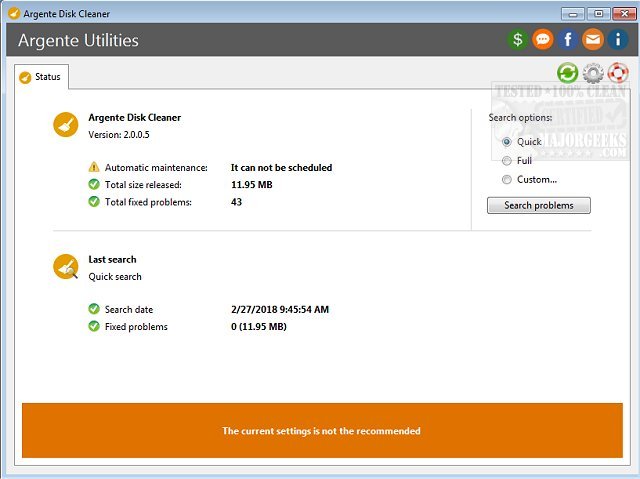
Argente Disk Cleaner version 3.0.6.3 has been released, offering an effective solution for optimizing your hard drive's performance. As part of the Argente Utilities suite, this tool specializes in swiftly identifying and eliminating unnecessary files that accumulate over time, helping users reclaim valuable disk space and enhance system efficiency.
Once the cleaning process is initiated, users are presented with a detailed list of detected junk files. They have the option to customize the cleaning process by manually selecting which files to delete, ensuring they have control over the changes made. For those unfamiliar with certain file listings, the tool provides an internet search feature for further clarification.
Argente Disk Cleaner offers three different scanning modes: quick, full, and custom, allowing users to choose the level of thoroughness that suits their needs. Additionally, it incorporates a safety net through the Rescue Center, which features an undo option and the capability to create a system restore point, ensuring that any changes can be reversed if necessary.
Designed with user-friendliness in mind, even novice users can navigate the software with ease. The program can be configured to perform automatic maintenance during system startup, and it includes settings to exclude system and hidden files, as well as to identify faulty or broken shortcuts.
Overall, Argente Disk Cleaner 3.0.6.3 stands out as a reliable tool for maintaining hard drive health and optimizing system performance, catering to both experienced users and those new to disk cleaning utilities.
Furthermore, future updates could expand its functionality, such as incorporating advanced scheduling options for automatic cleanups, enhancing the user interface for even greater accessibility, or integrating additional features for more comprehensive system optimization. This would ensure Argente Disk Cleaner remains competitive in a rapidly evolving market of system maintenance tools
Once the cleaning process is initiated, users are presented with a detailed list of detected junk files. They have the option to customize the cleaning process by manually selecting which files to delete, ensuring they have control over the changes made. For those unfamiliar with certain file listings, the tool provides an internet search feature for further clarification.
Argente Disk Cleaner offers three different scanning modes: quick, full, and custom, allowing users to choose the level of thoroughness that suits their needs. Additionally, it incorporates a safety net through the Rescue Center, which features an undo option and the capability to create a system restore point, ensuring that any changes can be reversed if necessary.
Designed with user-friendliness in mind, even novice users can navigate the software with ease. The program can be configured to perform automatic maintenance during system startup, and it includes settings to exclude system and hidden files, as well as to identify faulty or broken shortcuts.
Overall, Argente Disk Cleaner 3.0.6.3 stands out as a reliable tool for maintaining hard drive health and optimizing system performance, catering to both experienced users and those new to disk cleaning utilities.
Furthermore, future updates could expand its functionality, such as incorporating advanced scheduling options for automatic cleanups, enhancing the user interface for even greater accessibility, or integrating additional features for more comprehensive system optimization. This would ensure Argente Disk Cleaner remains competitive in a rapidly evolving market of system maintenance tools
Argente Disk Cleaner 3.0.6.3 released
Argente Disk Cleaner is an efficient option for cleaning your hard drive. This tool is a part of Argente Utilities.